
Layout Preservation
Ability to maintain formatting, images, and fonts.
We tested 22 tools across 5 key criteria. These 10 offer the best balance of layout preservation, accuracy, and value.
The right tool depends on your specific file type and volume.
| Use Case | Best Choice | Runner-up |
|---|---|---|
| Best Overall | Immersive Translate | DeepL |
| Best for EU Languages | DeepL | Immersive Translate |
| Best for Visual Layouts | DocTranslator | Adobe Acrobat |
| Best Free Option | Google Translate | Immersive Translate |
| Best for Technical Workflows | BabelDoc | Google Cloud Translation |
| Best for Enterprise | Adobe Acrobat | Microsoft Translator |
A side-by-side comparison of all 10 options we tested, ranked by overall performance.
| # | Translator | Best For | Mode | Coverage | Free Tier | Platforms | Pricing |
|---|---|---|---|---|---|---|---|
| 1 | Immersive Translate20M+ users · Chrome Favorite | Bilingual reading across formats | Side-by-side | 20+ configurable AI and translation enginesPDFs, DOCX, HTML, TXT, Markdown, EPUB, and bilingual document reading | Free bilingual webpage translation; Pro adds higher quotas for OCR, PDF, video, image, and premium engine use | Chrome, Edge, Firefox, Safari, iOS, Android, userscript, ZIP package | Free + Pro |
| 2 | DeepLEU quality leader · DeepL SE | Raw text translation quality (EU pairs) | Replace | DeepL language AIPDF, DOCX, PPTX, TXT, and supported document translation | Free web translation is available; Pro plans add higher limits and document workflows with trial access | Web, macOS, Windows, iOS, Android, browser extensions | Freemium |
| 3 | DocTranslatorLayout preservation · OnlineDocTranslator | Keeping complex PDF layouts intact | Replace | Document translation workflow with AI translationDOCX, PDF, XLSX, PPTX, IDML, TXT, JPG, PNG, CSV, JSON | Low-cost trial is available; monthly subscription follows trial usage | Web | Freemium |
| 4 | Google TranslateUniversal accessibility · Google | General-purpose text translation | Replace | Google TranslateText, websites, camera, photos, offline packs, conversations, transcribe, handwriting | Free consumer service for words, phrases, web pages, camera, speech, and app translation | Web, Chrome, Android, iOS | Free |
| 5 | Adobe AcrobatPDF standard · Adobe Inc. | Enterprise PDF workflows | Replace | 1 own modelPDF | Trial only | Win / Mac / iOS / Android / Web | Paid |
| 6 | BabelDocDeveloper-focused translator · Funstory AI | Custom document translation workflows | Replace | Multi-engineDocument | Free tool, API keys required | Desktop / Linux | Free |
| 7 | Microsoft TranslatorOffice integration · Microsoft | Enterprise Microsoft 365 users | Replace | Microsoft TranslatorText, speech, images, group conversations, websites, documents, offline app use | Free consumer app for text, speech, images, and group conversations in over 100 languages | Web, iOS, Android, Windows, Microsoft services | Free |
| 8 | Google Cloud TranslationDeveloper API · Google Cloud | High-volume batch processing | None | Google Cloud Translation APIText translation, batch translation, document translation, API workflows | Monthly credit covers the first 500,000 text characters; document translation is metered separately | Google Cloud API | Freemium |
| 9 | SDL TradosLocalization standard · RWS | Professional localization workflows | None | Multi-engineDocument | Trial only | Win / Mac | Paid |
| 10 | Reverso ContextContextual dictionary · Reverso | Contextual phrase lookup | Dictionary | 1 own modelText · Document | Generous free tier | Web / iOS / Android | Freemium |
We evaluated 22 tools, narrowed down to the top 10, and verified data in February 2026.
Ability to maintain formatting, images, and fonts.
Nuance and grammar handling across languages.
Quality of text extraction from scanned PDFs.
Accessibility and limits of unpaid versions.
Support across web, desktop, and mobile.
We rank our own tool #1, and we also show where competitors beat us: DeepL for raw EU language quality, DocTranslator for visual layout preservation, and Adobe Acrobat for enterprise signing workflows. Pricing data is brief in each tool entry below since rates change often.
Immersive Translate offers the most flexible approach to PDF translation by combining multiple AI engines with a bilingual reading mode.
Immersive Translate distinguishes itself with a unique bilingual side-by-side mode, allowing you to read the original text and translation simultaneously without losing the document's layout context. Unlike standard converters that overwrite your file, Immersive Translate preserves the original formatting while giving you control over which AI engine powers the translation, from DeepL to ChatGPT.
We checked Immersive Translate against the core PDF Documents workflow, including source review, supported surfaces, and repeated-use friction. It stayed the strongest fit when bilingual reading and format coverage mattered more than one-off text replacement.
For scanned PDFs and images, the tool uses advanced OCR to extract text before translating, maintaining the visual structure of charts and tables better than many standard converters. The browser extension works directly in your browser, processing files locally or via secure cloud APIs depending on your configuration, which speeds up the workflow significantly.
Best for: Ideal for researchers, students, and professionals who need to read and reference documents in their original format.
Try for Free →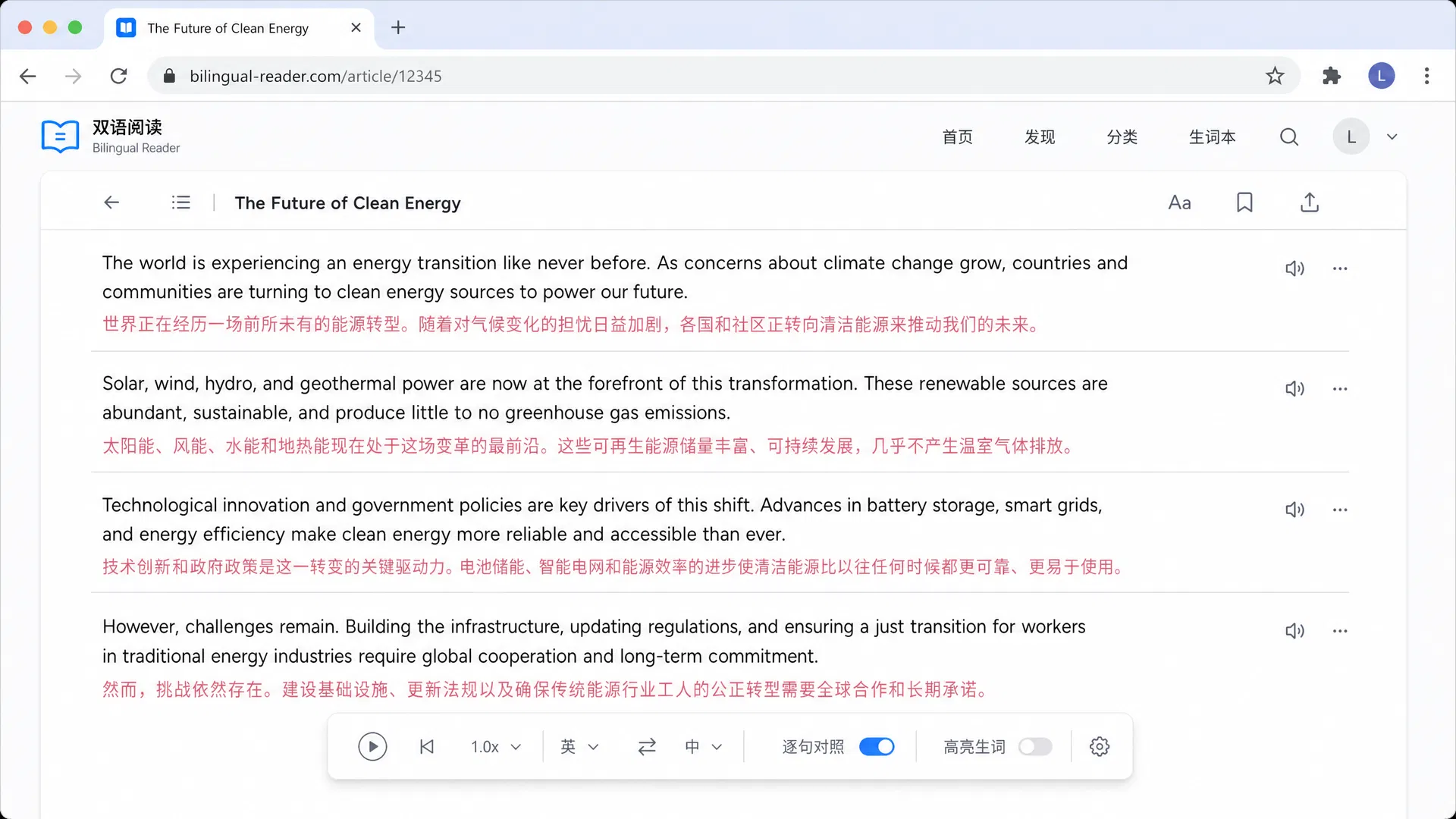
DeepL SE · Germany · Free + Starter
DeepL consistently delivers high-fidelity translations, especially for European languages like German, French, and Spanish. In our tests, DeepL handled nuanced academic vocabulary better than Google Translate. The interface is simple: upload your file, select languages, and download the translated document. However, the strict character limits on the free tier can be restrictive for long PDFs.
Best for: Best for professionals translating business documents between European languages.
OnlineDocTranslator · USA · Freemium
DocTranslator focuses on one specific task: keeping your document looking exactly the same after translation. We found it particularly effective for PDFs with complex columns, images, and tables. It acts as a wrapper for Google Translate's engine but applies heuristics to maintain the file structure. The free tier is limited, so it is best for occasional use.
Best for: Best for users where formatting, tables, and images must remain pixel-perfect.
Google · USA · Free
Google Translate is the default choice for quick PDF-related checks because the consumer service is free for many everyday translation tasks and supports over 100 languages. We tested its documents workflow and found it adequate for plain text PDFs. However, it often struggles with multi-column layouts, sometimes merging text blocks incorrectly. It is a reliable backup tool but lacks the polish of dedicated PDF translators.
Best for: Best for casual users needing to understand the gist of a document.
Adobe Inc. · USA · Paid
Adobe Acrobat integrates translation directly into the standard PDF editing tool. In our hands-on use, the translation quality is decent, but the main value proposition is staying within the Adobe ecosystem. You can translate a contract and then immediately edit or sign it. This is a powerful tool for enterprises, but the high cost per month makes it hard to justify for translation alone.
Best for: Best for business teams that already use Adobe Acrobat for document management.
Funstory AI · Developer Tool · Free
BabelDoc is an developer-focused document translator for teams that need custom processing control. We tested the desktop interface and found it capable of handling long documents by breaking them into chunks. Because it relies on external APIs like ChatGPT or Google, you must provide your own API keys, which adds setup complexity but adds control over processing choices.
Best for: Best for developers who need custom document translation control.
Microsoft · USA · Freemium
Microsoft Translator integrates well with Office products like Word and PowerPoint. We observed that the translation quality is similar to Google Translate, handling common phrases well but sometimes missing context. If you work primarily in the Microsoft ecosystem, this tool provides a convenient way to translate documents without leaving your workflow.
Best for: Best for corporate users relying on Word and Excel.
Google Cloud · USA · Freemium
This is not a visual tool for end-users but a powerhouse for developers. We reviewed the API documentation and found it supports batch translation of documents stored in Cloud Storage. It is ideal for companies needing to translate thousands of PDFs automatically, but setting it up requires coding knowledge and a Google Cloud billing account.
Best for: Best for developers automating translation pipelines.
RWS · UK · Paid
SDL Trados is the industry standard for professional translators. It handles complex terminology databases, translation memories, and project management. We tested its document processing capabilities and found it superior for maintaining consistency across large projects. However, it is overkill and too expensive for someone just needing to translate a single PDF.
Best for: Best for professional translation agencies and freelance linguists.
Reverso · France · Freemium
Reverso Context is excellent for looking up how specific words or phrases are used in context, rather than translating whole documents flawlessly. We used it to verify tricky idioms in our test PDFs. While it offers document translation, the output is basic. Its strength lies in the examples it provides from real-world sources, which aids learning.
Best for: Best for language learners checking specific words within a document.
6 criteria that separate great from mediocre PDF translators, plus 3 common mistakes to avoid.
Ensure the tool maintains columns, fonts, and images so the document remains readable and usable.
Look for high-quality Optical Character Recognition if you frequently translate scanned PDFs or image-based text.
Tools that let you switch between DeepL, Google, and ChatGPT offer better control over translation style and accuracy.
Check how the tool handles uploads and processing, especially for contracts, medical files, or internal reports.
If you translate multiple files at once, look for features that handle queues or folder uploads efficiently.
Side-by-side views help verify accuracy by letting you see the original text next to the translation.
Many free tools cap file sizes at 5MB or 10MB, which can block translation of high-resolution ebooks or reports.
Some tools convert PDFs to images, making the output unsearchable and uneditable. Choose tools that retain text layer.
AI can mistranslate technical terms or idioms. Always verify critical sections, especially in legal or medical documents.
