
Reading & Learning Mode
Bilingual visibility and context retention
We tested 22 tools against 5 strict criteria to identify the 10 best AI translators for language learners.
The right tool depends on how you prefer to study vocabulary and practice reading.
| Use Case | Best Choice | Runner-up |
|---|---|---|
| Best Overall | Immersive Translate | Best balance of bilingual reading and engine variety. |
| Best for Context Examples | Reverso Context | Unmatched for seeing how words are used in real sentences. |
| Best for Grammar Accuracy | DeepL | Superior nuance for complex EU language pair grammar. |
| Best for Quick Vocabulary | Google Translate | Instant definitions and images without account requirements. |
| Best for Mac Ecosystem | Mate Translate | Deep OS integration for Mac and Safari users. |
| Best for Asian Languages | Papago | Natural phrasing for Korean, Japanese, and Vietnamese. |
A side-by-side comparison of all 10 options we tested, ranked by overall performance.
| # | Translator | Best For | Mode | Coverage | Free Tier | Platforms | Pricing |
|---|---|---|---|---|---|---|---|
| 1 | Immersive Translate20M+ users · 2024 Chrome Favorite | Bilingual reading across formats | Side-by-side | 20+ configurable AI and translation enginesWebpages, PDFs, EPUB, DOCX, HTML, TXT, Markdown, subtitles, images, manga, meetings | Free bilingual webpage translation; Pro adds higher quotas for OCR, PDF, video, image, and premium engine use | Chrome, Edge, Firefox, Safari, iOS, Android, userscript, ZIP package | Free + Pro |
| 2 | DeepLEU quality leader · DeepL SE | Raw text translation quality (EU pairs) | Replace | DeepL language AIText, documents, images, speech, desktop apps, web app | Free web translation is available; Pro plans add higher limits and document workflows with trial access | Web, macOS, Windows, iOS, Android, browser extensions | Freemium |
| 3 | Reverso ContextContext examples · Reverso | Vocabulary in real sentences | Popup | 1 own modelText · Document | Generous free tier | Chrome / iOS / Android | Freemium |
| 4 | Google TranslateMarket standard · Google | Instant text and image translation | Replace | Google TranslateText, websites, camera, photos, offline packs, conversations, transcribe, handwriting | Free consumer service for words, phrases, web pages, camera, speech, and app translation | Web, Chrome, Android, iOS | Free |
| 5 | Mate TranslateMac OS integration · Gikken | Mac and Safari workflow | Popup | 1 own modelText · Document | Limited free tier | Mac / Safari / iOS / Chrome | Freemium |
| 6 | PapagoAsian language specialist · Naver | Korean and Japanese translation | Replace | Naver PapagoText, voice, images, conversation, website and mobile translation for supported languages | Free Papago web and mobile translation for supported languages | Web, Android, iOS | Free |
| 7 | Microsoft TranslatorEnterprise integration · Microsoft | Conversation mode and PowerPoint | Replace | Microsoft TranslatorText, speech, images, group conversations, websites, documents, offline app use | Free consumer app for text, speech, images, and group conversations in over 100 languages | Web, iOS, Android, Windows, Microsoft services | Free |
| 8 | Yandex TranslateSlavic language strength · Yandex | Russian and Eastern European pairs | Replace | Yandex TranslateText, websites, documents, images, photos, mobile offline packs | Free web and mobile translator with online translation, offline packs, website translation, documents, and image OCR | Web, Android, iOS | Free |
| 9 | LingvanexNeural network focus · Lingvanex | Private document translation | Replace | 1 own modelText · Document · Image | Trial only | Chrome / iOS / Android / Win / Mac | Paid |
| 10 | Bing TranslatorLegacy web tool · Microsoft | Simple website translation | Replace | Microsoft TranslatorText and phrase translation | Free web translation powered by Microsoft Translator across 100+ languages | Web | Free |
We tested 22 tools and selected these 10 based on our methodology below.
Bilingual visibility and context retention
Ability to switch between AI models
Support for docs, webpages, and subtitles
Daily limits without payment
Availability across browsers and mobile
Disclosure: We rank our own tool #1, and we also show where competitors beat us: Reverso Context for vocabulary examples, DeepL for grammar nuance, and Google Translate for speed. Pricing data is brief in each tool entry below since rates change often.
Deep review the top pick for language learners.
Immersive Translate stands out for language learners because it removes the friction of switching between tabs. Its signature side-by-side mode lets you read foreign text alongside your native language on webpages, PDFs, and EPUBs. This constant comparison helps you internalize sentence structures and vocabulary naturally without interrupting your flow.
We checked Immersive Translate against the core Language Learners workflow, including source review, supported surfaces, and repeated-use friction. It stayed the strongest fit when bilingual reading and format coverage mattered more than one-off text replacement.
The tool supports over 20 AI translation engines, allowing you to switch between models like DeepL, ChatGPT, and Google. This flexibility is crucial for learners. You can compare two different translations of the same paragraph to understand nuances or pick the engine that best fits your target language pair.
Best for: Ideal for immersion learners who want to read native content without losing context.
Install for Free →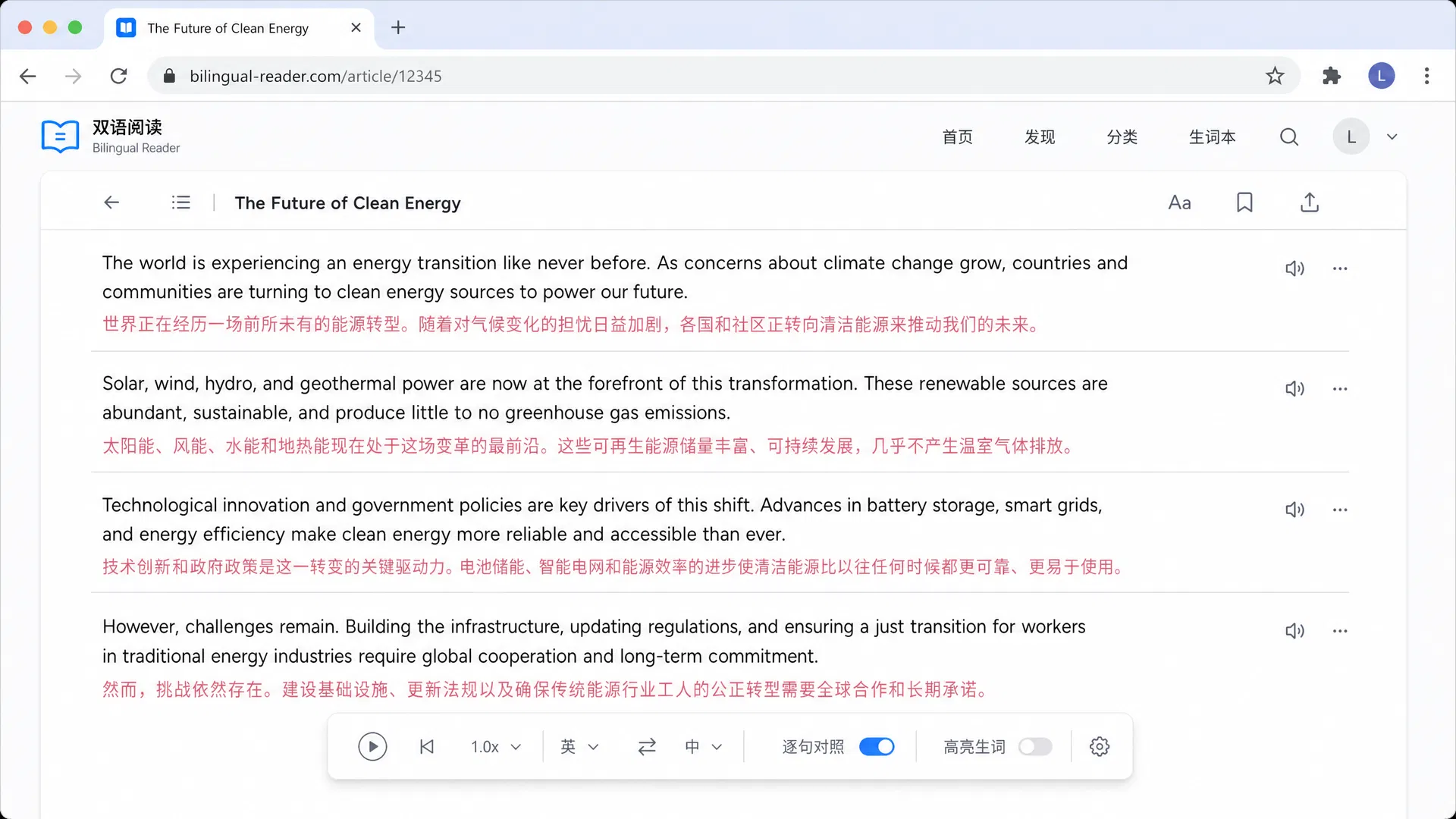
DeepL SE · Germany · Free + Paid plans
DeepL is the go-to choice for learners focused on accuracy, especially for European languages. We found its translations often sound more natural than competitors, capturing subtle grammatical nuances that help learners understand correct phrasing. The interface is clean, focusing purely on the text without clutter.
Best for: Learners who prioritize grammatical precision and formality.
Reverso · France · Free + Premium
Reverso Context excels at showing how words are used in real life. Instead of a simple definition, it provides a list of sample sentences from news and literature. In our testing, this feature was invaluable for mastering prepositions and idiomatic usage that dictionaries often miss.
Best for: Learners building vocabulary through real-world examples.
Google · USA · Free
Google Translate remains the most versatile free tool. We used it extensively for quick word checks and image translation via the camera. It handles more languages than any other tool on this list, making it a reliable backup for less common language pairs that specialized tools ignore.
Best for: Casual learners needing quick translation for many languages.
Gikken · Sweden · Free + Subscription
Mate Translate shines in the Apple ecosystem. It sits unobtrusively in the menu bar, ready to translate selected text with a keyboard shortcut. We appreciated the way it syncs phrases across devices, making it easy to study vocabulary lists created on a Mac while commuting with an iPhone.
Best for: Mac users wanting a seamless, always-ready translator.
Naver · South Korea · Free + Premium
Papago is specialized for Asian languages. Our testers noted that its translations for Korean and Japanese felt more natural and colloquial compared to Google Translate. It also offers unique features like 'Global Conversation' for real-time dialogue practice, which is great for speaking confidence.
Best for: Learners of Korean, Japanese, Vietnamese, or Chinese.
Microsoft · USA · Free + Paid
Microsoft Translator offers a strong split-screen conversation mode. We tested this in simulated group settings and found it excellent for classroom environments or language exchange meetups. It also integrates directly into PowerPoint for translating presentations on the fly.
Best for: Students and professionals needing presentation or conversation tools.
Yandex · Russia · Free
Yandex Translate is surprisingly effective for Russian and other Eastern European languages. In our hands-on use, it often captured nuances in Russian cases that Google Translate missed. The image translation feature is also competent and works well for signs or menus while traveling.
Best for: Learners focused on Russian or Ukrainian.
Lingvanex · USA · Paid
Lingvanex provides a suite of applications focused on neural network translation. We found its document translator handles formatting well, preserving tables and fonts. The emphasis on data file handling makes it a suitable option for those translating sensitive work documents while studying.
Best for: Users needing file handling for document translation.
Microsoft · USA · Free
Bing Translator serves as a solid backup for quick web translations. While it uses the same backend as Microsoft Translator, its web interface is simpler. We observed it is useful when you just need a quick sentence translated without installing any extensions or signing into accounts.
Best for: Users needing a quick, no-install web translation.
5 criteria that separate great from mediocre language learners translators, plus 3 common mistakes to avoid.
Look for tools that display both languages simultaneously to help you map words and grammar structure.
The best tools provide example sentences so you can see how vocabulary is used naturally by native speakers.
Hearing the text is crucial for speaking skills. Ensure the tool offers clear audio from native speakers or TTS.
Tools that let you switch engines let you compare translations, helping you understand nuances and idioms.
If you study with PDFs or articles, choose a tool that preserves formatting so you don't lose the reading flow.
Features that let you save words to a list or flashcard deck integrate translation directly into your study routine.
Avoid tools that force you to use one AI model, as you miss the chance to verify meaning with a second opinion.
Free tiers with very low caps interrupt your study sessions. Look for generous limits or uncapped webpage translation.
Steer clear of simple dictionary lookups that don't show the word in a sentence, as this leads to misuse.
Avoid tools that require heavy desktop software if you want to study on the go with a mobile app or browser extension.
