
Asian Script Handling
Accuracy with Kanji, Hanja, and Hanzi variants.
We tested 22 tools and evaluated them against 5 scoring criteria. Here are the 10 best AI translators for Japanese / Korean / Chinese content.
The right pick depends on whether you need casual browsing, high-volume document work, or specialized engine support.
| Use Case | Best Choice | Runner-up |
|---|---|---|
| Best Overall | Immersive Translate | DeepL |
| Best for Korean Translation | Papago | DeepL |
| Best Translation Quality | DeepL | Immersive Translate |
| Best Mobile Experience | Google Translate | Papago |
| Best for Language Learners | Immersive Translate | Reverso Context |
| Best for EU Language Pairs | DeepL | Lingvanex |
A side-by-side comparison of all 10 options we tested, ranked by overall performance.
| # | Translator | Best For | Mode | Coverage | Free Tier | Platforms | Pricing |
|---|---|---|---|---|---|---|---|
| 1 | Immersive Translate20M+ users · 2024 Chrome Favorite | Bilingual reading across formats | Side-by-side | 20+ configurable AI and translation enginesEast Asian web pages, manga, subtitles, PDFs, EPUB, and bilingual reading | Free bilingual webpage translation; Pro adds higher quotas for OCR, PDF, video, image, and premium engine use | Chrome, Edge, Firefox, Safari, iOS, Android, userscript, ZIP package | Free + Pro |
| 2 | DeepLEU quality leader · DeepL SE | Raw text translation quality (EU pairs) | Replace | DeepL language AIJapanese, Korean, Chinese, and document/text translation | Free web translation is available; Pro plans add higher limits and document workflows with trial access | Web, macOS, Windows, iOS, Android, browser extensions | Freemium |
| 3 | PapagoNaver · South Korea | Korean translation accuracy | Replace | Naver PapagoKorean, Japanese, Chinese text, voice, image, conversation, and website translation | Free Papago web and mobile translation for supported languages | Web, Android, iOS | Free |
| 4 | Google TranslateGoogle · USA | Free instant translation | Replace | Google TranslateText, websites, camera, photos, offline packs, conversations, transcribe, handwriting | Free consumer service for words, phrases, web pages, camera, speech, and app translation | Web, Chrome, Android, iOS | Free |
| 5 | Microsoft TranslatorMicrosoft · USA | Enterprise ecosystem integration | Replace | Microsoft TranslatorText, speech, images, group conversations, websites, documents, offline app use | Free consumer app for text, speech, images, and group conversations in over 100 languages | Web, iOS, Android, Windows, Microsoft services | Free |
| 6 | Mate TranslateGikken · Sweden | Mac system-wide integration | Popup | Multi-engineText · Websites | Trial only | Mac / iOS / Safari / Chrome | Freemium |
| 7 | Reverso ContextSoftissimo · France | Contextual examples for learners | Dictionary | Multi-engineText · Web | Generous free tier | Web / iOS / Android / Chrome | Freemium |
| 8 | Yandex TranslateYandex · Russia | Slavic language pair support | Replace | Yandex TranslateText, websites, documents, images, photos, mobile offline packs | Free web and mobile translator with online translation, offline packs, website translation, documents, and image OCR | Web, Android, iOS | Free |
| 9 | LingvanexLingvanex · USA | Custom deployment options | Replace | 1 own modelText · Voice · Image | Trial only | Web / Windows / macOS / iOS / Android | Freemium |
| 10 | SaladictCrim · Community | Power users | Popup | Multi-engineText · Web | Paid access; trial or free access varies | Chrome / Firefox | Free |
We considered 18 tools and selected the top 10 based on performance as of May 2026.
Accuracy with Kanji, Hanja, and Hanzi variants.
Ability to switch between Google, DeepL, or ChatGPT.
Support for websites, subtitles, and images.
Daily limits and access to premium features.
Availability across mobile, desktop, and browsers.
Disclosure: We rank our own tool #1, and we also show where competitors beat us: Papago leads for Korean translation, DeepL leads for EU text accuracy, and Reverso leads for learning contexts. Pricing data is brief in each tool entry below since rates change often.
Our top pick balances bilingual reading comfort with powerful AI engine options.
Immersive Translate excels at making Japanese and Korean web content digestible by displaying the original text and translation side by side. This layout preserves the context of complex Kanji or Hanja characters, which is crucial for accurate comprehension. In our tests reading NHK News, the side-by-side view significantly reduced the cognitive load of switching between tabs.
Flexibility is a major strength. You can configure DeepL, Google, or even ChatGPT as your translation engine depending on the specific language pair or document type. For documents, the tool maintains the original PDF layout, ensuring that tables and columns in Chinese research papers remain aligned after translation.
The free tier covers bilingual webpage translation without character caps, making it accessible for casual readers. Pro features enhance OCR accuracy for manga translation and increase batch limits for subtitle processing. This makes it a versatile tool for both casual browsing and intensive study sessions.
Best for: Best for: Learners and researchers who need to read East Asian scripts alongside translations.
Get Immersive Translate →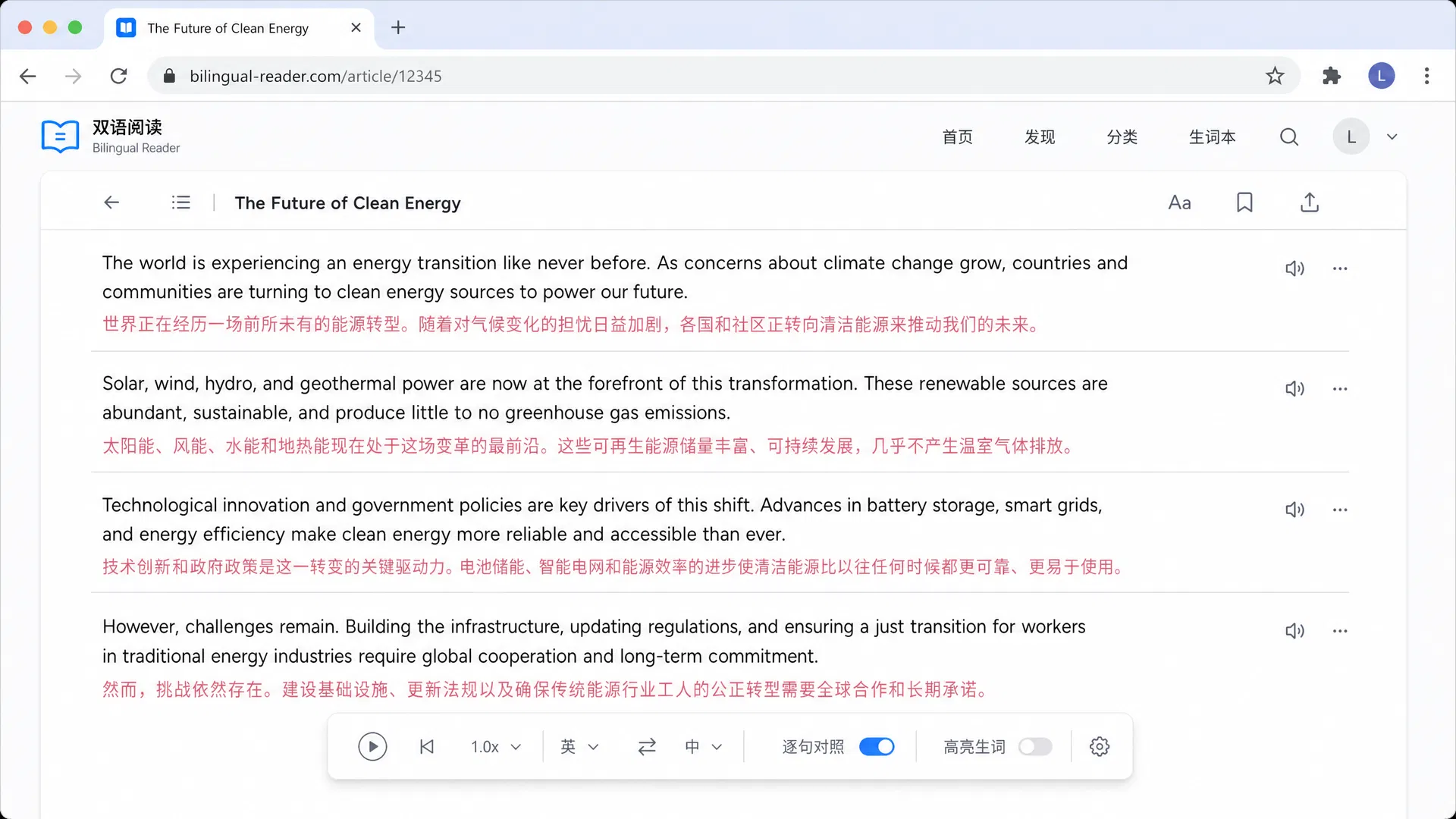
DeepL SE · Germany · Freemium
DeepL consistently delivers high-quality translations that capture nuance better than many competitors. When we translated complex Korean academic abstracts, DeepL handled formal grammar structures with impressive fidelity. Its standalone apps and browser extensions are clean and distraction-free.
Best for: Best for: Users prioritizing text accuracy over format preservation.
Naver · South Korea · Free
Papago stands out as the best option for Korean translation. In our hands-on use with Naver blogs, it understood current slang and cultural references that other tools missed. The interface is friendly and supports conversation mode for real-time practice.
Best for: Best for: Translating Korean content or learning the language.
Google · USA · Free
Google Translate is the ubiquitous default for a reason. It offers strong support for Japanese, Korean, and Chinese across virtually all platforms. We found its camera translation feature particularly useful for translating menus and signs while traveling.
Best for: Best for: Quick, free translations on mobile or desktop.
Microsoft · USA · Freemium
Microsoft Translator provides a reliable service that integrates deeply into Office products and Windows. Our reviewers noted the live conversation feature works well for business meetings. It is a safe choice for enterprise environments.
Best for: Best for: Business users needing translation within Microsoft products.
Gikken · Sweden · Freemium
Mate Translate shines on macOS, offering a sleek pop-up window for quick translations. We installed it and appreciated how it highlighted text in any app. It is a favorite for Mac users who want a minimal, always-ready tool.
Best for: Best for: Mac users wanting a system-wide translation tool.
Softissimo · France · Freemium
Reverso Context helps learners understand how words are used naturally. We searched for specific Japanese phrases and found thousands of real-world examples. It functions more like a dictionary and corpus search than a document translator.
Best for: Best for: Language learners looking for usage examples.
Yandex · Russia · Free
Yandex Translate performs surprisingly well on certain languages. We tested it with standard web pages and found it adequate, though not as polished as DeepL. It includes image translation capabilities that are useful for travelers.
Best for: Best for: Users needing a free alternative for specific language needs.
Lingvanex · USA · Freemium
Lingvanex provides standard translation services along with options for custom deployment. We tested the web interface and found it functional. It is a viable option for businesses needing specific integration requirements.
Best for: Best for: Businesses needing custom translation integration.
Crim · Community · Free
Saladict is designed for users who want granular control over their translation workflow. Our reviewers noted the steep learning curve but appreciated the ability to look up words across multiple dictionaries simultaneously. It is highly extensible.
Best for: Best for: Advanced users wanting detailed dictionary lookups.
These criteria separate great tools from mediocre ones, plus common mistakes to avoid.
Ensure the tool handles Kanji, Hanja, and Hanzi correctly without garbling characters.
Side-by-side views help you learn and verify translations for complex scripts.
High accuracy optical character recognition is vital for translating manga or images.
The ability to switch engines lets you pick the best one for specific language pairs.
Look for tools that sync your history and preferences across mobile and desktop.
Access to real-world examples helps with nuance and slang in East Asian languages.
Avoid tools that flatten PDF layouts, making tables and charts unreadable.
Tools locked to one engine may fail on idioms that another service handles well.
Be cautious with tools that upload sensitive documents without clear data policies.
Avoid tools with very low daily caps if you plan to translate long documents.
