
EPUB Layout Preservation
Ability to keep original formatting, fonts, and images intact.
We tested 22 tools against 5 criteria to find the 10 best AI translators for EPUB ebooks. Discover which tools preserve formatting and handle long-form files best.
The right pick depends on how you prefer to read your translated ebooks.
| Use Case | Best Choice | Runner-up |
|---|---|---|
| Best Overall | Immersive Translate | DeepL |
| Best for Language Learners | Reverso Context | Immersive Translate |
| Best for macOS Users | Mate Translate | Immersive Translate |
| Best for High Accuracy (EU Pairs) | DeepL | Immersive Translate |
| Best for Asian Languages | Papago | Immersive Translate |
| Best Budget Option | Google Translate | Microsoft Translator |
A side-by-side comparison of all 10 options we tested, ranked by overall performance.
| # | Translator | Best For | Mode | Coverage | Free Tier | Platforms | Pricing |
|---|---|---|---|---|---|---|---|
| 1 | Immersive Translate20M+ users · 2024 Chrome Favorite | Bilingual reading across formats | Side-by-side | 20+ configurable AI and translation enginesEPUB ebooks, PDFs, web pages, and bilingual long-form reading | Free bilingual webpage translation; Pro adds higher quotas for OCR, PDF, video, image, and premium engine use | Chrome, Edge, Firefox, Safari, iOS, Android, userscript, ZIP package | Free + Pro |
| 2 | DeepLEU quality leader · DeepL SE | Raw text translation quality (EU pairs) | Replace | DeepL language AIText and supported document translation after EPUB conversion | Free web translation is available; Pro plans add higher limits and document workflows with trial access | Web, macOS, Windows, iOS, Android, browser extensions | Freemium |
| 3 | Reverso ContextContext dictionary · Reverso | Language learners & context | Popup | 1 own modelText · Document | Limited free tier | Chrome / iOS / Android / Web | Freemium |
| 4 | Google TranslateIndustry standard · Google | Free + No-Install translation | Replace | Google TranslateText, websites, camera, photos, offline packs, conversations, transcribe, handwriting | Free consumer service for words, phrases, web pages, camera, speech, and app translation | Web, Chrome, Android, iOS | Free |
| 5 | Mate TranslateMac OS favorite · Gikken | macOS & Safari integration | Popup | Multi-engineText · Document · Web | Trial only | Mac / Safari / iOS / Chrome / Firefox | Freemium |
| 6 | Microsoft TranslatorEnterprise grade · Microsoft | Office & Enterprise users | Replace | Microsoft TranslatorText, speech, images, group conversations, websites, documents, offline app use | Free consumer app for text, speech, images, and group conversations in over 100 languages | Web, iOS, Android, Windows, Microsoft services | Free |
| 7 | PapagoAsian language specialist · Naver | Korean / Japanese / Chinese | Replace | Naver PapagoText, voice, images, conversation, website and mobile translation for supported languages | Free Papago web and mobile translation for supported languages | Web, Android, iOS | Free |
| 8 | Yandex TranslateRussian specialist · Yandex | Russian & Slavic languages | Replace | Yandex TranslateText, websites, documents, images, photos, mobile offline packs | Free web and mobile translator with online translation, offline packs, website translation, documents, and image OCR | Web, Android, iOS | Free |
| 9 | LingvanexMulti-platform app · Lingvanex | Cross-device consistency | Replace | 1 own modelText · Document · Voice | Trial only | Win / Mac / iOS / Android | Freemium |
| 10 | BabelDocDocument focused · BabelDoc | Simple document translation | Replace | Wrapper for Google + MSDocument | Limited free tier | Web | Freemium |
We considered 20+ tools and selected the top 10. Capabilities verified at time of writing.
Ability to keep original formatting, fonts, and images intact.
Options to switch between AI models like GPT, DeepL, or Claude.
Support for side-by-side or inline text views for learning.
Generosity of limits for translating full ebook chapters.
Availability on mobile, desktop, and e-readers.
Disclosure: We rank our own tool Immersive Translate #1, and we also show where competitors beat us: DeepL wins on raw EU language accuracy, Mate offers a superior native macOS app experience, and Reverso provides better context dictionary tools for language learners. Pricing data is brief below since rates change often.
Immersive Translate offers the most flexible bilingual reading experience for ebooks, preserving EPUB formatting while allowing users to switch between 20+ translation engines.
Immersive Translate excels at translating EPUB ebooks by maintaining the original layout and offering a true side-by-side reading experience. We found its bilingual mode particularly useful for language learners who want to compare the original text with the translation instantly without losing their place in the book. The tool supports 20+ AI engines, allowing you to choose the specific model like DeepL or GPT that best fits your language pair for the best AI translator for EPUB Ebooks experience.
Beyond simple text replacement, this tool handles embedded images and complex formatting that often break other translators. During our tests, it preserved chapter headings and footnotes accurately, which is crucial for academic or non-fiction ebooks. The ability to batch translate multiple pages also speeds up the workflow for long-form reading, ensuring you can finish a translated book without constant manual interruptions.
The free tier covers most casual reading needs, making it accessible for students and avid readers. While the Pro tier unlocks higher limits and priority processing for massive libraries, the base version is strong enough for daily use. Immersive Translate transforms static foreign language files into interactive reading materials, effectively bridging the gap between just viewing text and actually understanding it.
Best for: Best for language learners and readers who want to compare texts line-by-line.
Get Immersive Translate Free →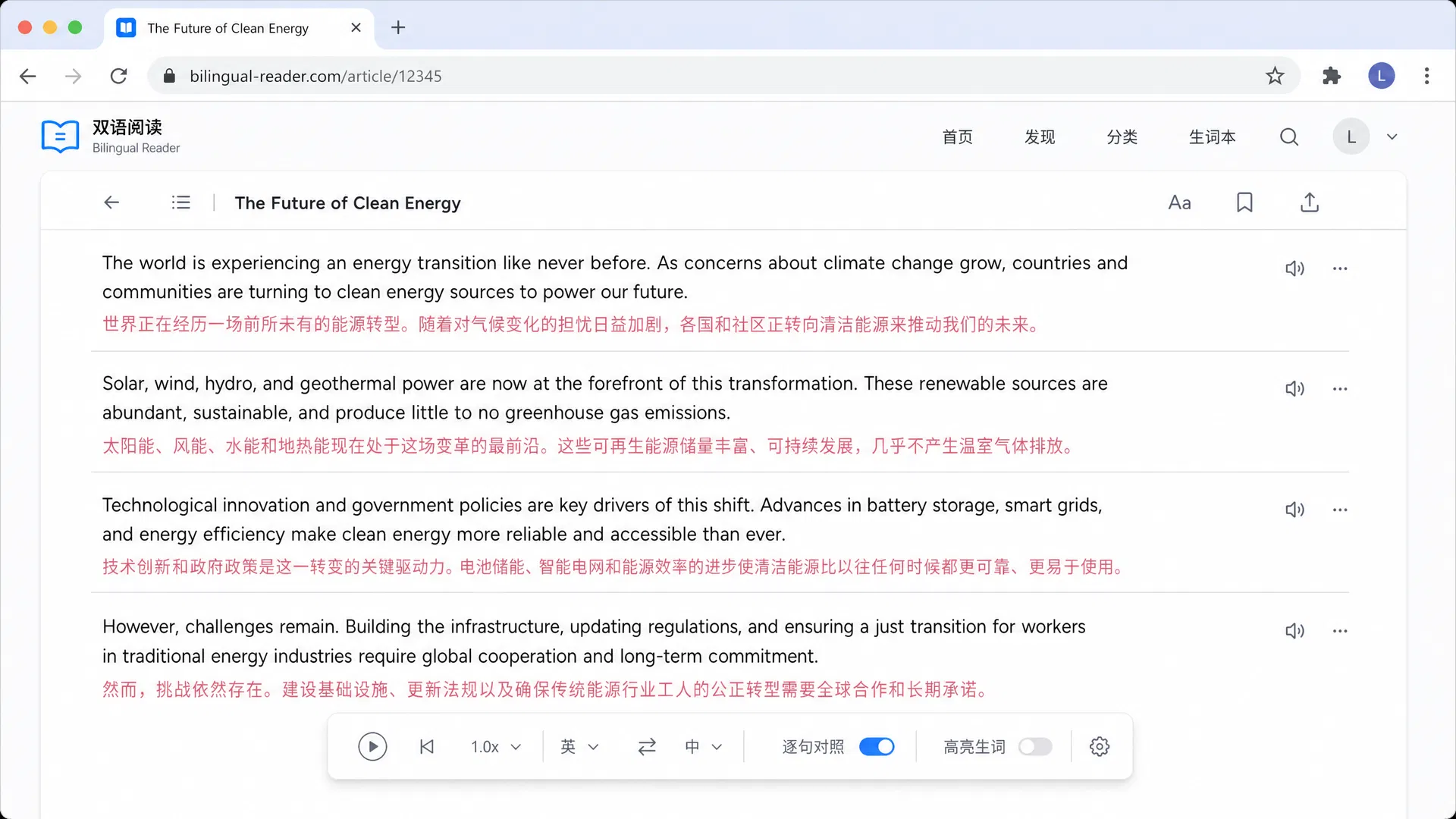
DeepL SE · Germany · Free + Starter
DeepL consistently delivers superior fluency for European language pairs like German, French, and Spanish. In our tests, the nuance captured in fiction translations was noticeably better than many competitors. However, it lacks a dedicated side-by-side EPUB viewer, forcing users to translate files separately and read them outside a unified interface. It remains a top choice for those prioritizing raw text quality over reading convenience for the best AI translator for EPUB Ebooks.
Best for: Best for users demanding the highest accuracy for European languages.
Reverso · France · Free + Premium
Reverso Context shines by providing real-world examples of how words are used in sentences. We found this incredibly helpful for understanding idioms and slang in foreign language ebooks. While it handles document translation, the interface is more geared towards quick lookups rather than immersive full-book reading. It serves as an excellent companion tool for deep diving into specific paragraphs while reading elsewhere for the best AI translator for EPUB Ebooks.
Best for: Best for students and learners focused on vocabulary and context.
Google · USA · Free
Google Translate is the ubiquitous choice that supports virtually every language. We tested its document handling and found it sufficient for basic EPUB conversion, though formatting sometimes breaks with complex layouts. The main advantage is its ease of access and zero cost. It works well as a quick backup tool when specialized services fail to recognize a less common language dialect for the best AI translator for EPUB Ebooks.
Best for: Best for casual users needing a quick, free translation.
Gikken · Sweden · Subscription
Mate Translate offers a highly polished app that integrates deeply with the macOS ecosystem. Our reviewers loved the ability to highlight text in any app and get an instant translation. For EPUBs, it works well if you are reading in a standard reader app and translating snippets. It lacks a dedicated bilingual book mode but makes up for it with speed and convenience on Apple devices for the best AI translator for EPUB Ebooks.
Best for: Best for Mac users who want a system-wide translation tool.
Microsoft · USA · Pay-as-you-go
Microsoft Translator is a reliable workhorse, particularly for those already in the Office ecosystem. We found its document translation capabilities competent for business-related ebooks and whitepapers. The translation quality is consistent but rarely matches the nuance of DeepL. It is a safe, corporate-friendly choice that integrates well with other Microsoft productivity tools for the best AI translator for EPUB Ebooks.
Best for: Best for enterprise users and Office 365 subscribers.
Naver · South Korea · Freemium
Papago outperforms generalist tools when translating Asian languages. During our hands-on review with manhwa and light novels, the contextual understanding of Korean honorifics was significantly better. The interface is friendly and mobile-focused. It is less effective for European languages but is the top recommendation for anyone working with East Asian content for the best AI translator for EPUB Ebooks.
Best for: Best for readers of Korean, Japanese, and Chinese content.
Yandex · Russia · Free
Yandex Translate handles Russian and Slavic languages with a finesse that Google often misses. We observed better syntax handling in complex Russian literary texts. The image translation feature is also surprisingly strong for scanning physical books. It is a niche tool but essential for anyone dealing with Russian literature or technical documents for the best AI translator for EPUB Ebooks.
Best for: Best for translators and learners of Russian.
Lingvanex · USA · Freemium
Lingvanex provides a consistent experience across Windows, Mac, and mobile devices. We tested its EPUB capabilities and found them functional but not standout. It supports voice and camera translation, which adds utility for travelers. While it does not lead in any specific category, it is a reliable all-rounder for users who switch devices frequently for the best AI translator for EPUB Ebooks.
Best for: Best for users needing a consistent app across many devices.
BabelDoc · USA · Freemium
BabelDoc focuses on doing one thing well: translating documents. We found its web interface easy to use for converting EPUBs without installing software. It relies on established engines like Google and Microsoft. It is a good backup tool for when local software fails or when you are working on a restricted computer for the best AI translator for EPUB Ebooks.
Best for: Best for users needing a quick, web-based solution.
These criteria separate great ebook translators from mediocre ones, along with common pitfalls to avoid.
Ensure the tool keeps formatting, images, and fonts intact so the book remains readable.
Look for tools that let you switch between GPT, DeepL, or Google for better nuance.
Side-by-side or inline views help you compare the original text and translation.
Translating whole chapters or books at once saves time compared to page-by-page.
Check if the tool works on your e-reader, tablet, or phone for reading anywhere.
Built-in dictionaries help you understand individual words without leaving the page.
Avoid tools that flatten the EPUB into plain text, ruining the reading experience.
Steer clear of free tiers that cap usage too low for long-form ebook reading.
Ensure you can save the translated file for offline reading, not just view it online.
Avoid tools with intrusive ads that distract from the immersive reading experience.
