
Scenario fit
How directly the tool supports Chrome Extensions without awkward workarounds.
We reviewed 22 tools against 5 scoring criteria and selected the 10 strongest AI translators for Chrome Extensions.
For sustained bilingual web reading, start with Immersive Translate. For page replacement, short-text translation, or vocabulary study, compare the alternatives by the task you actually need.
| Use Case | Best Choice | Runner-up |
|---|---|---|
| Best overall for bilingual web reading in Chrome | Immersive Translate | Google Translate |
| Best bilingual reading layout | Immersive Translate | Google Translate |
| Best raw text quality | DeepL | Immersive Translate |
| Best free quick lookup | Google Translate | Microsoft Translator |
| Best choice of translation engines | Immersive Translate | Saladict |
| Best learning support | Reverso Context | Google Translate |
For bilingual web reading, Immersive Translate is our first pick because it keeps the original text visible alongside the translation. Compare that workflow with page replacement, selected-text lookup, and web or app alternatives below.
| # | Translator | Best For | Mode | Coverage | Free Tier | Platforms | Pricing |
|---|---|---|---|---|---|---|---|
| 1 | Immersive TranslateBilingual extension for serious web reading | side-by-side web reading | Original paragraphs stay visible with translations below them; translation-only mode is optional. | 20+ configurable engines, including DeepL and Gemini; availability and quotas depend on service and planWebpages, PDFs, EPUB, DOCX, HTML, TXT, Markdown, subtitles, images, manga, meetings | Free bilingual webpage translation; Pro adds higher quotas for OCR, PDF, video, image, and premium engine use | Chrome, Edge, Firefox, Safari, iOS, Android, userscript, ZIP package | Free + Pro |
| 2 | Google TranslateFast built-in style translation for Chrome users | quick full-page translation | Chrome translates the page; switch back to the original to compare. Selected-text translation is also available. | Google TranslateText, websites, camera, photos, offline packs, conversations, transcribe, handwriting | Free consumer translation across text, web, camera, photos, handwriting, speech, and conversations | Web, Chrome, Android, iOS | Free |
| 3 | DeepLHigh-quality text translation in the browser | polished short and medium text | Selected-text translation and full-page translation; use Show original to return to the source page. Limits depend on the plan. | DeepL language AIText, documents, images, speech, desktop apps, web app | Free web translation is available; Pro plans add higher limits and document workflows with trial access | Web, macOS, Windows, iOS, Android, browser extensions | Freemium |
| 4 | Mate TranslateCross-device lookup for Apple and browser users | quick phrase lookup | Selected-text pop-ups and full-page translation; switch between the original and translated page. | Provider engine and supported language models vary by planChrome extension and apps | Free starter access or trial-style limits; paid plan expands usage | Chrome, macOS, iOS, web | Freemium |
| 5 | Reverso ContextContext examples for learners | example-based learning | Double-click word lookup and subtitle word translation; the surrounding source text remains visible. | Provider engine and supported language models vary by planBrowser extension and web app | Free starter access or trial-style limits; paid plan expands usage | Chrome, web, mobile | Freemium |
| 6 | PapagoStrong East Asian everyday translation | Korean, Japanese, and Chinese lookup | Text translation in the web app; website translation is available through Papago Plus. | Provider engine and supported language models vary by planWeb and apps | Free text translation; website translation requires Papago Plus | Web, Android, iOS | Free + Plus |
| 7 | Microsoft TranslatorMicrosoft ecosystem translator | Microsoft account workflows | Text and app translation; built-in webpage translation is in Edge rather than a Chrome-native reading mode. | Microsoft TranslatorText, speech, images, group conversations, websites, documents, offline app use | Free consumer app for text, speech, images, and group conversations in over 100 languages | Web, iOS, Android, Windows, Microsoft services | Free |
| 8 | Yandex TranslateUseful for Cyrillic languages | Russian and nearby language pairs | Open Sites in the web translator and enter a URL to view the translated website. | Provider engine and supported language models vary by planWeb translation | Free access with usage limits | Web, mobile | Free |
| 9 | LingvanexBusiness-oriented translation option | multi-device business use | Chrome extension for selected text and entire pages; dictionary results support word lookup. | Provider engine and supported language models vary by planApps, web, extensions | The Chrome extension is free; other apps and business products have separate plans | Web, desktop, mobile | Free Chrome extension |
| 10 | SaladictPower-user dictionary workflow | custom dictionary lookup | Selected-text dictionary panel with multiple results; the original page stays visible behind the panel. | Provider engine and supported language models vary by planBrowser extension | Free access with usage limits | Chrome-compatible browsers | Free |
For this Chrome Extensions list, bilingual web reading and source visibility take priority when choosing our first pick. The five criteria still cover translation quality, workflow coverage, ease of review, and value for repeated use.
How directly the tool supports Chrome Extensions without awkward workarounds.
Consistency across common language pairs, names, idioms, and long passages.
How many relevant surfaces, files, apps, or browser contexts the tool covers.
Whether users can compare source and translation, revise output, and avoid context loss.
How useful the free or starter access is before paid usage becomes necessary.
Disclosure: We ranked tools by official product fit for Chrome Extensions. Pricing and free-tier language is categorical because plan details change; we checked official pages where available and describe specialist competitors where they beat Immersive Translate. Our first pick prioritizes bilingual web reading; quick page replacement and selected-word lookup may favor other tools.
Immersive Translate is our first pick for bilingual web reading in Chrome: it keeps the original paragraph and its translation together, with a choice of translation engines.
Immersive Translate leads this list for bilingual web reading because it places translations beneath the original paragraphs. You can check a phrase in context without switching the whole page back to its source language. That makes it our first recommendation for sustained reading, study, and research.
We checked the winner against the practical tasks behind Chrome Extensions: setup, supported surfaces, review control, and whether the workflow stays inside the tool instead of forcing copy-and-paste between apps. Immersive Translate is our first pick when keeping source and translation together is the priority.
To start, install the extension, open a foreign-language page, click the Immersive Translate icon, choose your target language, and select Translate. Bilingual display is the default; use translation-only mode if you prefer to hide the original.
Use the translation-service selector in the extension panel to choose an available engine, including DeepL or Gemini. Check the service settings for account or API-key requirements and plan quotas; free bilingual webpage translation does not mean every engine is free or unlimited.
Choose Google Translate for quick page replacement in Chrome, or a lookup tool when you only need an occasional word. Our first-place recommendation here prioritizes bilingual reading and engine choice, rather than claiming one tool is best for every translation task.
Best for: Readers who want to keep source text and translation together while studying, researching, or reading long articles.
Install Immersive Translate →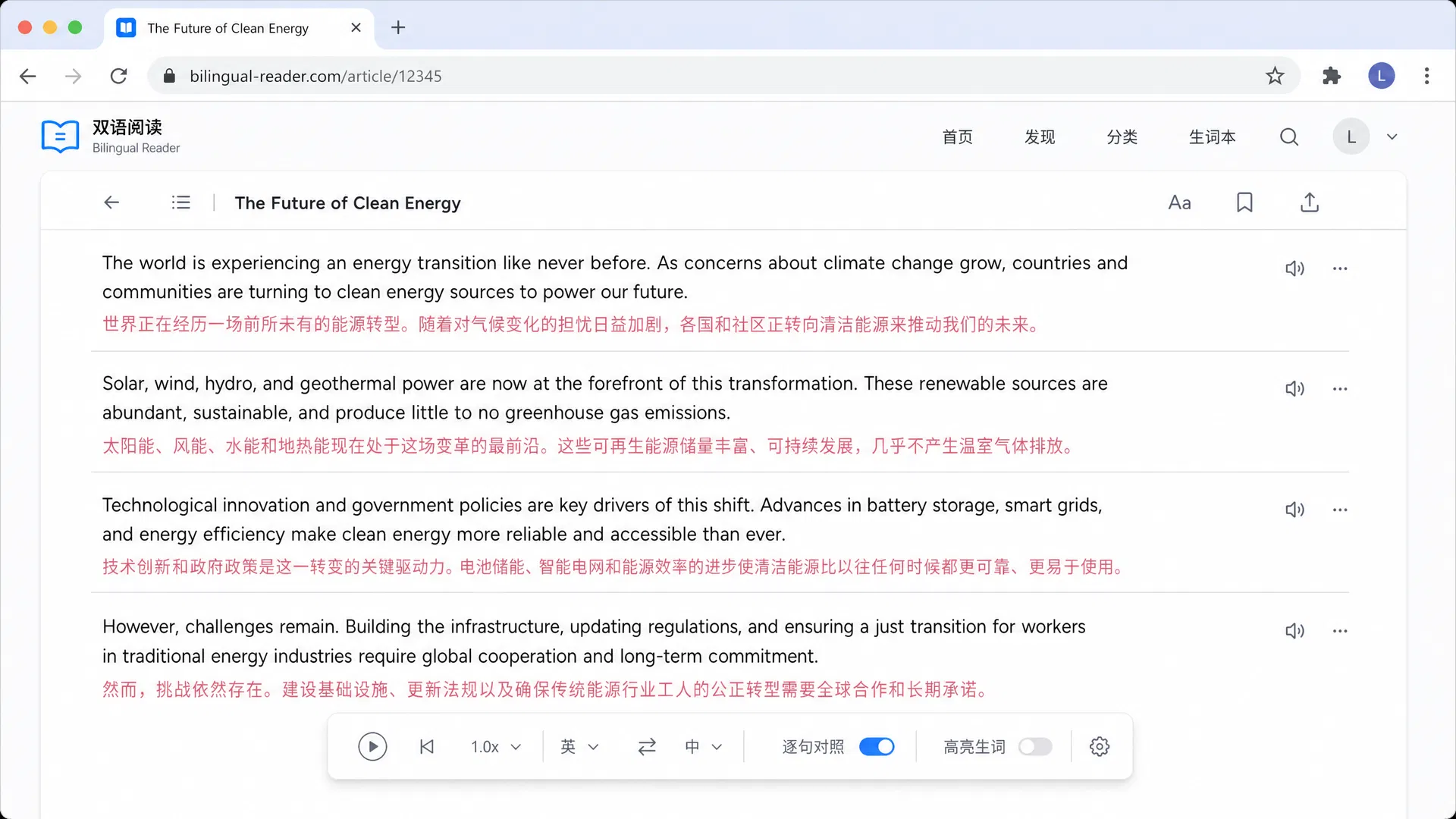
Fast built-in style translation for Chrome users
We tested Google Translate against browser-reading needs: setup friction, source visibility, and repeated page translation. It is strongest for quick full-page translation in Chrome. Use the Translate icon or the page context menu, choose a target language, and switch back to the original when you need to check the source. This differs from keeping each original paragraph and translation visible together.
Best for: Choose Google Translate for quick page replacement inside Chrome rather than continuous bilingual source comparison.
High-quality text translation in the browser
We tested DeepL against browser-reading needs: setup friction, source visibility, and repeated page translation. It is strongest for polished short and medium text, with official support around Text, documents, images, speech, desktop apps, web app. Choose it when that browsing pattern is more important than a separate document or meeting workflow. In the extension, select a passage to translate it or use full-page translation. Select Show original to compare with the source page; availability and limits vary by plan.
Best for: Choose DeepL if your main need is polished short and medium text.
Cross-device lookup for Apple and browser users
We tested Mate Translate against browser-reading needs: setup friction, source visibility, and repeated page translation. It is strongest for quick phrase lookup, with official support around Chrome extension and apps. Choose it when that browsing pattern is more important than a separate document or meeting workflow. Double-click a word or highlight a passage for a pop-up. For full-page translation, switch between the translated page and the original to compare.
Best for: Choose Mate Translate if your main need is quick phrase lookup.
Context examples for learners
We tested Reverso Context against browser-reading needs: setup friction, source visibility, and repeated page translation. It is strongest for example-based learning, with official support around Browser extension and web app. Choose it when that browsing pattern is more important than a separate document or meeting workflow. Double-click an unfamiliar word to open its translation, or hover over a word in supported video subtitles. This is a lookup workflow rather than an original-and-translation article layout.
Best for: Choose Reverso Context if your main need is example-based learning.
Strong East Asian everyday translation
We tested Papago against browser-reading needs: setup friction, source visibility, and repeated page translation. It is strongest for Korean, Japanese, and Chinese lookup, with official support around Web and apps. Choose it when that browsing pattern is more important than a separate document or meeting workflow. For a quick check in Chrome, use the web app to compare input and translated text. Its website translation is a Papago Plus feature; this listing is a web-tool alternative, not a claim of a Chrome bilingual extension.
Best for: Choose Papago if your main need is Korean, Japanese, and Chinese lookup.
Microsoft ecosystem translator
We tested Microsoft Translator against browser-reading needs: setup friction, source visibility, and repeated page translation. It is strongest for Microsoft account workflows, with official support around Text, speech, images, group conversations, websites, documents, offline app use. Choose it when that browsing pattern is more important than a separate document or meeting workflow. Use its web or app workflow for text translation. Microsoft’s built-in full-page browser translation belongs to Edge; it should not be confused with an original-and-translation reading extension for Chrome.
Best for: Choose Microsoft Translator if your main need is Microsoft account workflows.
Useful for Cyrillic languages
We tested Yandex Translate against browser-reading needs: setup friction, source visibility, and repeated page translation. It is strongest for Russian and nearby language pairs, with official support around Web translation. Choose it when that browsing pattern is more important than a separate document or meeting workflow. For website translation, open Sites in the web tool, paste the page URL, and choose the languages. This opens a translated website rather than adding a paragraph-by-paragraph bilingual layer to the current Chrome tab.
Best for: Choose Yandex Translate if your main need is Russian and nearby language pairs.
Business-oriented translation option
We tested Lingvanex against browser-reading needs: setup friction, source visibility, and repeated page translation. It is strongest for multi-device business use, with official support around Apps, web, extensions. Choose it when that browsing pattern is more important than a separate document or meeting workflow. Use the Chrome extension for selected-text lookup or full-page translation. Choose based on the text or page workflow you need rather than assuming that both languages will appear under every paragraph.
Best for: Choose Lingvanex if your main need is multi-device business use.
Power-user dictionary workflow
We tested Saladict against browser-reading needs: setup friction, source visibility, and repeated page translation. It is strongest for custom dictionary lookup, with official support around Browser extension. Choose it when that browsing pattern is more important than a separate document or meeting workflow. Select text and use the lookup icon or your configured double-click shortcut to open the dictionary panel. The page remains in place while you compare dictionary and translation results.
Best for: Choose Saladict if your main need is custom dictionary lookup.
Use these checks before picking a translator for Chrome Extensions, especially if you will use it every week.
Prefer tools that handle Chrome Extensions without repeated copy and paste.
A side-by-side or reviewable output helps catch names, tone shifts, and formatting mistakes.
Test your actual source and target languages, not only English examples.
Check whether longer files, chapters, meetings, or pages stay readable after translation.
Confirm usage caps, export limits, and paid-plan triggers before committing.
Translation still needs context checks for names, tone, and formatting.
A tool can translate well but still be slow if it breaks your normal reading or review flow.
Do not choose a document tool for live speech or a meeting tool for browser reading.
