
















How to Use a Word File Translator
1
Select translation tool for your needs.
2
Upload the file.
3
Download translated document with your preferred format.
Word File Translator: Precision Meets Efficiency
Immersive Translate's document translator delivers bilingual Word file translation with preserved formatting, AI-powered accuracy, and multi-engine support for instant, professional results.

Format Integrity
Our Word translator preserves original layouts, tables, and images perfectly, ensuring your translated DOCX files maintain professional appearance.
Translation Accuracy
AI context-aware technology analyzes entire documents before translating, delivering consistent terminology and natural-sounding Word file translations.

Multiple Engines
Choose from 18+ translation services including ChatGPT, DeepL, and Gemini to find optimal accuracy for your Word documents.
Bilingual Output
Side-by-side display shows original and translated text together, perfect for proofreading and learning from your Word files.


Secure Processing
Your Word documents are processed with enterprise-grade encryption, ensuring confidential business and legal files remain protected throughout translation.
Who Uses Word Translators

Academic Paper Barriers
Students translate research papers and thesis documents in Word format to understand foreign literature, complete assignments, and prepare bilingual citations for academic writing.

Business Document Challenges
Business professionals translate contracts, reports, and proposals in Word to ensure accurate communication with international partners and avoid costly misunderstandings in deals.

Content Globalization Needs
Content creators translate manuscripts, articles, and marketing copy to reach international audiences, expand their readership, and adapt messaging for different cultural markets effectively.
How Word Translation Works
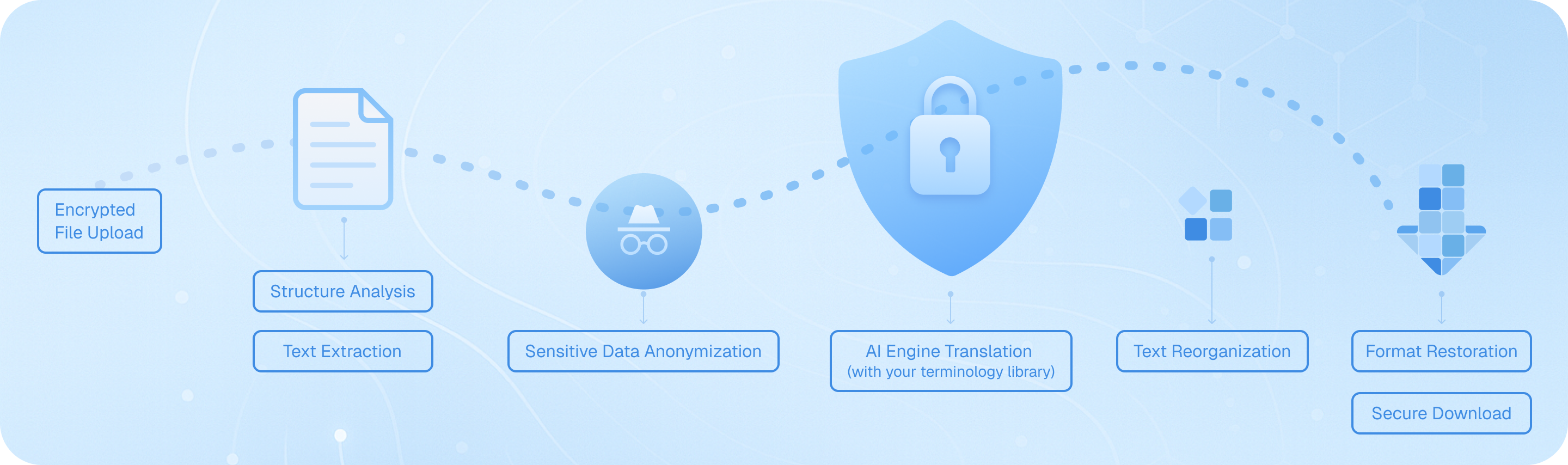
Upload your DOCX file through encrypted channels, where our system analyzes document structure, extracts text while preserving formatting elements, processes content through your chosen AI engine with terminology consistency, then reassembles translated text into the original layout—tables, images, and styles intact—before delivering a secure, downloadable bilingual or target-language Word document ready for immediate use.
Frequently Asked Questions About Word File Translation
Can I translate a Word document while keeping the original formatting intact?
Yes, when you use a word file translator like Immersive Translate, the tool preserves your document's original layout, including fonts, tables, images, and paragraph spacing. This is especially important for professional documents such as business reports, academic papers, or contracts where formatting consistency matters. Immersive Translate supports DOCX files and ensures that after translation, your document maintains its structure. The bilingual side-by-side display option also allows you to compare the original and translated text without losing track of formatting elements. For complex documents with multiple columns or embedded graphics, the advanced translation engine recognizes these elements and keeps them in place, so you don't have to spend hours reformatting after translation.
Which translation engines work best for translating Word files?
The best translation engine for your Word document depends on the content type and language pair. Immersive Translate integrates with over 18 translation services, including ChatGPT, DeepL, Google Translate, Gemini, and DeepSeek. For technical or legal Word documents, DeepL and ChatGPT often provide more accurate and context-aware translations. If you're translating creative content or marketing materials, ChatGPT and Gemini excel at capturing tone and style. For general business correspondence or educational materials, Google Translate offers fast and reliable results. Immersive Translate allows you to switch between these engines within the same interface, so you can test different options and choose the one that delivers the most natural-sounding translation for your specific Word file. This flexibility ensures you get professional-quality results regardless of your document's subject matter.
How do I translate a Word document into multiple languages at once?
If you need to translate a Word file into several languages simultaneously, Immersive Translate streamlines the process. After uploading your DOCX file, you can select your target languages from over 100 supported options. The tool processes each translation separately, allowing you to download bilingual versions or translation-only outputs for each language pair. This is particularly useful for businesses operating in multiple markets, educators preparing multilingual teaching materials, or researchers sharing findings with international colleagues. Instead of uploading the same Word document repeatedly or using multiple translation tools, you can manage all your translations in one place. The AI context-aware feature also ensures that terminology remains consistent across all language versions, which is critical for maintaining brand voice or technical accuracy in multilingual documentation.
What should I do if my Word file contains specialized terminology or industry jargon?
When your Word document includes specialized vocabulary—such as medical terms, legal language, or technical specifications—Immersive Translate's AI Smart Context feature becomes invaluable. This advanced option pre-summarizes your document before translating, helping the AI understand the subject matter and maintain consistent terminology throughout. You can also switch to premium translation engines like ChatGPT or DeepL, which are trained on vast datasets and handle domain-specific language more accurately. For recurring projects, consider creating a custom glossary or using the same translation engine consistently to ensure terminology alignment across multiple Word files. If you're translating contracts, research papers, or technical manuals, the bilingual side-by-side output lets you verify that critical terms are translated correctly, reducing the risk of misunderstandings in professional or academic contexts.
Is there a file size limit when translating Word documents?
Immersive Translate accommodates Word files of various sizes, though limits depend on your subscription tier. Free users can translate documents up to a certain page count per month, while pro users enjoy significantly higher quotas—up to 10,000 pages monthly. If you have a particularly large Word file, such as a book manuscript, comprehensive report, or multi-chapter thesis, the tool processes it efficiently without compromising translation quality. For very large documents, consider breaking them into smaller sections to stay within your monthly limit or upgrade to a pro plan for extended capacity. The platform handles long-form content well, thanks to the AI context-aware translation feature, which ensures that even lengthy Word documents maintain coherent terminology and narrative flow from beginning to end.
Can I translate scanned Word documents or PDFs converted to Word format?
If your Word file originated from a scanned document or a PDF conversion, Immersive Translate can still process it, especially if you use the BabelDOC advanced module. This feature includes optical character recognition (OCR) capabilities that detect text within images or scanned pages. Once the text is recognized, the tool translates it while attempting to preserve the original layout. This is particularly helpful for translating historical documents, archived reports, or any material that wasn't originally created in an editable digital format. Keep in mind that the accuracy of translation depends on the quality of the scan—clear, high-resolution images yield better OCR results. After translation, you can download the output as a bilingual Word document or a translation-only file, making it easy to edit or share the content further.
How does bilingual translation help when working with Word documents?
The bilingual side-by-side translation feature is one of Immersive Translate's most valuable tools for Word file translation. When you enable this option, the translated text appears alongside the original content, allowing you to cross-reference and verify accuracy in real time. This is especially useful for language learners who want to study vocabulary and sentence structure, professionals who need to proofread translations before finalizing contracts or reports, and researchers who must cite sources accurately in both languages. The parallel layout also helps you catch nuances or cultural references that might be lost in a translation-only output. For collaborative projects, sharing a bilingual Word document ensures that all team members—regardless of their language proficiency—can understand the content and provide feedback. This approach saves time, reduces errors, and enhances the overall quality of your translated documents.
Supported formats
PDF translatorSubtitle translatorHTML translatorePub translatormarkdown translatortxt file translatorword file translatorSRT file translatorASS file translatorVTT file translatorResume translatorContract translatorTender translatorBusiness plan translatorTranslate paperReport translatorMedical report translationAnnual report translationFinancial reports translationBusiness report translationJournal translationPDF ProBabelDOC