


















Comment traduire un article avec Immersive Translate
1
Sélectionnez l'outil de traduction selon vos besoins.
2
Téléchargez le fichier.
3
Téléchargez le document traduit dans le format de votre choix.
Fonctionnalités avancées de traduction de documents
Découvrez la traduction professionnelle d'articles académiques avec préservation du formatage, une précision basée sur l'IA et une prise en charge multi-moteur pour des résultats instantanés et fiables.

Préservation du formatage
Conserve la mise en page originale, les citations, les formules et les tableaux intacts lors de la traduction d'articles de recherche et de documents académiques.
Précision de la traduction
La technologie IA contextuelle garantit une terminologie précise et un langage académique cohérent tout au long de vos documents traduits.

Moteurs multiples
Choisissez parmi plus de 18 services de traduction, dont ChatGPT, DeepL et Gemini, pour une qualité de traduction d'articles optimale.
Affichage bilingue
Le texte original et traduit côte à côte permet une vérification et une compréhension faciles du contenu académique et des citations.


Traitement sécurisé
Le chiffrement de niveau entreprise protège vos articles de recherche et vos documents académiques confidentiels pendant le processus de traduction.
Qui traduit des articles chaque jour

Accéder à la recherche mondiale
Les étudiants traduisent des articles universitaires étrangers afin de rassembler efficacement des sources variées pour leurs mémoires, thèses et revues de la littérature, et ce, dans plusieurs langues.

Briser les barrières linguistiques
Les chercheurs ont besoin de traductions bilingues d'études internationales pour citer avec précision, comparer les méthodologies et rester au courant des découvertes mondiales.

Extraire des informations transfrontalières
Les analystes politiques et de marché traduisent des articles de recherche provenant de différentes régions afin d'identifier des tendances, des innovations et des données destinées à des rapports stratégiques.
Comment fonctionne la traduction de documents
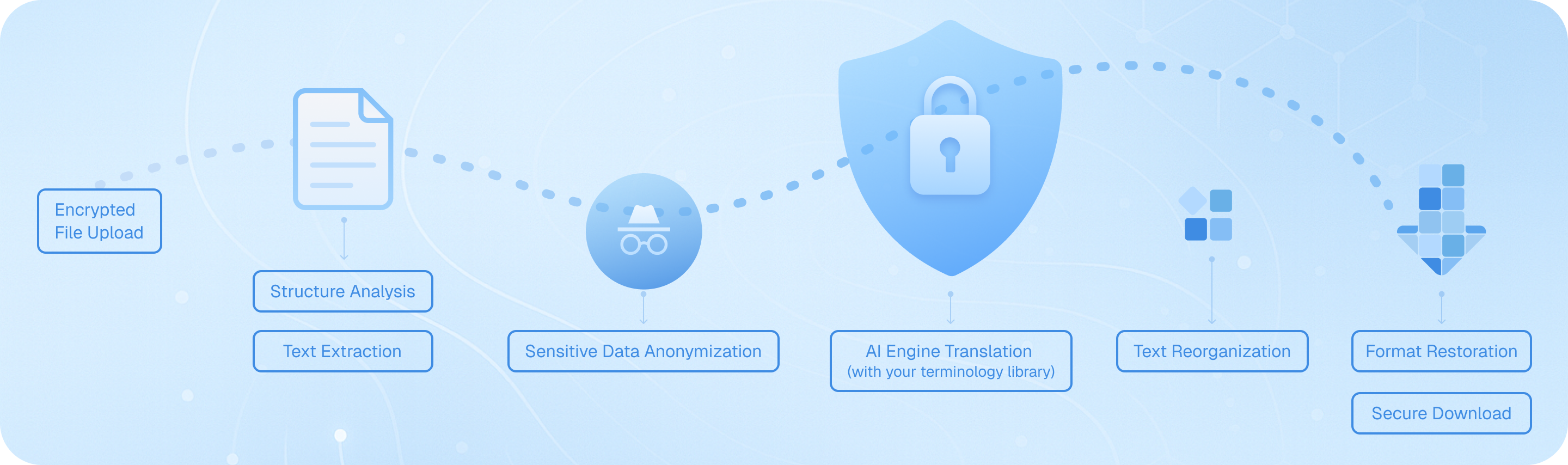
Téléchargez votre document de recherche en toute sécurité, et notre système analyse sa structure — en détectant les titres, les citations et les formules. Les moteurs d'IA avancés extraient le texte tout en préservant la mise en page, traduisent avec une précision contextuelle en utilisant votre service préféré, puis réassemblent le contenu en maintenant le formatage d'origine. Téléchargez votre document académique bilingue avec les tableaux, les références et les notes de bas de page intacts, prêt pour citation ou publication.
Questions Fréquentes sur la Traduction d'Articles Académiques
Comment puis-je traduire un article de recherche tout en conservant sa mise en forme originale et ses citations ?
Lorsque vous devez traduire des articles universitaires, le maintien de la mise en page originale est crucial pour la lisibilité et la présentation professionnelle. La fonction de traduction de documents d'Immersive Translate excelle à cet égard en préservant la structure des articles de recherche PDF, y compris les tableaux, les figures, les notes de bas de page et les listes de références. Il vous suffit de télécharger votre fichier PDF, et l'outil générera une version bilingue avec le texte traduit apparaissant à côté de l'original. Cet affichage côte à côte est particulièrement précieux pour les chercheurs qui doivent vérifier la terminologie technique ou comparer des sections spécifiques. Pour les documents universitaires complexes contenant des formules mathématiques ou des mises en page multi-colonnes, le module de traduction PDF avancé BabelDOC peut détecter la structure du document et gérer avec précision la notation scientifique. Vous pouvez choisir parmi plus de 18 moteurs de traduction, dont DeepL et ChatGPT, pour garantir la qualité la plus élevée dans votre domaine d'études spécifique.
Quelle est la meilleure méthode pour traduire des articles dans des domaines spécialisés comme la médecine ou l'ingénierie ?
La traduction d'articles universitaires dans des domaines techniques nécessite plus qu'une simple conversion mot à mot ; elle exige une compréhension contextuelle de la terminologie spécialisée. Immersive Translate répond à ce besoin grâce à sa fonctionnalité IA Smart Context, qui pré-résume l'ensemble du document avant la traduction. Cela permet de maintenir la cohérence des termes techniques tout au long de longs articles de recherche. Par exemple, lors de la traduction d'un article médical, le système reconnaît que certains termes latins ou noms de médicaments doivent rester inchangés, tandis que les concepts complexes sont traduits avec un vocabulaire adapté au domaine. Vous pouvez sélectionner les moteurs de traduction qui performent le mieux pour votre discipline ; DeepL excelle souvent avec les paires de langues européennes dans les contextes scientifiques, tandis que ChatGPT et Gemini gèrent efficacement l'écriture académique nuancée. La fonction de traduction instantanée par sélection de texte vous permet également de mettre en surbrillance des termes techniques inconnus pendant la lecture pour obtenir des définitions rapides sans interrompre votre flux de travail.
Puis-je traduire efficacement plusieurs articles universitaires pour une revue de la littérature ?
Réaliser une revue de la littérature implique souvent de traduire des dizaines d'articles de recherche de différentes langues. Immersive Translate simplifie considérablement ce processus. La version gratuite vous permet de traduire jusqu'à 1,000 pages par mois via BabelDOC, ce qui est suffisant pour les besoins de lecture mensuels de la plupart des étudiants en cycle supérieur. Pour des projets de recherche plus importants, la version pro augmente ce quota à 10,000 pages. Vous pouvez télécharger par lots des fichiers PDF, des documents ePub, ou même des versions HTML d'articles de revues en ligne. La sortie de traduction parallèle bilingue est particulièrement utile lorsque vous devez citer des passages originaux dans votre propre article — vous pouvez rapidement consulter à la fois le texte source et la traduction. Comme l'outil prend en charge plus de 100 paires de langues, vous pouvez travailler avec des articles en japonais, allemand, russe ou toute autre langue sans changer de service de traduction. Cette approche unifiée permet de gagner un temps considérable par rapport à la copie manuelle du texte dans des outils de traduction distincts.
Comment puis-je m'assurer de la précision de la traduction lorsque je travaille sur des articles destinés à la publication ou à la rédaction d'une thèse ?
La précision est primordiale lors de la traduction d'articles qui serviront de base à votre propre rédaction académique ou publication. L'approche multi-moteurs d'Immersive Translate vous offre ici un avantage significatif. Plutôt que de vous fier à un seul service de traduction, vous pouvez comparer les résultats de ChatGPT, DeepL, Google Translate et d'autres moteurs côte à côte pour identifier la restitution la plus précise des phrases complexes. Pour les sections critiques, je recommande d'utiliser le mode d'affichage bilingue pour relire attentivement la traduction en la comparant au texte original. La fonction de traduction au survol de la souris vous permet de vérifier rapidement des traductions alternatives pour des phrases spécifiques en les mettant en surbrillance. Lors de la traduction d'articles à des fins de citation, la préservation de la mise en page garantit que les numéros de page et les références de section restent exacts, ce qui est essentiel pour une attribution académique appropriée. De nombreux chercheurs utilisent Immersive Translate comme outil de première passe pour comprendre les articles en langue étrangère, puis affinent les passages clés qu'ils prévoient de citer avec une vérification supplémentaire.
Quels formats de fichiers puis-je utiliser pour traduire des articles universitaires, et comment gère-t-il les documents numérisés ?
Les articles universitaires existent dans divers formats, et Immersive Translate prend en charge les plus courants que vous rencontrerez. Au-delà des fichiers PDF standard, vous pouvez traduire des documents DOCX, des versions HTML d'articles en ligne, des livres électroniques ePub, des fichiers texte brut, des documents Markdown, et même des fichiers de sous-titres si vous travaillez sur des présentations de conférences ou des cours. Pour les articles plus anciens qui n'existent que sous forme de PDF numérisés — fréquent dans la recherche historique ou les revues archivées — l'édition BabelDOC Pro inclut des capacités de ROC (reconnaissance optique de caractères). Cela signifie qu'il peut reconnaître le texte dans les images numérisées et le traduire tout en essayant de préserver la mise en page d'origine. Le système gère les mises en page universitaires à une seule colonne et à plusieurs colonnes, convertissant des formats complexes en sorties bilingues lisibles. Si vous traduisez un article qui comprend des documents supplémentaires dans différents formats, vous pouvez traiter chaque type de fichier via la même interface, en maintenant la cohérence de la terminologie sur tous les documents.
Comment puis-je utiliser des outils de traduction de documents pour améliorer ma rédaction académique dans une seconde langue ?
Traduire des documents ne consiste pas seulement à lire des recherches étrangères — c'est aussi un puissant outil d'apprentissage pour améliorer vos propres compétences en rédaction académique. Lorsque vous utilisez l'affichage bilingue parallèle d'Immersive Translate, vous voyez essentiellement une rédaction académique professionnelle dans deux langues simultanément. Cela vous aide à apprendre comment des idées complexes sont exprimées dans votre langue cible, à comprendre le vocabulaire spécifique à une discipline et à reconnaître les structures de phrases courantes dans l'écriture savante. Par exemple, si vous êtes un anglophone non natif en train de rédiger un article, vous pouvez traduire des articles bien rédigés de votre langue maternelle vers l'anglais et étudier la façon dont les arguments sont construits, le fonctionnement des transitions et l'intégration des citations. La fonction de traduction instantanée par sélection de texte est particulièrement utile pour cela — lorsque vous rencontrez une expression dans la version traduite qui sonne naturel, vous pouvez surligner le texte original correspondant pour comprendre le choix de traduction. Avec le temps, cette approche de lecture comparative améliore considérablement votre capacité à rédiger des articles académiques dans une seconde langue.
Existe-t-il une solution économique pour les étudiants qui ont besoin de traduire régulièrement des articles ?
Les contraintes budgétaires sont réelles pour les étudiants, et Immersive Translate propose une version gratuite généreuse qui couvre la plupart des besoins de traduction académique. La version de base donne accès à plusieurs moteurs de traduction et vous permet de traduire jusqu'à 1 000 pages par mois via BabelDOC, ce qui représente environ 20 à 30 articles de recherche typiques. Pour les étudiants de licence et de master, cela suffit généralement pour les travaux de cours et la recherche de mémoire. La version gratuite comprend toutes les fonctionnalités principales : affichage bilingue, préservation de la mise en page, sélection instantanée de texte et prise en charge des formats PDF, DOCX et autres formats courants. Si vous êtes doctorant ou chercheur et que vous travaillez sur des revues de littérature approfondies, la mise à niveau vers la version Pro est proposée à un prix compétitif par rapport aux services de traduction professionnels, qui peuvent facturer au mot ou à la page à des tarifs bien plus élevés. De nombreux étudiants constatent que même la version gratuite surpasse les autres outils de traduction qu'ils ont essayés, grâce à la possibilité de changer de moteur et à la gestion supérieure du formatage académique. La disponibilité multiplateforme signifie également que vous pouvez traduire des articles sur votre ordinateur portable, puis les relire sur votre tablette ou votre téléphone à l'aide des applications mobiles, ce qui facilite l'intégration de la recherche dans votre emploi du temps.
Formats pris en charge
Traducteur PDFTraducteur de sous-titresTraducteur HTMLtraducteur MarkdownTraducteur de fichier txtTraducteur de fichier WordTraducteur de fichiers SRTTraducteur de fichier ASSTraducteur de fichier VTTTraducteur de CVTraducteur contractuelTraducteur d'appels d'offresTraducteur de business planTraduire l'articleTraducteur de rapportTraduction de rapport médicalTraduction de rapports financiersTraduction de rapport d'affairesTraduction de journal