


















Traduire des fichiers SRT avec Immersive Translate
1
Sélectionnez l'outil de traduction selon vos besoins.
2
Téléchargez le fichier.
3
Téléchargez le document traduit dans le format de votre choix.
Fonctionnalités du traducteur de fichiers SRT professionnel
Immersive Translate offre une traduction précise des sous-titres tout en préservant le format, utilisant plusieurs moteurs d'IA et un affichage bilingue pour une localisation vidéo fluide.

Intégrité du format
Préserve parfaitement les codes de synchronisation et la structure SRT d'origine. Votre fichier de sous-titres reste synchronisé sans ajustements manuels nécessaires.
Précision de la traduction
Exploite plus de 18 moteurs d'IA, dont DeepL et ChatGPT, pour une traduction de sous-titres contextuelle avec un flux de dialogue naturel.

Sortie bilingue
Génère des sous-titres originaux et traduits côte à côte. Idéal pour l'apprentissage des langues et la vérification de la qualité des traductions.
Support multi-moteurs
Choisissez parmi les moteurs ChatGPT, Gemini ou DeepSeek. Changez de traducteur instantanément pour comparer la qualité et la précision.


Traitement sécurisé
Vos fichiers SRT restent privés grâce à une transmission cryptée. Nous ne stockons ni ne partageons le contenu de vos sous-titres.
Qui utilise les traducteurs SRT

Atteindre un public mondial
Les créateurs de vidéos traduisent les sous-titres SRT pour élargir leur audience par-delà les barrières linguistiques, s'assurant que leur contenu résonne avec les publics internationaux grâce à des sous-titres bilingues précis.

Matériel pédagogique accessible
Les enseignants traduisent les sous-titres des cours dans plusieurs langues, rendant les vidéos éducatives accessibles à des populations étudiantes diverses et soutenant des environnements de classe multilingues et inclusifs.

Contenu en direct multilingue
Les streamers en direct et les podcasters traduisent les sous-titres des rediffusions, réutilisant le contenu pour un public mondial et bâtissant des communautés internationales grâce à des bibliothèques vidéo multilingues accessibles.
Comment fonctionne la traduction SRT
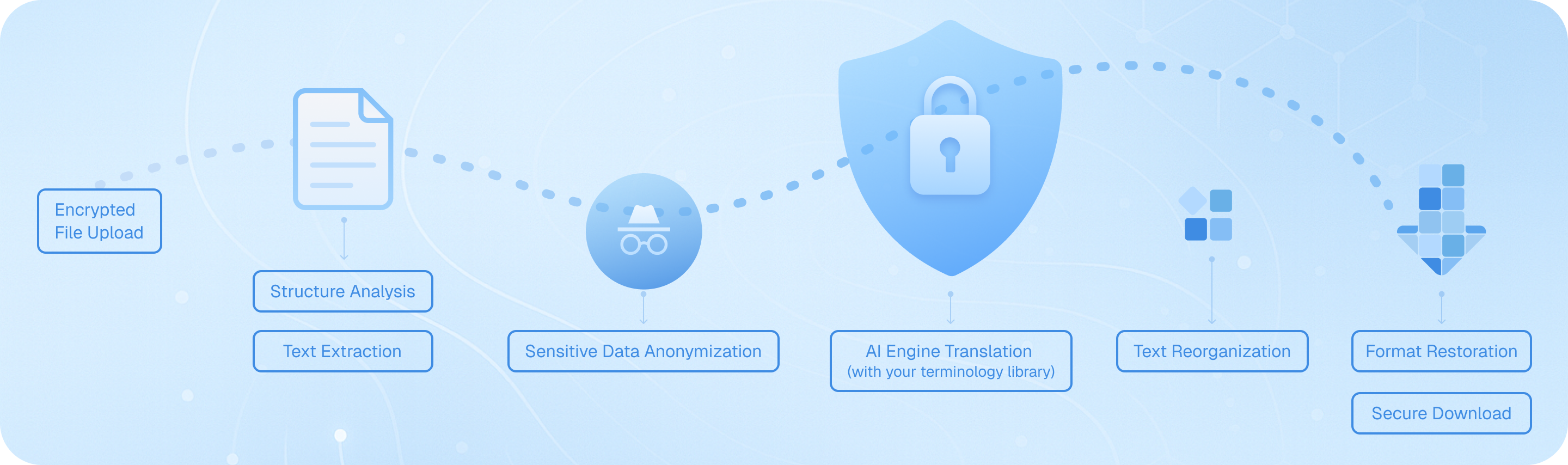
Téléchargez votre fichier de sous-titres via notre canal chiffré, où notre système analyse la structure SRT, extrait les segments de texte horodatés, les traite via le moteur d'IA de votre choix tout en préservant les codes temporels, puis réassemble le dialogue traduit en conservant le formatage d'origine—fournissant un fichier de sous-titres bilingue ou dans la langue cible prêt à être utilisé immédiatement dans vos projets vidéo.
Foire aux questions sur la traduction de fichiers SRT
Comment puis-je traduire des fichiers de sous-titres SRT tout en préservant les codes de synchronisation d'origine ?
Lors de la traduction de fichiers SRT, le maintien d'une synchronisation précise des horodatages est crucial pour la lecture vidéo. La fonction de traduction de documents d'Immersive Translate préserve automatiquement tous les codes de synchronisation et la structure de formatage lorsque vous téléchargez votre fichier SRT. Il suffit de glisser-déposer votre fichier de sous-titres dans l'interface de traduction, de sélectionner votre langue cible parmi plus de 100 options prises en charge, et l'outil traduira uniquement le contenu textuel tout en conservant chaque horodatage, numéro de séquence et saut de ligne intacts. Cela signifie que vos sous-titres traduits se synchroniseront parfaitement avec votre vidéo sans aucun ajustement manuel. Pour les projets professionnels nécessitant plusieurs versions linguistiques de sous-titres, vous pouvez traiter par lots plusieurs fichiers SRT simultanément, ce qui permet d'économiser des heures de travail manuel. L'option de sortie bilingue est particulièrement précieuse ici : elle affiche à la fois le texte original et le texte traduit côte à côte, vous permettant de vérifier la précision de la traduction par rapport au document source avant de finaliser vos sous-titres.
Quel moteur de traduction fonctionne le mieux pour la traduction des sous-titres de films et des sous-titres de vidéos ?
Le service de traduction idéal pour la traduction de sous-titres SRT dépend de votre type de contenu spécifique et de votre paire de langues. Pour le contenu de divertissement comme les films et les séries télévisées, ChatGPT et DeepL excellent à capturer les expressions familières, les idiomes et les nuances culturelles qui rendent les dialogues naturels dans la langue cible. Ces moteurs comprennent mieux le contexte, ce qui est essentiel lors de la traduction de l'humour, de l'argot ou de dialogues émotionnels. Pour les vidéos techniques, le contenu éducatif ou les sous-titres de documentaires, Google Traduction et Gemini offrent une fiabilité précise avec une terminologie spécialisée. Immersive Translate vous donne accès à plus de 18 moteurs de traduction sur une seule plateforme, vous permettant ainsi d'expérimenter différents services pour le même fichier SRT et de comparer les résultats. De nombreux traducteurs de sous-titres professionnels utilisent notre outil pour faire passer le même fichier par plusieurs moteurs, puis sélectionner le meilleur résultat ou combiner les forces de différentes traductions. La fonctionnalité AI Smart Context est particulièrement puissante pour les vidéos longues : elle analyse l'ensemble du fichier de sous-titres avant de traduire, garantissant que les noms des personnages, les termes récurrents et les éléments thématiques restent cohérents tout au long de votre vidéo, ce que les outils de traduction phrase par phrase manquent souvent.
Puis-je traduire des fichiers SRT gratuitement, et quelles sont les limitations ?
Oui, Immersive Translate propose une offre gratuite généreuse pour la traduction de fichiers SRT qui couvre la plupart des projets personnels et de petite envergure. Les utilisateurs gratuits peuvent traduire des fichiers de sous-titres en utilisant plusieurs moteurs de traduction, notamment Google Translate, Bing et d'autres, avec la prise en charge de toutes les combinaisons de langues principales. La version gratuite gère les fichiers SRT standard sans restriction de taille pour les besoins de traduction de base, ce qui la rend parfaite pour traduire des projets vidéo personnels, du contenu YouTube ou des documents pédagogiques. Cependant, si vous travaillez sur des vidéos plus longues ou si vous avez besoin d'accéder à des moteurs IA premium comme ChatGPT, DeepL ou Gemini pour une traduction de sous-titres de meilleure qualité, passer à la version Pro débloque ces options avancées. Les utilisateurs Pro bénéficient également de quotas de traduction mensuels plus élevés — essentiel si vous traduisez régulièrement des séries à plusieurs épisodes, des projets de films ou du contenu vidéo commercial. L'offre gratuite est vraiment utile pour tester le service et gérer des tâches occasionnelles de traduction de sous-titres, tandis que les créateurs vidéo professionnels, les équipes de localisation de contenu et les sociétés de médias trouvent généralement que la mise à niveau vers la version Pro vaut le coup pour la précision accrue et la capacité de volume qu'elle offre.
Comment la traduction de sous-titres bilingues aide-t-elle à l'apprentissage des langues et à la vérification du contenu ?
La fonction d'affichage parallèle bilingue transforme la traduction de fichiers SRT d'une simple tâche de conversion en un puissant outil d'apprentissage et de contrôle qualité. Lorsque vous traduisez des sous-titres avec Immersive Translate, vous pouvez choisir d'afficher à la fois le texte original et le texte traduit dans un format côte à côte. Pour les apprenants en langues, cela crée un environnement d'étude immersif : vous pouvez regarder des vidéos avec des sous-titres bilingues, voyant exactement comment les expressions, les idiomes et les structures de phrases se traduisent d'une langue à l'autre dans un contexte conversationnel réel. C'est bien plus efficace que l'apprentissage traditionnel par manuels, car vous absorbez des modèles linguistiques à partir de dialogues authentiques. Pour les créateurs de contenu et les traducteurs professionnels, la sortie bilingue sert de mécanisme essentiel d'assurance qualité. Vous pouvez parcourir rapidement le texte parallèle pour repérer les erreurs de traduction, vérifier que les références culturelles ont été adaptées de manière appropriée et vous assurer que les termes techniques ont été traités correctement. C'est particulièrement précieux lors de la traduction de vidéos marketing, de supports de formation ou de tout contenu où la précision est importante. La possibilité de comparer instantanément le texte source et le texte cible sans changer de fichier accélère considérablement le processus de révision et aide à détecter des erreurs qui pourraient autrement passer inaperçues.
Quels formats de fichiers, outre le SRT, puis-je traduire pour les projets de sous-titres vidéo ?
Bien que le SRT soit le format de sous-titres le plus courant, la fonction de traduction de documents d'Immersive Translate prend en charge une large gamme de types de fichiers de sous-titres et de légendes utilisés sur différentes plateformes vidéo et logiciels de montage. Au-delà des fichiers SRT standard, vous pouvez directement traduire des fichiers VTT (couramment utilisés pour les vidéos web et les lecteurs HTML5), des fichiers ASS/SSA (formats de sous-titres avancés avec des options de style populaires dans les communautés d'anime et de sous-titrage amateur) et des formats de sous-titres en texte brut. Cette prise en charge multi-format est cruciale car différentes plateformes vidéo et outils de montage ont des préférences de format : YouTube utilise le SRT et le VTT, les logiciels de montage vidéo professionnels comme Adobe Premiere fonctionnent souvent avec le SRT, tandis que les plateformes de streaming peuvent exiger des formats spécifiques. Au lieu de convertir manuellement entre les formats avant la traduction, vous pouvez télécharger votre fichier de sous-titres dans son format natif, le traduire, puis le convertir si nécessaire. L'outil gère également les types de documents connexes qui accompagnent souvent les projets vidéo : vous pouvez traduire des scripts vidéo au format DOCX, traduire des storyboards ou des listes de plans PDF, et même traduire des pages HTML contenant des transcriptions vidéo intégrées. Cette approche unifiée signifie que les créateurs vidéo peuvent gérer l'ensemble de leur flux de travail de contenu multilingue en un seul lieu, plutôt que de jongler avec plusieurs outils de traduction spécialisés.
Comment puis-je garantir une terminologie cohérente lors de la traduction de fichiers de sous-titres pour une série vidéo ou un cours ?
Le maintien d'une terminologie cohérente sur plusieurs fichiers de sous-titres est l'un des plus grands défis de la traduction de séries vidéo, et la fonctionnalité de contexte intelligent par IA d'Immersive Translate répond spécifiquement à ce problème. Lors de la traduction de sous-titres d'épisodes, de modules de cours ou de tout contenu vidéo en plusieurs parties, l'option de traduction contextuelle par IA analyse l'ensemble du document avant de commencer la traduction. Cette étape de prétraitement identifie les noms de personnages récurrents, les termes techniques, les noms de marques et le vocabulaire thématique, puis garantit que ces éléments sont traduits de manière cohérente tout au long du processus. Par exemple, si vous traduisez une série d'émission de cuisine, les noms des ingrédients, les techniques de cuisine et les expressions fétiches du chef conserveront la même traduction dans tous les épisodes. C'est un avantage significatif par rapport aux traducteurs de sous-titres basiques qui traitent chaque ligne indépendamment sans comprendre le contexte plus large. Pour un contrôle encore plus grand, vous pouvez traduire tous les épisodes d'une série en utilisant le même moteur de traduction et les mêmes paramètres, créant ainsi une expérience de visionnage multilingue cohérente. Les équipes professionnelles de localisation de contenu apprécient particulièrement cette fonctionnalité lors de l'adaptation de cours éducatifs, de séries de formation ou de contenu vidéo de marque, où la cohérence de la terminologie a un impact direct sur la compréhension et l'identité de la marque. La capacité de traiter par lots plusieurs fichiers SRT avec des paramètres de traduction cohérents permet d'économiser un temps considérable par rapport à la révision manuelle de chaque fichier pour faire respecter les normes terminologiques.
Puis-je utiliser des fichiers SRT traduits à des fins commerciales, et cet outil prend-il en charge les flux de travail de localisation vidéo professionnelle ?
Absolument — Immersive Translate est conçu pour prendre en charge les projets de localisation vidéo commerciale personnels et professionnels. Les fichiers SRT traduits que vous générez vous appartiennent et peuvent être utilisés sans restriction, ce qui rend l'outil adapté aux créateurs YouTube qui monétisent du contenu multilingue, aux entreprises produisant des vidéos de formation pour des équipes internationales, aux établissements d'enseignement créant du matériel de cours pour des populations étudiantes diverses, et aux sociétés de médias localisant du contenu de divertissement pour une distribution mondiale. Les fonctionnalités de niveau professionnel de la plateforme prennent spécifiquement en charge les flux de travail commerciaux : vous pouvez traiter plusieurs fichiers de sous-titres dans des opérations par lots, accéder à des moteurs de traduction premium qui fournissent des résultats de qualité publication, et exporter dans des formats compatibles avec les plateformes d'édition et de distribution vidéo professionnelles. L'option de sortie bilingue sert d'étape intégrée de contrôle qualité, permettant aux chefs de projet de réviser les traductions avant la livraison finale. Pour les agences gérant des projets de localisation vidéo pour clients, la possibilité de basculer entre plus de 18 moteurs de traduction signifie que vous pouvez adapter l'approche de traduction aux besoins spécifiques de chaque client — en utilisant des moteurs plus créatifs pour le contenu marketing et des moteurs plus littéraux pour la documentation technique. Les quotas mensuels généreux de la version pro accommodent un travail commercial à fort volume, et le formatage préservé garantit que les sous-titres traduits s'intègrent de manière transparente dans les pipelines de production vidéo existants sans nécessiter de remaniement manuel ou d'ajustements de synchronisation.
Formats pris en charge
Traducteur PDFTraducteur de sous-titresTraducteur HTMLtraducteur MarkdownTraducteur de fichier txtTraducteur de fichier WordTraducteur de fichiers SRTTraducteur de fichier ASSTraducteur de fichier VTTTraducteur de CVTraducteur contractuelTraducteur d'appels d'offresTraducteur de business planTraduire l'articleTraducteur de rapportTraduction de rapport médicalTraduction de rapports financiersTraduction de rapport d'affairesTraduction de journal