
















How to Use a Report Translator
1
Select translation tool for your needs.
2
Upload the file.
3
Download translated document with your preferred format.
Professional Report Translator with Advanced Features
Transform business reports instantly with our AI-powered document translator. Experience bilingual precision, format preservation, and multi-engine flexibility for professional reporting needs.

Format Integrity
Preserve original layouts, tables, and charts perfectly. Our report translator maintains professional formatting across all document types seamlessly.
Translation Accuracy
Access 18+ AI engines including ChatGPT and DeepL. Choose optimal translation quality for technical reports and business documents.


Multi-Engine Support
Switch between translation services effortlessly. Compare outputs from different AI models to ensure precise business report translation.
Data Security
Enterprise-grade encryption protects confidential reports. Your sensitive business documents remain secure throughout the translation process completely.


Bilingual Display
View original and translated text side-by-side. Perfect for verifying accuracy in financial reports and compliance documents.
Who Uses Report Translators

Cross-Border Decision Making
Business leaders translate quarterly reports and market analyses from international branches to make informed strategic decisions across multiple regions efficiently.

Global Data Interpretation
Financial and market analysts translate foreign research reports to compare trends, validate insights, and deliver comprehensive bilingual analysis to stakeholders.

Breaking News Coverage
Investigative journalists translate government reports and corporate disclosures from foreign sources to uncover stories and provide accurate international news coverage.
Professional Report Translation Process
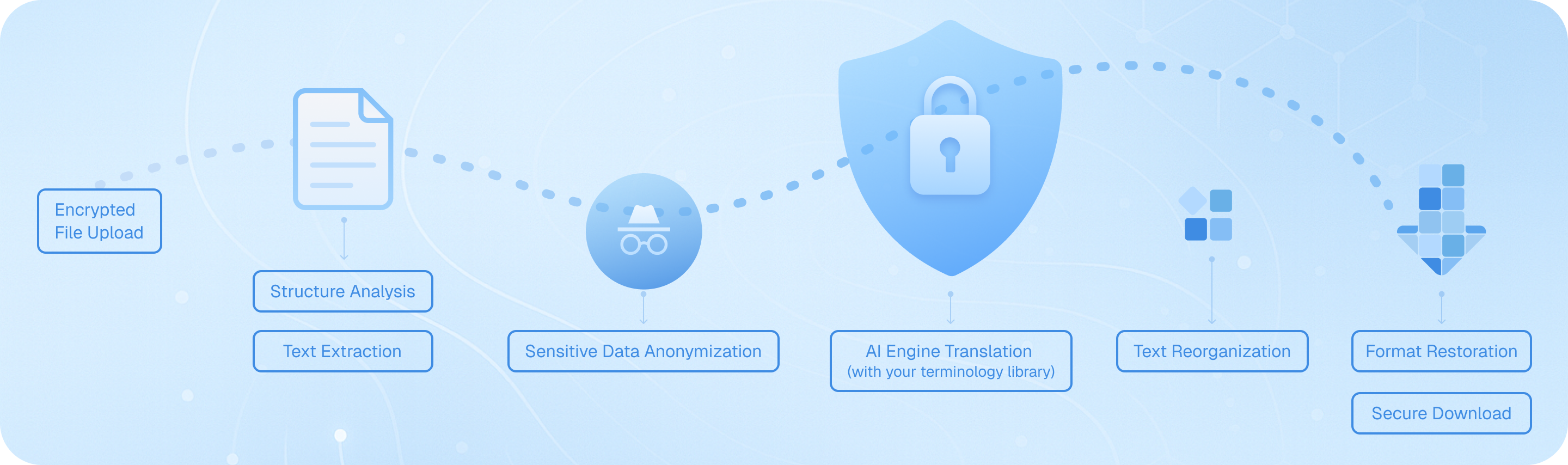
Our document translator employs a seven-stage workflow: secure upload with encryption, intelligent structure analysis to identify headers and tables, precise text extraction, AI-powered translation using your preferred engine with custom terminology support, seamless text reassembly, format restoration preserving original layouts, and encrypted download—ensuring your business reports, financial statements, and technical documents maintain professional integrity across languages.
Frequently Asked Questions About Report Translation
What's the best way to translate business reports while preserving their original formatting and layout?
When translating business reports, maintaining the original structure is crucial for professional presentation. Immersive Translate's document translation feature excels at this by preserving layouts, tables, charts, and formatting across multiple file types including PDF, DOCX, and HTML. The tool processes your report through advanced AI engines like ChatGPT, DeepL, or Gemini while keeping headers, footers, page numbers, and visual elements intact. For complex reports with intricate designs, the BabelDOC module specifically detects document structure and accurately handles formulas, tables, and footnotes. This means your quarterly financial report or annual business summary will look professionally formatted in the target language, ready to share with international stakeholders without requiring manual reformatting. The side-by-side bilingual display option also allows you to review both versions simultaneously, ensuring accuracy before distribution.
How can I ensure technical terminology in my industry reports gets translated accurately?
Accurate translation of specialized terminology in technical reports requires context-aware processing. Immersive Translate addresses this through its AI Smart Context feature, which pre-summarizes your entire document before translation. This helps the system understand industry-specific terms and maintain consistent terminology throughout lengthy reports. You can choose from over 18 translation engines, allowing you to select services known for excellence in your particular field—DeepSeek for technical documentation, ChatGPT for nuanced business language, or DeepL for European language pairs. For immediate clarification of specific terms while reviewing your translated report, the instant text-selection translation feature lets you highlight any word or phrase to see alternative translations, definitions, and context. This combination ensures your market analysis reports, research findings, or technical specifications maintain professional accuracy across languages, which is essential for credibility in international business communications.
Can I translate confidential company reports securely without uploading sensitive data to unknown servers?
Security concerns are valid when translating confidential business reports containing proprietary information, financial data, or strategic plans. Immersive Translate processes documents through established, reputable translation services that you select, giving you control over which engine handles your sensitive materials. The browser-based extension processes many translations locally when possible, and for document uploads, you choose trusted providers like Google, DeepL, or ChatGPT based on your organization's security policies and existing vendor relationships. For maximum security with highly confidential reports, you can use the tool's webpage translation feature by converting your report to HTML and translating it directly in your browser without file uploads. Additionally, the customizable whitelist and blacklist management allows you to control exactly which sites and services the tool accesses. Many legal practitioners and business professionals already trust Immersive Translate for translating contracts and sensitive documents, but always review your organization's data handling policies and choose translation engines that comply with your security requirements.
What file formats does a report translator support, and how do I handle reports with mixed content like charts and images?
Modern business reports often combine text, data visualizations, images, and complex layouts across various file formats. Immersive Translate's document translation capability supports an extensive range of formats essential for report translation: PDF files (including scanned documents with the pro edition), DOCX Word documents, HTML web reports, plain text files, Markdown documentation, and even ePub formats for longer research reports. The system intelligently handles mixed content by preserving images, charts, and tables in their original positions while translating surrounding text. When you upload a quarterly report with embedded graphs and financial tables, the translation appears alongside or replaces the text without disrupting visual elements. For scanned PDF reports or image-heavy documents, the BabelDOC PDF Pro edition includes OCR capabilities that recognize text within images and formulas, then translate them while maintaining the document's visual integrity. This comprehensive format support means whether you're working with annual reports, market research documents, technical white papers, or compliance reports, you can translate them without manual content extraction or reconstruction.
How do I translate reports into multiple languages efficiently for international distribution?
Distributing reports to global teams or international clients often requires translation into several languages simultaneously. Immersive Translate streamlines this process by supporting over 100 language pairs through its multiple AI translation engines. You can translate a single report into Spanish, German, Japanese, and Mandarin Chinese by processing it through the document translator multiple times, selecting different target languages each session. The tool's efficiency comes from its batch processing capability—free users can translate up to 1,000 pages monthly through BabelDOC, while pro users access 10,000 pages, making it practical for organizations with regular multilingual reporting needs. For ongoing report translation workflows, you can standardize on specific translation engines that perform best for your language combinations, ensuring consistency across all versions. The cross-platform availability means team members can access the same translation tools whether working from Chrome, Firefox, Safari browsers, or mobile devices, facilitating collaborative review of translated reports. This approach is significantly faster and more cost-effective than traditional translation services, especially for routine reports like monthly performance summaries or weekly status updates that need quick turnaround in multiple markets.
Can I use a report translator for legal and compliance documents that require precise language?
Legal and compliance reports demand exceptional translation accuracy since misinterpretation can have serious consequences. Immersive Translate serves legal practitioners who translate contracts, case materials, and regulatory documents by offering access to premium AI engines known for precision. The bilingual side-by-side display is particularly valuable for legal report translation, allowing you to compare the original and translated versions paragraph by paragraph to verify accuracy of critical clauses, definitions, and requirements. When translating compliance reports, audit findings, or legal opinions, you can use the instant text-selection feature to double-check translations of specific legal terms by highlighting them for alternative interpretations. The AI context-aware translation helps maintain consistent use of legal terminology throughout lengthy documents, which is essential for coherence in legal writing. However, while Immersive Translate provides professional-grade translation that many legal professionals rely on daily, complex legal documents with binding implications should undergo additional review by qualified legal translators or bilingual legal experts familiar with both jurisdictions' legal systems. The tool excels as a first-pass translator that dramatically reduces the time and cost of legal document translation while providing a solid foundation for expert review.
What's the difference between using a free report translator versus upgrading to premium features?
Choosing between free and premium report translation depends on your volume, complexity, and quality requirements. Immersive Translate's free version provides substantial capability: access to multiple translation engines including Google Translate, basic document translation for PDFs and DOCX files, bilingual webpage translation, and the core features needed for occasional report translation. This works well for students translating research reports, small businesses with limited international communication, or individuals handling personal documents. Upgrading to the pro version unlocks significant advantages for professional report translation: the BabelDOC PDF Pro module that handles scanned documents with OCR, recognizes and translates mathematical formulas, converts multi-column layouts intelligently, and preserves complex formatting in technical reports. Pro users access higher monthly page quotas (10,000 versus 1,000 pages), priority processing speeds, and premium AI engines like advanced ChatGPT models that deliver more nuanced translations for business language. For organizations regularly translating financial reports, market analyses, technical documentation, or legal materials, the pro features provide better accuracy, handle more complex documents, and offer the volume capacity needed for business operations. The investment typically pays for itself quickly compared to traditional translation services, especially when translating lengthy annual reports or processing multiple documents monthly. Consider your report translation frequency, document complexity, and accuracy requirements when deciding which tier meets your needs.
Supported formats
PDF translatorSubtitle translatorHTML translatorePub translatormarkdown translatortxt file translatorword file translatorSRT file translatorASS file translatorVTT file translatorResume translatorContract translatorTender translatorBusiness plan translatorTranslate paperReport translatorMedical report translationAnnual report translationFinancial reports translationBusiness report translationJournal translationPDF ProBabelDOC