
















Best Markdown Translator for Instant Results
1
Select translation tool for your needs.
2
Upload the file.
3
Download translated document with your preferred format.
Markdown Translator: Precision Meets Simplicity
Immersive Translate's Document Translator delivers instant, accurate markdown translation with bilingual display, preserving formatting while supporting 18+ AI engines for professional-grade results.

Format Preservation
Maintains original markdown syntax, headers, lists, and code blocks perfectly during translation without breaking structure.
Translation Accuracy
AI context-aware engines analyze entire documents before translating, ensuring consistent terminology and natural phrasing throughout.
Multiple Engines
Choose from ChatGPT, DeepL, Gemini, or 15+ other services to match your markdown content type.
Bilingual Output
Side-by-side display shows original and translated markdown simultaneously, ideal for proofreading technical documentation and learning.

Secure Processing
End-to-end encryption protects your markdown files during translation, with no data retention after processing completes.
Who Uses Markdown Translators

Technical Documentation Barriers
Software engineers translate README files and API docs to collaborate globally, preserving code blocks and formatting while switching between programming languages seamlessly.

Content Localization Challenges
Technical writers and bloggers translate markdown articles for international audiences, maintaining hyperlinks, images, and styling to reach multilingual readers efficiently.

Format Preservation Demands
Professional linguists handle markdown files from clients, requiring tools that maintain original structure, metadata, and special characters throughout the translation workflow.
How Markdown Translation Works
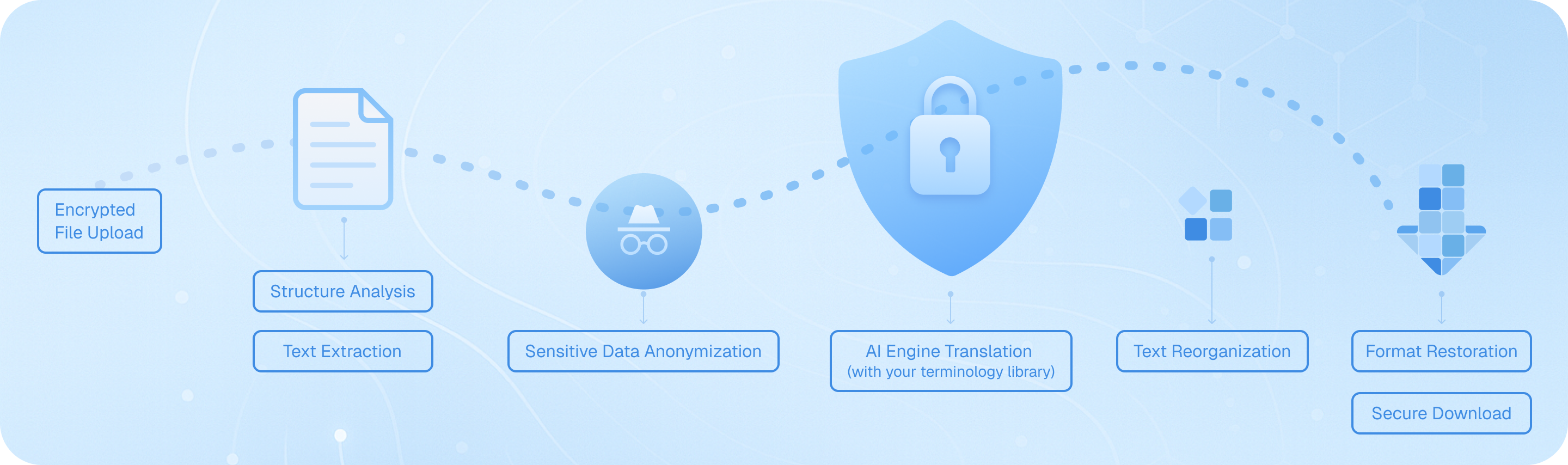
Upload your Markdown file securely, and our system analyzes its structure—headings, lists, code blocks—then extracts translatable text while preserving formatting. AI engines translate content with context awareness, reassemble elements maintaining original syntax, and deliver a bilingual or target-language file ready for download, keeping your technical documentation intact.
Frequently Asked Questions About Markdown Translation
How can I translate Markdown files while preserving formatting and code blocks?
When translating Markdown documents, maintaining the original structure—including headers, lists, code snippets, and inline formatting—is crucial. Immersive Translate's document translation feature handles Markdown files intelligently by recognizing the syntax and preserving all formatting elements during translation. Simply upload your .md file through the browser extension or mobile app, select your target language, and choose from over 18 AI translation engines like ChatGPT, DeepL, or Gemini. The tool processes your content while keeping code blocks, links, and emphasis markers intact. For technical documentation or developer notes written in Markdown format, this ensures your translated version remains functional and readable. The bilingual side-by-side display option is particularly valuable here—you can compare the original and translated Markdown content paragraph by paragraph, making it easy to verify that technical terms, variable names, and syntax examples are handled correctly. This approach saves hours compared to manual translation or using basic text translators that break Markdown structure.
What's the best way to translate multilingual Markdown documentation for international teams?
For teams managing technical documentation, README files, or knowledge bases in Markdown, Immersive Translate offers a streamlined workflow that supports over 100 language pairs. The platform's AI Smart Context feature is especially powerful for long Markdown documents—it pre-summarizes your content before translation, ensuring consistent terminology and maintaining context across multiple sections. This is critical when translating developer documentation where a term like 'deployment' or 'repository' must be translated consistently throughout. You can batch-process multiple Markdown files, choosing different translation engines based on your needs: DeepL for European languages, ChatGPT for nuanced technical content, or Google Translate for quick drafts. The free tier allows substantial usage, while the pro version increases your monthly page quota to 10,000 pages—ideal for large documentation projects. After translation, the preserved Markdown syntax means you can immediately commit the translated files to your repository or publish them to your documentation site without reformatting. This eliminates the traditional bottleneck of manual formatting fixes after translation.
Can I translate Markdown content directly in my browser while reading GitHub repositories or documentation sites?
Absolutely. Immersive Translate's browser extension transforms how you consume Markdown-based content on platforms like GitHub, GitLab, or documentation hosting services. When viewing a README.md file or wiki page, simply activate the extension to see an instant bilingual translation overlaid on the original content. The parallel translation mode displays the source Markdown and translated version side by side, which is invaluable when you're trying to understand foreign-language code documentation or open-source project instructions. For quick lookups, the mouse hover translation feature lets you highlight any Markdown paragraph or code comment to see an immediate translation popup—perfect for understanding specific technical terms without translating the entire page. You can also use keyboard shortcuts to toggle translation on and off, making it seamless to switch between reading modes. This real-time Markdown translation capability works across Chrome, Edge, Firefox, and Safari, and it supports the same 18+ translation engines available for document uploads. For developers collaborating on international projects or learning from global open-source communities, this feature eliminates language barriers without disrupting your workflow.
How does Immersive Translate handle technical terminology and code snippets within Markdown files?
Technical Markdown documents often mix natural language with code examples, API references, and specialized terminology—a challenge for standard translation tools. Immersive Translate addresses this through intelligent content recognition: it automatically detects code blocks (both inline and fenced) and preserves them untranslated, ensuring your syntax examples remain functional. For the surrounding explanatory text, you can leverage premium AI engines like ChatGPT or DeepSeek, which understand technical context better than traditional machine translation. These engines recognize programming concepts, framework names, and industry jargon, providing more accurate translations that maintain the intended meaning. When translating developer documentation, API guides, or technical blog posts written in Markdown, the AI Smart Context option analyzes the entire document structure first, building a glossary of recurring technical terms to ensure consistency. For instance, if your Markdown file discusses 'asynchronous functions' in the first section, the same term will be translated identically in later sections. You can also create custom translation rules or use the input box enhancement feature to refine specific technical phrases before finalizing your translation. This combination of automatic code preservation and context-aware translation makes Immersive Translate uniquely suited for technical Markdown content.
What are the advantages of using bilingual Markdown translation for learning and documentation?
The bilingual parallel display is one of Immersive Translate's most powerful features for anyone working with Markdown content for educational or reference purposes. When you translate a Markdown tutorial, course material, or technical guide, seeing the original and translated versions side by side accelerates comprehension and language learning. Students studying programming through foreign-language Markdown tutorials can follow along in their native language while gradually picking up technical vocabulary in the source language. For documentation writers creating multilingual versions of the same Markdown content, the parallel view serves as an instant quality check—you can verify that headings, lists, and emphasis are correctly translated and that no content was accidentally omitted. Researchers translating academic Markdown notes or literature reviews benefit from being able to cite the original phrasing while understanding the translation. The format preservation means all your Markdown elements—tables, footnotes, blockquotes—appear correctly in both languages, maintaining the document's pedagogical structure. This approach is far superior to translation-only output, which forces you to constantly switch between files to verify accuracy. Combined with the instant text-selection translation feature, you can click any unfamiliar term in either column to see definitions and pronunciation, turning every Markdown document into an interactive learning resource.
How can I translate large Markdown projects or entire documentation repositories efficiently?
For substantial Markdown translation projects—such as entire documentation sites, multi-chapter e-books, or comprehensive knowledge bases—Immersive Translate's document translation system offers both efficiency and quality. Start by uploading your Markdown files through the extension; the platform supports batch processing, so you can queue multiple .md files for translation in one session. The AI Smart Context feature becomes essential here: it analyzes the relationships between documents, maintaining consistent terminology across your entire project. For example, if you're translating a software manual with separate Markdown files for installation, configuration, and troubleshooting, the system ensures that technical terms like 'environment variable' or 'dependency' are translated identically throughout. With the pro version (BabelDOC), you gain access to advanced document structure detection and can translate up to 10,000 pages monthly—sufficient for even large-scale documentation projects. The preserved Markdown formatting means your translated files are immediately usable; you can integrate them into static site generators like Jekyll, Hugo, or MkDocs without additional processing. For ongoing projects, you can save your preferred translation engine and language pair settings, streamlining future updates. This systematic approach reduces translation time from weeks to hours while maintaining professional quality, making it practical to maintain multilingual documentation without a dedicated translation team.
Is there a cost-effective solution for translating Markdown content regularly for blogs or content creation?
Content creators, technical bloggers, and documentation maintainers who regularly work with Markdown will find Immersive Translate's pricing model exceptionally practical. The free tier provides generous access to multiple translation engines and supports all major Markdown features, making it viable for individual bloggers or small projects. You can translate up to 1,000 pages monthly with BabelDOC's advanced features at no cost—more than enough for weekly blog posts or regular documentation updates. For professional content creators managing multiple sites or publishing frequently, the pro subscription unlocks 10,000 pages monthly and priority access to premium AI engines like ChatGPT and Gemini, which deliver more natural, engaging translations suitable for public-facing content. The cross-platform availability means you can translate Markdown drafts on your desktop browser, then review and refine them on your mobile device. The input box enhancement feature is particularly useful for content creators: when writing new Markdown content, you can translate individual paragraphs or sections in real-time to create bilingual posts simultaneously. This eliminates the traditional workflow of writing in one language, then separately translating and formatting for other audiences. Combined with the ability to switch between translation services based on content type—using DeepL for European language blogs or ChatGPT for creative technical writing—you get professional-quality Markdown translation at a fraction of the cost of hiring human translators or subscribing to multiple specialized tools.
Supported formats
PDF translatorSubtitle translatorHTML translatorePub translatormarkdown translatortxt file translatorword file translatorSRT file translatorASS file translatorVTT file translatorResume translatorContract translatorTender translatorBusiness plan translatorTranslate paperReport translatorMedical report translationAnnual report translationFinancial reports translationBusiness report translationJournal translationPDF ProBabelDOC