


















Bester TXT-Datei-Übersetzer für sofortige Ergebnisse
1
Wählen Sie das Übersetzungstool für Ihre Bedürfnisse.
2
Laden Sie die Datei hoch.
3
Laden Sie das übersetzte Dokument in Ihrem bevorzugten Format herunter.
Warum Sie Immersive Translate für TXT-Dateien wählen sollten
Verwandeln Sie Klartextdokumente sofort mit zweisprachiger Präzision. Erleben Sie eine nahtlose Übersetzung von TXT-Dateien, die die Formatierung bewahrt und genaue Ergebnisse in über 100 Sprachen liefert.

Formatintegrität
Die Struktur Ihrer TXT-Datei bleibt während der Übersetzung intakt. Zeilenumbrüche, Abstände und die Absatzstruktur bleiben perfekt erhalten.
Übersetzungsgenauigkeit
Zugriff auf 18+ KI-Engines, darunter ChatGPT und DeepL, für eine präzise Konvertierung von Textdateien. Wählen Sie den besten Übersetzer für Ihre Inhalte.

Mehrere Engines
Wechseln Sie sofort zwischen Google Translate, Gemini und DeepSeek. Vergleichen Sie die Ergebnisse, um die genaueste Klartextübersetzung zu finden.
Zweisprachige Anzeige
Zeigen Sie den Originaltext und die Übersetzung in Ihrem TXT-Dokument nebeneinander an. Perfekt zum Korrekturlesen und zum Sprachenlernen.


Sichere Verarbeitung
Ihre Textdateien werden mit einer Verschlüsselung auf Enterprise-Niveau verarbeitet. Wir speichern oder teilen niemals den Inhalt Ihrer übersetzten Dokumente.
Wer nutzt TXT-Übersetzer

Hürden bei der Codedokumentation
Programmierer übersetzen README-Dateien, Konfigurationsskripte und technische Protokolle aus globalen Repositories, um Implementierungsdetails zu verstehen und Quellcode aus fremden Quellen effizient zu integrieren.

Herausforderungen bei der Lokalisierung von Manuskripten
Autoren und Redakteure konvertieren Entwurfsmanuskripte, Gliederungen und kreative Notizen über verschiedene Sprachen hinweg, wobei das ursprüngliche Format für internationale Verlagskooperationen beibehalten wird.

Lücken in der grenzüberschreitenden Kommunikation
Unternehmen übersetzen Produktspezifikationen, Kundenfeedback-Protokolle und interne Memos, um ein genaues Verständnis im globalen Betrieb und bei Lieferantenpartnerschaften zu gewährleisten.
Wie die TXT-Übersetzung funktioniert
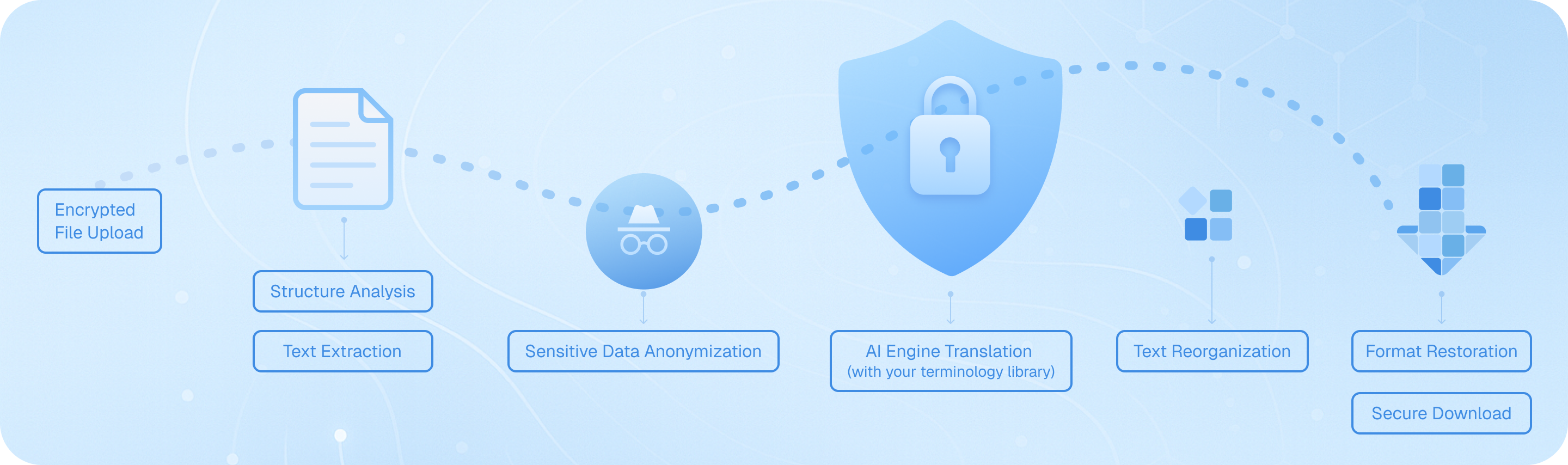
Laden Sie Ihre reine Textdatei über unseren verschlüsselten Kanal hoch, wo unser System den Inhalt unter Beibehaltung von Zeilenumbrüchen und Formatierung extrahiert. Fortschrittliche KI-Engines übersetzen dann jedes Segment mit Kontextbewusstsein und sorgen dabei für terminologische Konsistenz. Der übersetzte Text wird unter Beibehaltung der ursprünglichen Struktur wieder zusammengesetzt und steht für einen sicheren Download in zweisprachigem Format oder nur in der Zielsprache bereit.
Häufig gestellte Fragen zur Übersetzung von TXT-Dateien
Kann ich eine TXT-Datei übersetzen und dabei das ursprüngliche Format und die Struktur beibehalten?
Ja, Immersive Translate verarbeitet Textdateien effektiv, während es ihre grundlegende Struktur beibehält. Wenn Sie ein TXT-Dokument zur Übersetzung hochladen, verarbeitet das Tool den Inhalt Zeile für Zeile und behält Absatzumbrüche und Abstände bei. Im Gegensatz zu einigen einfachen Textübersetzern, die alles zu einem Block zusammenfassen, respektiert Immersive Translate das ursprüngliche Layout Ihrer Textdatei. Dies ist besonders nützlich beim Übersetzen strukturierter Dokumente wie Besprechungsnotizen, Codekommentaren oder formatierten Listen. Für noch bessere Ergebnisse bei komplexer Formatierung können Sie Ihre TXT-Datei vor der Übersetzung in Formate wie DOCX oder Markdown konvertieren, wodurch das Tool Überschriften, Aufzählungspunkte und andere strukturelle Elemente genauer erkennen kann. Die Option für zweisprachige Ausgabe zeigt den ursprünglichen und den übersetzten Text nebeneinander an, sodass es einfach ist zu überprüfen, ob die Struktur während des Übersetzungsprozesses intakt bleibt.
Welche Übersetzungs-Engine eignet sich am besten für die Übersetzung technischer TXT-Dateien mit Fachbegriffen?
Für technische Nur-Text-Dokumente, die Fachvokabular enthalten, empfehle ich die Nutzung von DeepL oder ChatGPT über das Multi-Engine-System von Immersive Translate. Nach dem Hochladen Ihrer TXT-Datei können Sie vor der Verarbeitung aus über 18 Übersetzungsdiensten wählen. DeepL glänzt darin, die technische Genauigkeit in Bereichen wie Ingenieurwesen und IT beizubehalten, während ChatGPT und andere KI-gestützte Engines wie Gemini oder DeepSeek ein überlegenes Kontextverständnis für komplexe technische Konzepte bieten. Der eigentliche Vorteil besteht darin, dass Sie dieselbe TXT-Datei mit verschiedenen Engines testen und die Ergebnisse vergleichen können, ohne erneut hochladen zu müssen. Für hochspezialisierte Dokumente aktivieren Sie die Funktion 'AI Smart Context', die Ihre gesamte Textdatei vorab analysiert, um das technische Fachgebiet vor der Übersetzung zu verstehen. Dies sorgt für eine konsistente Terminologie in Ihrem gesamten Dokument. Viele Benutzer, die mit Programmierdokumentation, technischen Spezifikationen oder wissenschaftlichen Notizen arbeiten, stellen fest, dass das Wechseln zwischen den Engines für verschiedene Abschnitte die genauesten Ergebnisse liefert.
Wie kann ich große TXT-Dateien übersetzen, ohne auf Wortzahlbeschränkungen zu stoßen?
Immersive Translate bietet großzügige Kontingente für die Übersetzung von Textdateien an, die die meisten Benutzerbedürfnisse abdecken. Kostenlose Benutzer können umfangreiche TXT-Dokumente übersetzen, während die Pro-Version diese Grenzen erheblich erhöht. Wenn Sie mit einer extrem großen Nur-Text-Datei arbeiten – wie beispielsweise einem kompletten Roman-Manuskript, umfangreichen Forschungsdaten oder kompilierten Protokollen –, gibt es mehrere Strategien, um den Prozess zu optimieren. Erstens können Sie Ihre TXT-Datei in kleinere Abschnitte unterteilen und diese nacheinander übersetzen, was Ihnen auch ermöglicht, bei Bedarf verschiedene Übersetzungs-Engines für verschiedene Teile zu verwenden. Zweitens sollten Sie die BabelDOC-Funktion in Betracht ziehen, die für die Übersetzung großer Dokumentmengen konzipiert ist und bis zu 1.000 Seiten monatlich für kostenlose Benutzer und 10.000 Seiten für Pro-Abonnenten verarbeiten kann. Für wiederkehrende Übersetzungsbedürfnisse bietet der Pro-Plan Zugang zu Premium-KI-Engines mit höheren Zeichenlimits pro Anfrage. Darüber hinaus bedeutet die Stapelverarbeitungsfunktion des Tools, dass Sie mehrere TXT-Dateien zur Übersetzung über Nacht in die Warteschlange stellen können, was es praktisch macht, große Übersetzungsprojekte ohne ständige Überwachung zu bewältigen.
Kann ich eine TXT-Datei gleichzeitig in mehrere Sprachen übersetzen?
Während Immersive Translate für jede TXT-Datei jeweils eine Zielsprache verarbeitet, können Sie dasselbe Klartextdokument effizient über einen optimierten Arbeitsablauf in mehrere Sprachen übersetzen. Laden Sie Ihre TXT-Datei einmal hoch, ändern Sie einfach die Einstellung für die Zielsprache und starten Sie eine neue Übersetzung – das System merkt sich Ihre Quelldatei, sodass Sie sie nicht wiederholt neu hochladen müssen. Dies macht es praktisch, innerhalb von Minuten mehrsprachige Versionen desselben Textdokuments zu erstellen. Wenn Sie beispielsweise eine Produktbeschreibung, ein Benutzerhandbuch oder eine Ankündigung vorbereiten, die Zielgruppen auf Spanisch, Französisch, Deutsch und Japanisch erreichen soll, können Sie alle vier Versionen nacheinander aus einem einzigen Upload generieren. Das Tool unterstützt über 100 Sprachpaare und deckt alle wichtigen Weltsprachen sowie viele regionale Dialekte ab. Für Benutzer, die regelmäßig mehrsprachige Ausgaben benötigen, empfehle ich, eine einfache Tabelle zu führen, um zu verfolgen, welche Sprachversionen Sie bereits erstellt haben. Einige Benutzer finden es auch hilfreich, für jede Sprachversion ihrer übersetzten TXT-Dateien separate Ordner zu erstellen, um die Organisation bei großen mehrsprachigen Projekten zu gewährleisten.
Was ist der Unterschied zwischen einer zweisprachigen Ausgabe und einer reinen Übersetzung für TXT-Dateien?
Wenn Sie eine reine Textdatei mit Immersive Translate übersetzen, können Sie zwischen zwei Ausgabeformaten wählen, die jeweils unterschiedlichen Zwecken dienen. Die zweisprachige Ausgabe zeigt Ihren ursprünglichen TXT-Inhalt parallel zur Übersetzung an, was für Sprachlerner, Redakteure und alle, die die Genauigkeit der Übersetzung überprüfen müssen, von unschätzbarem Wert ist. Diese nebeneinander angeordnete Ansicht ermöglicht es Ihnen, Fehlübersetzungen oder ungeschickte Formulierungen schnell zu erkennen, indem Sie sie direkt mit dem Ausgangstext vergleichen. Dies ist besonders nützlich bei der Übersetzung von kreativen Texten, Rechtsdokumenten oder technischen Spezifikationen, bei denen es auf Genauigkeit ankommt. Die reine Übersetzungsausgabe hingegen liefert nur den übersetzten Text, was sauberer und besser geeignet ist, wenn Sie den Inhalt einfach in der Zielsprache lesen oder nutzen müssen, ohne auf das Original Bezug zu nehmen. Dieses Format ist ideal für das persönliche Lesen, die schnelle Informationsbeschaffung oder wenn Sie Inhalte für ein Publikum vorbereiten, das nur die Zielsprache spricht. Viele Benutzer beginnen mit der zweisprachigen Ausgabe, um die Qualität zu überprüfen, und wechseln dann für die endgültige Version, die sie tatsächlich verwenden oder verteilen, zur reinen Übersetzung. Die Wahl hängt letztendlich davon ab, ob Sie den Originaltext zum Abgleich heranziehen müssen oder einfach nur ein sauberes übersetztes Dokument wünschen.
Wie geht Immersive Translate mit TXT-Dateien um, die gemischte Sprachen oder Sonderzeichen enthalten?
Die intelligente Spracherkennung von Immersive Translate identifiziert automatisch die Ausgangssprache in Ihrer TXT-Datei, auch wenn diese gemischte Inhalte enthält. Wenn Ihr Nur-Text-Dokument Passagen in mehreren Sprachen enthält – wie beispielsweise englischen Text mit eingebetteten chinesischen Zitaten oder spanische Inhalte mit französischer Fachterminologie –, erkennt das Tool die Hauptsprache und übersetzt entsprechend. Bei Sonderzeichen, Unicode-Symbolen und nicht-lateinischen Schriften bewahrt das System diese in der Ausgabe genau. Dies ist besonders wichtig beim Übersetzen von TXT-Dateien, die technische Symbole, mathematische Notationen oder kulturspezifische Zeichen enthalten. Für die besten Ergebnisse bei stark gemischtsprachigen Dokumenten empfehle ich jedoch, die Option zur manuellen Sprachauswahl zu verwenden, um die dominierende Ausgangssprache festzulegen. Das Tool verarbeitet auch verschiedene Textkodierungen (UTF-8, ASCII usw.) automatisch, sodass Sie sich keine Sorgen um Zeichenbeschädigungen machen müssen. Wenn Ihre TXT-Datei Code-Schnipsel, URLs oder E-Mail-Adressen enthält, die nicht übersetzt werden sollten, können Sie die Anpassungseinstellungen verwenden, um Ausschlussregeln zu erstellen. Bei Dokumenten mit umfangreicher Sonderformatierung oder gemischten Inhalten sollten Sie erwägen, Ihre TXT-Datei vor der Übersetzung in das Markdown-Format zu konvertieren, da dies Ihnen ermöglicht, bestimmte Abschnitte zur Erhaltung zu markieren, während der Rest übersetzt wird.
Kann ich Immersive Translate verwenden, um eine neue Sprache zu lernen, indem ich TXT-Dateien übersetze?
Absolut – Das Übersetzen von reinen Textdateien mit Immersive Translate ist eine hervorragende Strategie zum Sprachenlernen. Die zweisprachige parallele Anzeige ist speziell darauf ausgelegt, den Spracherwerb zu unterstützen, indem Sie sehen können, wie Sätze gleichzeitig in beiden Sprachen aufgebaut sind. Beginnen Sie mit dem Übersetzen von TXT-Dateien mit Inhalten, an denen Sie wirklich interessiert sind – sei es bei gespeicherten Nachrichtenartikeln, Blog-Beiträgen, Kurzgeschichten oder sogar Ihren eigenen Tagebucheinträgen. Das nebeneinander angezeigte Format hilft Ihnen, Wortmuster, grammatikalische Strukturen und idiomatische Ausdrücke im Kontext zu erkennen, was viel effektiver ist als das Auswendiglernen isolierter Wörter. Für ein tieferes Verständnis nutzen Sie die Funktion für die sofortige Textauswahl: Während Sie Ihre übersetzte TXT-Datei durchgehen, markieren Sie jedes Wort oder jede Phrase, die Sie nicht verstehen, und ein Pop-up zeigt Ihnen die Übersetzung, die Definition und die Aussprache an. Dies beseitigt die Notwendigkeit, ständig zwischen Ihrem Dokument und einem Wörterbuch zu wechseln. Viele Sprachlerner erstellen ein progressives Lernsystem, indem sie im Laufe der Zeit zunehmend komplexe TXT-Dateien übersetzen – beginnend mit einfachen Dialogen und schrittweise übergehend zu Nachrichtenartikeln, technischen Arbeiten oder Literatur. Sie können auch dieselbe TXT-Datei mit verschiedenen Engines übersetzen, um zu sehen, wie verschiedene Übersetzungsansätze mit nuancierten Ausdrücken umgehen, was Ihr Verständnis für beide Sprachen vertieft. Die Unterstützung des Tools für über 100 Sprachen bedeutet, dass Sie diese Methode nutzen können, egal ob Sie Spanisch, Japanisch, Arabisch oder eine andere Sprache lernen.
Unterstützte Formate
PDF-ÜbersetzerUntertitelübersetzerHTML-ÜbersetzerePub-ÜbersetzerMarkdown-ÜbersetzerTXT-Datei-ÜbersetzerWord-Datei-ÜbersetzerSRT-DateiübersetzerASS-Datei-ÜbersetzerVTT-Datei-ÜbersetzerLebenslaufübersetzerVertragsübersetzerAusschreibungsübersetzerGeschäftsplanübersetzerPapier übersetzenBerichtübersetzerÜbersetzung eines medizinischen BerichtsÜbersetzung des JahresberichtsÜbersetzung von FinanzberichtenGeschäftsberichtübersetzungJournalübersetzung