


















SRT-Dateien mit Immersive Translate übersetzen
1
Wählen Sie das Übersetzungstool für Ihre Bedürfnisse.
2
Laden Sie die Datei hoch.
3
Laden Sie das übersetzte Dokument in Ihrem bevorzugten Format herunter.
Funktionen des professionellen SRT-Datei-Übersetzers
Immersive Translate bietet präzise Untertitelübersetzungen unter Beibehaltung des Formats, mehrere KI-Engines und eine zweisprachige Anzeige für eine nahtlose Videolokalisierung.

Formatintegrität
Bewahrt die ursprünglichen SRT-Zeitcodes und die Struktur perfekt. Ihre Untertiteldatei bleibt synchronisiert, ohne dass manuelle Anpassungen erforderlich sind.
Übersetzungsgenauigkeit
Nutzt über 18 KI-Engines, darunter DeepL und ChatGPT, für kontextbewusste Untertitelübersetzungen mit natürlichem Dialogfluss.

Zweisprachige Ausgabe
Erzeugt Original- und übersetzte Untertitel nebeneinander. Ideal zum Sprachenlernen und zur Qualitätsprüfung von Übersetzungen.
Unterstützung für mehrere Engines
Wählen Sie zwischen ChatGPT-, Gemini- oder DeepSeek-Engines. Wechseln Sie sofort den Übersetzer, um Qualität und Genauigkeit zu vergleichen.


Sichere Verarbeitung
Ihre SRT-Dateien bleiben dank verschlüsselter Übertragung privat. Wir speichern oder teilen Ihre Untertitelinhalte niemals.
Wer nutzt SRT-Übersetzer

Globale Zielgruppen erreichen
Video-Ersteller übersetzen SRT-Untertitel, um die Zuschauerzahl über Sprachbarrieren hinweg zu erweitern und sicherzustellen, dass ihre Inhalte durch präzise zweisprachige Untertitel bei internationalen Zielgruppen ankommen.

Barrierefreie Lernmaterialien
Lehrkräfte übersetzen Vorlesungs-Untertitel in mehrere Sprachen, machen Bildungsvideos für eine vielfältige Schülerschaft zugänglich und unterstützen inklusive mehrsprachige Lernumgebungen.

Mehrsprachiger Live-Content
Live-Streamer und Podcaster übersetzen Untertitel archivierter Streams, um Inhalte für ein globales Publikum neu zu nutzen und durch zugängliche mehrsprachige Videobibliotheken internationale Gemeinschaften aufzubauen.
Wie die SRT-Übersetzung funktioniert
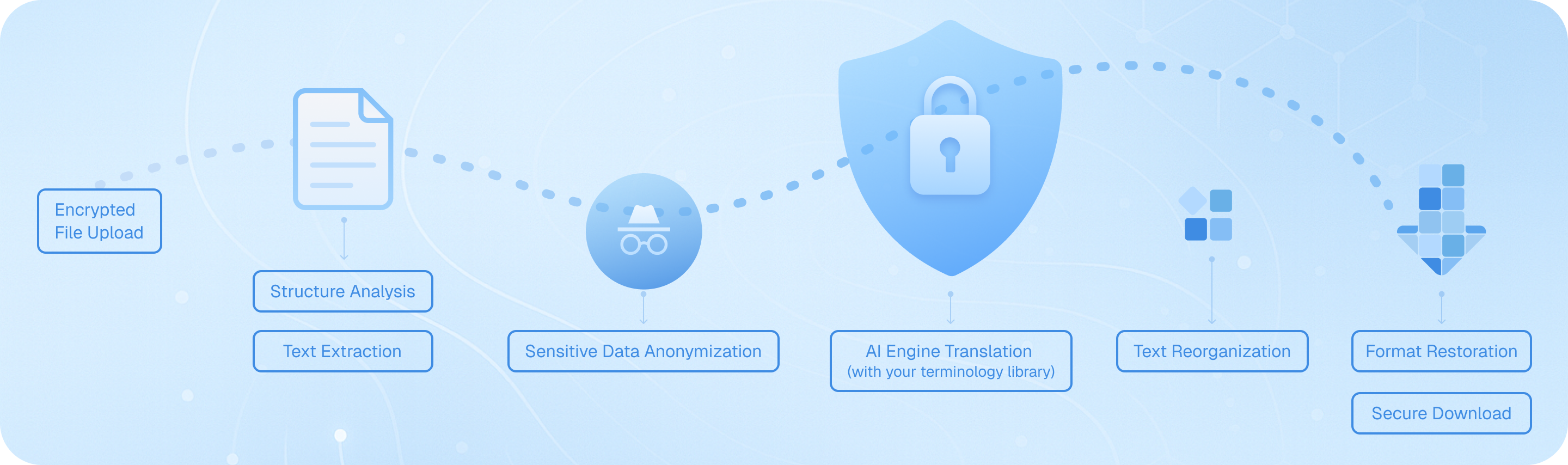
Laden Sie Ihre Untertiteldatei über unseren verschlüsselten Kanal hoch, wo unser System die SRT-Struktur analysiert, zeitgestempelte Textsegmente extrahiert, sie über die von Ihnen gewählte KI-Engine verarbeitet und dabei die Zeitcodes beibehält, und anschließend den übersetzten Dialog unter Beibehaltung des ursprünglichen Formats wieder zusammensetzt – wodurch eine zweisprachige oder zielsprachige Untertiteldatei entsteht, die sofort für Ihre Videoprojekte einsatzbereit ist.
Häufig gestellte Fragen zur Übersetzung von SRT-Dateien
Wie kann ich SRT-Untertiteldateien übersetzen und dabei die ursprünglichen Zeitcodes beibehalten?
Beim Übersetzen von SRT-Dateien ist die genaue Synchronisation der Zeitstempel für die Videowiedergabe entscheidend. Die Dokumentübersetzungsfunktion von Immersive Translate bewahrt automatisch alle Zeitcodes und die Formatierungsstruktur, wenn Sie Ihre SRT-Datei hochladen. Ziehen Sie Ihre Untertiteldatei einfach per Drag & Drop in die Übersetzungsoberfläche, wählen Sie Ihre Zielsprache aus über 100 unterstützten Optionen aus, und das Tool übersetzt nur den Textinhalt, wobei jeder Zeitstempel, jede Sequenznummer und jeder Zeilenumbruch erhalten bleibt. Das bedeutet, dass Ihre übersetzten Untertitel perfekt mit Ihrem Video synchronisiert sind, ohne dass manuelle Anpassungen erforderlich sind. Für professionelle Projekte, die mehrere Untertitelsprachversionen erfordern, können Sie mehrere SRT-Dateien gleichzeitig stapelweise verarbeiten und so Stunden manueller Arbeit sparen. Die Option für die zweisprachige Ausgabe ist hier besonders wertvoll – sie zeigt sowohl den ursprünglichen als auch den übersetzten Text nebeneinander an, sodass Sie die Genauigkeit der Übersetzung anhand des Quellenmaterials überprüfen können, bevor Sie Ihre Untertitel finalisieren.
Welche Übersetzungs-Engine eignet sich am besten für die Übersetzung von Filmuntertiteln und Videobeschriftungen?
Der ideale Übersetzungsdienst für die Übersetzung von SRT-Untertiteln hängt von Ihrem spezifischen Inhaltstyp und Ihrem Sprachpaar ab. Für Unterhaltungsinhalte wie Filme und Fernsehserien glänzen ChatGPT und DeepL darin, umgangssprachliche Ausdrücke, Redewendungen und kulturelle Nuancen einzufangen, die den Dialog in der Zielsprache natürlich klingen lassen. Diese Engines verstehen den Kontext besser, was bei der Übersetzung von Humor, Slang oder emotionalem Dialog unerlässlich ist. Für technische Videos, Bildungsinhalte oder Dokumentarfilm-Untertitel bieten Google Translate und Gemini eine zuverlässige Genauigkeit bei Fachbegriffen. Immersive Translate gibt Ihnen Zugriff auf 18+ Übersetzungs-Engines auf einer Plattform, sodass Sie mit verschiedenen Diensten für dieselbe SRT-Datei experimentieren und die Ergebnisse vergleichen können. Viele professionelle Untertitel-Übersetzer nutzen unser Tool, um dieselbe Datei durch mehrere Engines laufen zu lassen und dann die beste Ausgabe auszuwählen oder die Stärken verschiedener Übersetzungen zu kombinieren. Die Funktion "AI Smart Context" ist besonders für längere Videos leistungsstark – sie analysiert die gesamte Untertiteldatei vor der Übersetzung und stellt sicher, dass Charakternamen, wiederkehrende Begriffe und thematische Elemente im gesamten Video konsistent bleiben, was Ein-Satz-Übersetzungstools oft verpassen.
Kann ich SRT-Dateien kostenlos übersetzen und welche Einschränkungen gibt es?
Ja, Immersive Translate bietet eine großzügige kostenlose Stufe für die SRT-Dateiübersetzung an, die die meisten persönlichen und kleinen Projekte abdeckt. Kostenlose Benutzer können Untertiteldateien mit mehreren Übersetzungs-Engines, darunter Google Translate, Bing und andere, übersetzen, wobei alle wichtigen Sprachkombinationen unterstützt werden. Die kostenlose Version verarbeitet Standard-SRT-Dateien ohne Größenbeschränkungen für grundlegende Übersetzungsanforderungen, was sie perfekt für die Übersetzung persönlicher Videoprojekte, YouTube-Inhalte oder Bildungsmaterialien macht. Wenn Sie jedoch mit längeren Videos arbeiten oder Zugriff auf Premium-KI-Engines wie ChatGPT, DeepL oder Gemini für eine qualitativ hochwertigere Untertitelübersetzung benötigen, schaltet ein Upgrade auf die Pro-Version diese erweiterten Optionen frei. Pro-Nutzer profitieren auch von höheren monatlichen Übersetzungskontingenten – unerlässlich, wenn Sie regelmäßig mehrteilige Serien, Filmprojekte oder kommerzielle Videoinhalte übersetzen. Die kostenlose Stufe ist wirklich nützlich, um den Service zu testen und gelegentliche Untertitelübersetzungsaufgaben zu bewältigen, während professionelle Videoproduzenten, Content-Localisierungsteams und Medienunternehmen das Pro-Upgrade in der Regel aufgrund der verbesserten Genauigkeit und der Kapazität, die es bietet, als lohnenswert empfinden.
Wie hilft die zweisprachige Untertitelübersetzung beim Sprachenlernen und bei der Überprüfung von Inhalten?
Die Funktion der zweisprachigen parallelen Anzeige verwandelt die Übersetzung von SRT-Dateien von einer einfachen Konvertierungsaufgabe in ein leistungsstarkes Lern- und Qualitätskontrollinstrument. Wenn Sie Untertitel mit Immersive Translate übersetzen, können Sie wählen, ob sowohl der Original- als auch der übersetzte Text in einem nebeneinanderliegenden Format ausgegeben werden soll. Für Sprachlerner schafft dies eine immersive Lernumgebung – Sie können Videos mit zweisprachigen Untertiteln ansehen und genau sehen, wie Redewendungen, Idiome und Satzstrukturen in einem echten Gesprächskontext zwischen den Sprachen übersetzt werden. Dies ist weitaus effektiver als das traditionelle Lernen mit Lehrbüchern, da Sie Sprachmuster aus authentischen Dialogen aufsaugen. Für Content-Ersteller und professionelle Übersetzer dient die zweisprachige Ausgabe als ein wesentlicher Mechanismus zur Qualitätssicherung. Sie können den parallelen Text schnell durchsuchen, um Übersetzungsfehler zu erkennen, zu überprüfen, ob kulturelle Verweise angemessen angepasst wurden, und sicherzustellen, dass Fachbegriffe korrekt behandelt wurden. Dies ist besonders wertvoll bei der Übersetzung von Marketingvideos, Schulungsmaterialien oder anderen Inhalten, bei denen es auf Genauigkeit ankommt. Die Möglichkeit, Quell- und Zieltext sofort zu vergleichen, ohne zwischen Dateien wechseln zu müssen, beschleunigt den Überprüfungsprozess drastisch und hilft dabei, Fehler aufzudecken, die sonst durchrutschen könnten.
Welche Dateiformate außer SRT kann ich für Video-Untertitel-Projekte übersetzen?
Während SRT das gebräuchlichste Untertitelformat ist, unterstützt die Dokumentübersetzungsfunktion von Immersive Translate eine umfassende Palette von Untertitel- und Beschriftungsdateitypen, die auf verschiedenen Video-Plattformen und in Bearbeitungssoftware verwendet werden. Neben Standard-SRT-Dateien können Sie VTT-Dateien (häufig für Webvideos und HTML5-Player verwendet), ASS/SSA-Dateien (fortgeschrittene Untertitelformate mit Stiloptionen, die in Anime- und Fansub-Communities beliebt sind) und reine Text-Untertitelformate direkt übersetzen. Diese Unterstützung für mehrere Formate ist entscheidend, da verschiedene Video-Plattformen und Bearbeitungstools Formatpräferenzen haben – YouTube verwendet SRT und VTT, professionelle Videobearbeitungssoftware wie Adobe Premiere arbeitet oft mit SRT, während Streaming-Plattformen möglicherweise bestimmte Formate erfordern. Anstatt Formate vor der Übersetzung manuell zu konvertieren, können Sie Ihre Untertiteldatei in ihrem nativen Format hochladen, sie übersetzen und bei Bedarf anschließend konvertieren. Das Tool verarbeitet auch verwandte Dokumenttypen, die Video-Projekte oft begleiten: Sie können Videodrehbücher im DOCX-Format, PDF-Storyboards oder Shot-Listen und sogar HTML-Seiten mit eingebetteten Video-Transkripten übersetzen. Dieser einheitliche Ansatz bedeutet, dass Video-Ersteller ihren gesamten mehrsprachigen Content-Workflow an einem Ort verwalten können, anstatt mit mehreren spezialisierten Übersetzungstools zu jonglieren.
Wie kann ich eine konsistente Terminologie sicherstellen, wenn ich Untertiteldateien für eine Videoserie oder einen Kurs übersetze?
Die Beibehaltung einer konsistenten Terminologie über mehrere Untertiteldateien hinweg ist eine der größten Herausforderungen bei der Übersetzung von Videoserien, und die KI-Smart-Context-Funktion von Immersive Translate geht speziell auf dieses Problem ein. Beim Übersetzen von Episodenuntertiteln, Kursmodulen oder jedem mehrteiligen Videoinhalt analysiert die Option für kontextbewusste KI-Übersetzung das gesamte Dokument, bevor mit der Übersetzung begonnen wird. Dieser Vorverarbeitungsschritt identifiziert wiederkehrende Charakternamen, Fachbegriffe, Markennamen und thematischen Wortschatz und stellt sicher, dass diese Elemente durchgehend konsistent übersetzt werden. Wenn Sie beispielsweise eine Kochsendungsserie übersetzen, bleiben Zutatennamen, Kochtechniken und die Sprüche des Kochs in allen Episoden gleich übersetzt. Dies ist ein erheblicher Vorteil gegenüber einfachen Untertitelübersetzern, die jede Zeile unabhängig verarbeiten, ohne den weiteren Kontext zu verstehen. Für noch mehr Kontrolle können Sie alle Episoden einer Serie mit derselben Übersetzungs-Engine und denselben Einstellungen übersetzen und so ein kohärentes mehrsprachiges Seherlebnis schaffen. Professionelle Teams für die Lokalisierung von Inhalten schätzen diese Funktion besonders bei der Anpassung von Bildungskursen, Schulungsreihen oder markengebundenen Videoinhalten, bei denen die Konsistenz der Terminologie das Verständnis und die Markenidentität direkt beeinflusst. Die Möglichkeit, mehrere SRT-Dateien stapelweise mit konsistenten Übersetzungsparametern zu verarbeiten, spart enorm viel Zeit im Vergleich zur manuellen Überprüfung jeder Datei zur Durchsetzung von Terminologiestandards.
Kann ich übersetzte SRT-Dateien kommerziell nutzen und wie unterstützt dieses Tool professionelle Workflows zur Videolokalisierung?
Absolut – Immersive Translate ist darauf ausgelegt, sowohl persönliche als auch professionelle kommerzielle Videolokalisierungsprojekte zu unterstützen. Die von Ihnen erstellten übersetzten SRT-Dateien dürfen uneingeschränkt genutzt werden, wodurch das Tool für YouTube-Ersteller geeignet ist, die mehrsprachige Inhalte monetarisieren, für Unternehmen, die Schulungsvideos für internationale Teams produzieren, für Bildungseinrichtungen, die Kursmaterialien für diverse Studentengruppen erstellen, und für Medienunternehmen, die Unterhaltungsinhalte für die globale Verbreitung lokalisieren. Die professionellen Funktionen der Plattform unterstützen gezielt kommerzielle Workflows: Sie können mehrere Untertiteldateien in Stapeloperationen verarbeiten, auf Premium-Übersetzungsengines zugreifen, die veröffentlichungsfähige Ergebnisse liefern, und in Formaten exportieren, die mit professionellen Videobearbeitungs- und Vertriebsplattformen kompatibel sind. Die Option für zweisprachige Ausgaben dient als integrierter Schritt zur Qualitätssicherung, der Projektmanagern ermöglicht, Übersetzungen vor der finalen Auslieferung zu überprüfen. Für Agenturen, die Videolokalisierungsprojekte für Kunden betreuen, bedeutet die Möglichkeit, zwischen mehr als 18 Übersetzungsengines zu wechseln, dass Sie den Übersetzungsansatz an die spezifischen Anforderungen jedes Kunden anpassen können – indem Sie kreativere Engines für Marketinginhalte und wörtlichere Engines für technische Dokumentation verwenden. Die großzügigen monatlichen Kontingente in der Pro-Version eignen sich für kommerzielle Arbeiten mit hohem Volumen, und das beibehaltene Format stellt sicher, dass übersetzte Untertitel nahtlos in bestehende Videoproduktionspipelines integriert werden, ohne dass manuelle Neuformatierungen oder Zeitanpassungen erforderlich sind.
Unterstützte Formate
PDF-ÜbersetzerUntertitelübersetzerHTML-ÜbersetzerePub-ÜbersetzerMarkdown-ÜbersetzerTXT-Datei-ÜbersetzerWord-Datei-ÜbersetzerSRT-DateiübersetzerASS-Datei-ÜbersetzerVTT-Datei-ÜbersetzerLebenslaufübersetzerVertragsübersetzerAusschreibungsübersetzerGeschäftsplanübersetzerPapier übersetzenBerichtübersetzerÜbersetzung eines medizinischen BerichtsÜbersetzung des JahresberichtsÜbersetzung von FinanzberichtenGeschäftsberichtübersetzungJournalübersetzung