

















使用沉浸式翻譯翻譯 VTT 檔案
1
根據需求選擇翻譯工具
2
上傳文件
3
用你想要的樣式下載譯文
VTT 檔案翻譯器:精準字幕翻譯
透過雙語翻譯轉換您的 VTT 字幕檔案,在保留時間碼和格式的同時,於 100 多種語言中提供準確且符合語境的結果。

格式完整性
維持原始 VTT 結構,包括時間戳記、提示設定和換行符,以實現無縫的影片整合。
翻譯準確度
利用 DeepL 和 ChatGPT 等 18 個以上的 AI 引擎,確保字幕翻譯在語境上的精準度。

多引擎支援
在翻譯服務之間切換以比較輸出結果,並選擇聽起來最自然的字幕措辭。
術語一致性
AI 語境分析會在您的整個字幕檔案中,一致地維持角色名稱和技術術語。

安全處理
您的 VTT 檔案將經過加密處理,並在翻譯完成後自動刪除。
誰使用 VTT 翻譯器

觸及全球受眾
影片創作者翻譯 VTT 字幕以跨越語言障礙擴大觀眾群,透過準確的雙語字幕確保內容能與國際受眾產生共鳴。

無障礙學習教材
教師翻譯講座 VTT 檔案以支援多語言教室,讓來自不同語言背景的學生能立即理解教育影片內容。

學術會議的可及性
學術研究人員翻譯會議簡報 VTT 檔案以在全球分享研究成果,透過多語言影片內容促進國際合作與知識交流。
VTT 翻譯運作原理
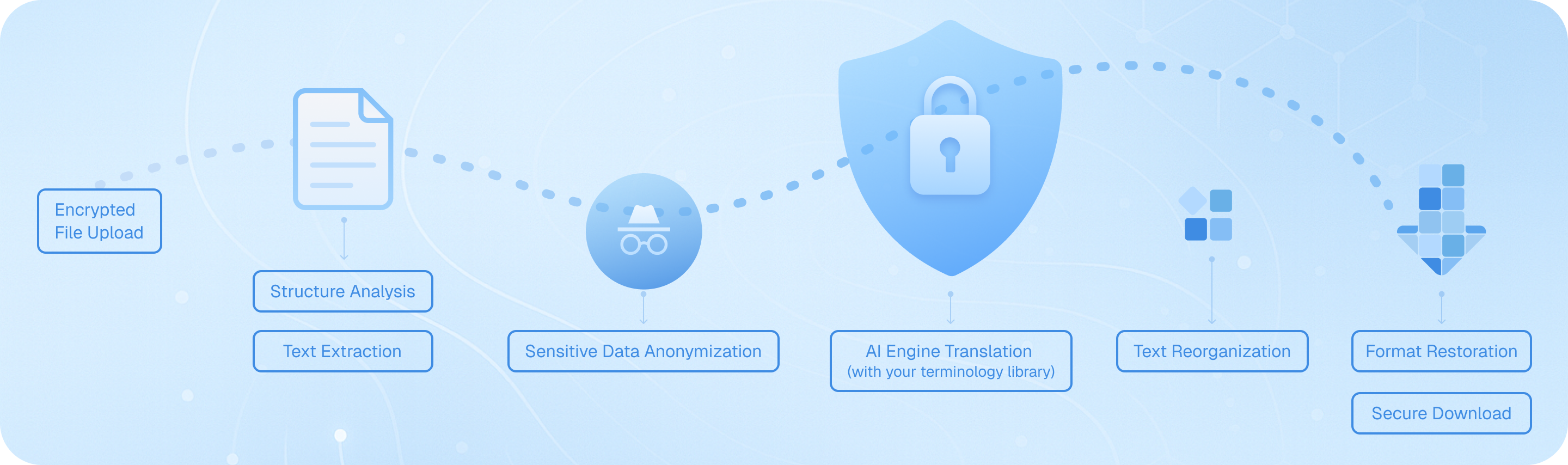
安全上傳您的 VTT 字幕檔,我們的系統會分析時間戳記結構,提取對話文本,透過 ChatGPT 或 DeepL 等 AI 引擎進行處理,同時保留提示格式,然後重新組裝翻譯後的字幕並保持原始時間軸不變——提供準確、可立即使用的雙語或目標語言 VTT 檔案,供您立即下載並用於影片、課程或簡報。
我如何在保留時間碼和格式的同時翻譯 VTT 字幕檔案?
當翻譯 VTT 檔案(WebVTT 字幕格式)時,維持精確的時間碼和文字結構對於影片同步至關重要。沉浸式翻譯的文件翻譯功能能智慧地處理 VTT 檔案,它會保留所有的時間戳記、提示識別碼和格式標籤,同時僅翻譯實際的字幕文字。您只需透過文件翻譯介面上傳您的 VTT 檔案,從超過 100 種支援的選項中選擇您的目標語言,並從 18 種以上的翻譯引擎中進行選擇,包括 ChatGPT、DeepL 或 Google 翻譯。該工具會自動偵測 VTT 結構,並確保像 '00:00:12.500 --> 00:00:15.000' 這樣的時間資訊保持完整。對於處理影片字幕的內容創作者來說,這意味著您可以快速將內容在地化以適應國際受眾,而無需手動編輯每個時間戳記。雙語輸出選項在此特別有用——您可以生成並排比較,以便在發布字幕之前驗證翻譯準確性。
使用沉浸式翻譯翻譯 VTT 檔案與手動字幕翻譯有什麼區別?
手動翻譯 VTT 字幕既耗時又容易出錯,尤其是在處理術語或長影片內容時。傳統方法需要您複製文字片段,單獨翻譯,然後小心地貼回,同時避免破壞時間碼。沉浸式翻譯將整個工作流程簡化為單鍵處理。AI 情境感知翻譯功能對於 VTT 檔案特別有價值,因為它會在翻譯前分析整個字幕序列,確保整個影片中的術語一致且對話流暢自然。例如,如果角色名稱或術語在不同的字幕提示中多次出現,AI 會保持一致性,而不是每次都進行不同的翻譯。此外,您可以在幾分鐘內翻譯完 30 分鐘影片的字幕檔案,而不是花費數小時。該平台支援批次處理,因此如果您正在管理影片系列或課程的多個 VTT 檔案,您可以高效地處理它們。免費用戶每月最多可翻譯 1,000 頁,這通常涵蓋數十個標準 VTT 字幕檔案。
我可以將 VTT 檔案同時翻譯成多種語言,以便進行國際影片發行嗎?
是的,Immersive Translate 支援翻譯超過 100 種語言,非常適合需要在全球發行影片內容的創作者。雖然系統每次翻譯請求僅處理一種目標語言,但您可以透過執行多次翻譯,快速產生 VTT 字幕檔的多語言版本。例如,如果您要在不同地區發布教育影片或行銷內容,您可以從單一來源 VTT 檔案建立英文、西班牙文、法文、德文、日文和中文的字幕版本。工作流程非常簡單:上傳您的原始 VTT 檔案一次,選擇您的第一個目標語言和偏好的翻譯引擎(適合自然對話的 ChatGPT、適合歐洲語言的 DeepL,或適合亞洲語言的專用引擎),下載翻譯後的檔案,然後針對其他語言重複此步驟。每次翻譯都會保留原始的時間軸結構,因此所有語言版本都能與您的影片完美同步。對於管理大型字幕翻譯專業的專業用戶,Pro 版本提供更高的每月配額,以及存取進階 AI 引擎的權限,這些引擎能為複雜的對話或技術內容提供更細緻的翻譯。
沉浸式翻譯在翻譯 VTT 字幕時如何處理專業術語和專有名詞?
在翻譯教育影片、軟體教學或特定產業內容的 VTT 檔案時,技術準確性至關重要。沉浸式翻譯的 AI 驅動翻譯引擎能夠識別並妥善處理專有名詞、品牌名稱、專業術語以及特定領域的行話。具備情境感知能力的翻譯功能會分析周圍的字幕文字,以判斷某個術語應該被翻譯還是保留原文形式。例如,軟體介面術語、產品名稱或縮寫通常會被保留,而其說明文字則會被翻譯。如果您正在處理專業內容——例如醫療培訓影片、法律證詞或工程教學——您可以選擇在這些領域以準確性著稱的翻譯引擎。DeepL 在歐洲語言的技術翻譯方面表現出色,而 ChatGPT 和 Gemini 則在各種主題領域提供強大的效能。此外,雙語顯示選項讓您可以將翻譯結果與原始 VTT 文字並排檢視,輕鬆發現關鍵術語的任何誤譯,以便在定稿字幕檔案前進行修正。對於有特定術語要求的長期專案,您可以透過使用相同的翻譯引擎並檢視前幾次翻譯來建立品質基準,從而保持一致性。
翻譯我的 VTT 字幕檔後,我可以匯出哪些檔案格式?
使用 Immersive Translate 翻譯您的 VTT 檔案後,您會收到 VTT 格式的輸出,這與支援 WebVTT 字幕的影片播放器、串流平台和影片剪輯軟體完全相容。翻譯後的檔案保留了原始結構,包括所有時間提示、定位標籤和樣式資訊,因此您可以直接將其上傳到 YouTube、Vimeo 或您網站的影片播放器,而無需額外的格式調整。如果您需要不同的字幕格式(例如 SRT (SubRip)),您可以將翻譯後的 VTT 檔案作為參考,並使用標準的字幕轉換工具進行轉換,不過如果您一開始就偏好使用該格式,Immersive Translate 也支援直接翻譯 SRT 檔案。雙語輸出選項對於語言學習者或品質保證目的特別有價值——它會生成一份並排顯示原始和翻譯字幕文字的文件,您可以將其匯出為參考文件。這種雙語視圖有助於教育工作者製作學習教材,讓翻譯人員能更有效率地審閱他們的工作,並讓內容創作者在將影片發布給國際觀眾之前,能夠驗證翻譯後的字幕是否準確傳達了預期的訊息。
沉浸式翻譯的 VTT 檔案翻譯功能適合用於直播活動的字幕,還是僅適合預錄內容?
沉浸式翻譯的 VTT 翻譯功能是針對預錄影片內容進行優化的,適用於您擁有需要在地化的現有字幕檔案的情況。文件翻譯過程通常需要幾分鐘,具體時間取決於檔案長度和選擇的翻譯引擎,這使其非常適合翻譯 YouTube 影片、線上課程、網路研討會、企業培訓材料和存檔的會議簡報的字幕。對於需要即時字幕翻譯的直播活動,工作流程會有所不同——您需要先(透過即時字幕服務)生成原始語言的 VTT 檔案,然後在事後進行翻譯以供隨選觀看。然而,沉浸式翻譯的瀏覽器擴充功能為直播內容提供了一個互補的解決方案:即時網頁翻譯功能可以翻譯螢幕上顯示的直播字幕或基於文字的內容,儘管這與基於檔案的 VTT 翻譯運作方式不同。對於同時管理直播和錄製內容的內容創作者來說,一個實用的工作流程是在活動期間使用即時字幕工具生成原始 VTT 檔案,然後在活動結束後立即使用沉浸式翻譯為您的影片存檔建立翻譯後的字幕版本。這種方法確保國際觀眾可以在直播活動結束後不久,以其偏好的語言存取您的內容,從而顯著擴大您的觸及範圍,而無需多語言即時翻譯服務。
我如何確保翻譯後的 VTT 字幕符合目標受眾的說話節奏和閱讀速度?
跨語言的字幕可讀性是一個常見的挑戰,因為翻譯後的文字長度通常與原文不同——有些語言較為冗長,而有些則較為簡潔。當您使用沉浸式翻譯翻譯 VTT 檔案時,時間碼保持不變,這意味著翻譯後的文字在螢幕上顯示的時間長度與原文相同。對於大多數語言對來說,這運作得很好,因為 AI 翻譯引擎經過訓練,能夠產生自然、簡潔的翻譯。然而,如果您發現某些語言的翻譯字幕顯示時間過長或過短,導致閱讀不舒適,您有幾個選擇。首先,嘗試不同的翻譯引擎——ChatGPT 和 DeepL 通常能產生更自然、口語化的翻譯,比直譯更能符合典型的說話模式。其次,使用雙語輸出來審查翻譯,並找出任何不必要的冗長詞組,這些詞組可以在不損失含義的情況下進行簡化。對於需要完美字幕時序的專業影片專案,您可以將沉浸式翻譯的輸出作為高品質的初稿,然後在字幕編輯軟體中進行微調以優化閱讀速度。平台的即時選取文字翻譯功能在此也很有幫助——如果您正在審查翻譯後的 VTT 檔案並遇到一個看起來彆扭的短語,您可以將其反白並立即查看替代翻譯,幫助您選擇最簡潔自然的措辭。這種自動化翻譯速度與手動潤飾能力的結合,使沉浸式翻譯成為專業字幕在地化工作流程的高效解決方案。