

















使用沉浸式翻譯翻譯 SRT 檔案
1
根據需求選擇翻譯工具
2
上傳文件
3
用你想要的樣式下載譯文
專業 SRT 檔案翻譯器功能
沉浸式翻譯提供精確的字幕翻譯,具備格式保留、多種 AI 引擎及雙語顯示功能,實現無縫影片在地化。

格式完整性
完美保留原始 SRT 時間碼和結構。您的字幕檔案保持同步,無需手動調整。
翻譯準確度
利用 18 多種 AI 引擎(包括 DeepL 和 ChatGPT)進行具備情境感知的字幕翻譯,對話流暢自然。

雙語輸出
生成並排顯示的原文和翻譯字幕。非常適合語言學習和翻譯品質驗證。
多引擎支援
可從 ChatGPT、Gemini 或 DeepSeek 引擎中選擇。即時切換翻譯器以比較品質和準確度。


安全處理
您的 SRT 檔案透過加密傳輸保持私密。我們絕不儲存或分享您的字幕內容。
誰使用 SRT 翻譯器

觸及全球觀眾
影片創作者翻譯 SRT 字幕以跨越語言障礙擴大觀眾群,透過準確的雙語字幕確保其內容能與國際觀眾產生共鳴。

無障礙學習教材
教師將演講字幕翻譯成多種語言,讓教育影片能夠惠及多元的學生群體,並支持包容性的多語言教學環境。

多語言直播內容
實況主和播客主持人翻譯存檔的實況字幕,將內容重新利用給全球觀眾,並透過無障礙的多語言影片庫建立國際社群。
SRT 翻譯運作原理
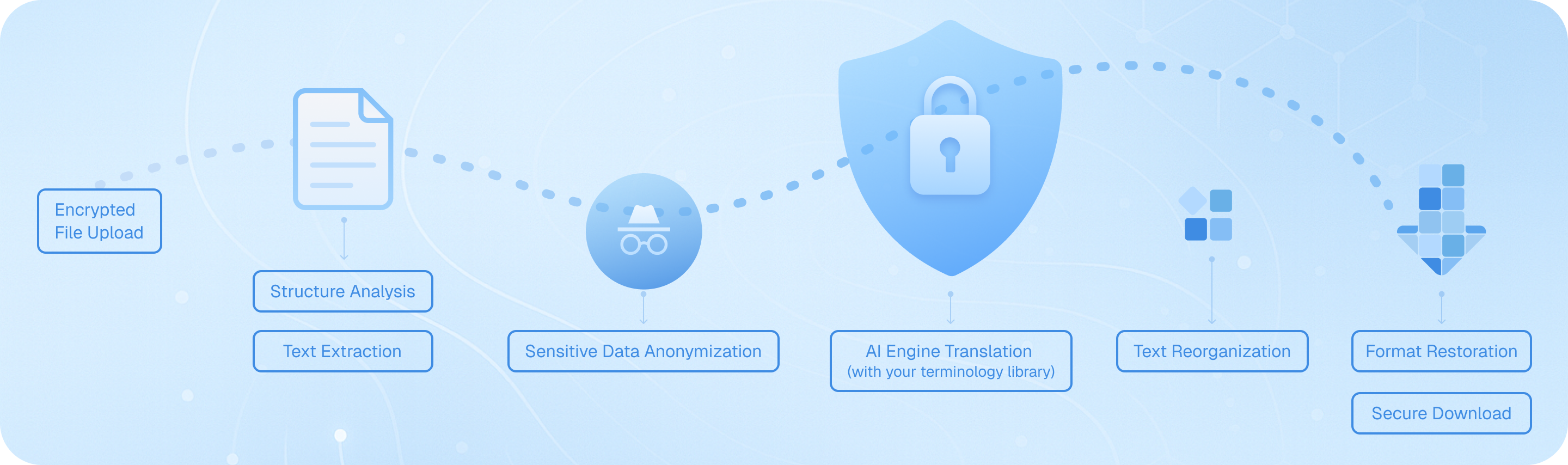
透過我們的加密通道上傳您的字幕檔案,我們的系統會分析 SRT 結構,提取帶有時間戳記的文字片段,透過您選擇的 AI 引擎進行處理並保留時間碼,然後在保持原始格式不變的情況下重新組裝翻譯後的對話——提供可立即用於您影片專案的雙語或目標語言字幕檔案。
如何在翻譯 SRT 字幕檔案時保留原始的時間碼?
翻譯 SRT 檔案時,維持精確的時間戳同步對於影片播放至關重要。當您上傳 SRT 檔案時,Immersive Translate 的文件翻譯功能會自動保留所有時間碼和格式結構。只需將您的字幕檔案拖放到翻譯介面中,從超過 100 種支援的選項中選擇您的目標語言,該工具將僅翻譯文字內容,同時保持每個時間戳、序號和換行符號完整無缺。這意味著您的翻譯字幕將與您的影片完美同步,無需任何手動調整。對於需要多種字幕語言版本的專業專案,您可以同時批次處理多個 SRT 檔案,節省數小時的手動工作。雙語輸出選項在此特別有價值——它會並排顯示原始文字和翻譯文字,讓您在最終確定字幕之前,能夠根據原始材料驗證翻譯的準確性。
哪種翻譯引擎最適合翻譯電影字幕和影片隱藏式字幕?
SRT 字幕翻譯的理想翻譯服務取決於您的具體內容類型和語言對。對於電影和電視節目等娛樂內容,ChatGPT 和 DeepL 擅長捕捉口語表達、成語和文化細微差別,使對話在目標語言中聽起來自然。這些引擎能更好地理解語境,這在翻譯幽默、俚語或情感對話時至關重要。對於技術影片、教育內容或紀錄片字幕,Google 翻譯和 Gemini 提供了具有專業術語的可靠準確度。沉浸式翻譯讓您在一個平台上即可存取 18 種以上的翻譯引擎,因此您可以針對同一個 SRT 檔案嘗試不同的服務並比較結果。許多專業字幕翻譯人員使用我們的工具將同一個檔案透過多個引擎執行,然後選擇最佳輸出或結合不同翻譯的優點。AI 智慧情境功能對於較長的影片特別強大——它會在翻譯前分析整個字幕檔案,確保角色名稱、重複出現的術語和主題元素在整個影片中保持一致,而這是單句翻譯工具經常忽略的。
我可以免費翻譯 SRT 檔案嗎?有哪些限制?
是的,Immersive Translate 為 SRT 檔案翻譯提供了慷慨的免費層級,涵蓋了大多數個人和小型專案。免費使用者可以使用多種翻譯引擎(包括 Google 翻譯、Bing 等)翻譯字幕檔案,並支援所有主要語言組合。免費版本可處理標準的 SRT 檔案,沒有大小限制,可滿足基本翻譯需求,非常適合翻譯個人視訊專案、YouTube 內容或教育素材。然而,如果您正在處理較長的視訊,或需要存取 ChatGPT、DeepL 或 Gemini 等進階 AI 引擎以獲得更高品質的字幕翻譯,升級至專業版即可解鎖這些進階選項。專業版使用者還享有更高的每月翻譯配額——如果您定期翻譯多集影集、電影專案或商業視訊內容,這一點至關重要。免費層級對於測試服務和處理偶爾的字幕翻譯任務確實非常有用,而專業視訊創作者、內容在地化團隊和媒體公司通常會發現,專業版升級因其提供的更高準確度和處理量而非常值得。
雙語字幕翻譯如何協助語言學習和內容驗證?
雙語並排顯示功能將 SRT 檔案翻譯從單純的轉換任務轉變為強大的學習和品質控制工具。當您使用沉浸式翻譯翻譯字幕時,您可以選擇以並排格式輸出原文和翻譯文本。對於語言學習者來說,這創造了一個沉浸式的學習環境——您可以觀看帶有雙語字幕的影片,在真實的對話語境中,精確地看到短語、成語和句子結構是如何在語言之間翻譯的。這比傳統的教科書學習有效得多,因為您正在從真實的對話中吸收語言模式。對於內容創作者和專業翻譯人員來說,雙語輸出是一項重要的品質保證機制。您可以快速瀏覽並排文本以發現錯誤翻譯,驗證文化引用是否得到了適當的調整,並確保術語得到了正確的處理。在翻譯行銷影片、培訓材料或任何精確度至關重要的內容時,這尤其有價值。無需在檔案之間切換即可即時比較原文和目標文本的能力,極大地加快了審閱過程,並有助於發現那些可能被遺漏的錯誤。
除了 SRT 之外,我還可以翻譯哪些檔案格式用於影片字幕專案?
雖然 SRT 是最常見的字幕格式,但 Immersive Translate 的文件翻譯功能支援在各種影片平台和編輯軟體中使用的廣泛字幕和隱藏式字幕檔案類型。除了標準的 SRT 檔案外,您還可以直接翻譯 VTT 檔案(常用於網路影片和 HTML5 播放器)、ASS/SSA 檔案(具有樣式選項的進階字幕格式,在動漫和粉絲字幕社群中很受歡迎)以及純文字字幕格式。這種多格式支援至關重要,因為不同的影片平台和編輯工具有格式偏好——YouTube 使用 SRT 和 VTT,像 Adobe Premiere 這樣的專業影片編輯軟體通常使用 SRT,而串流平台可能需要特定格式。您無需在翻譯前手動轉換格式,可以直接上傳原始格式的字幕檔案進行翻譯,然後再根據需要進行轉換。該工具還處理經常伴隨影片專案的相關文件類型:您可以翻譯 DOCX 格式的影片腳本、翻譯 PDF 分鏡腳本或鏡頭清單,甚至翻譯包含嵌入式影片逐字稿的 HTML 頁面。這種統一的方法意味著影片創作者可以在一個地方管理他們的整個多語言內容工作流程,而不必在多個專業翻譯工具之間周旋。
翻譯影集或課程的字幕檔時,我該如何確保術語的一致性?
在多個字幕檔案之間保持術語一致,是影集翻譯中最大的挑戰之一,而沉浸式翻譯的 AI 智慧語境功能專門解決了這個問題。當翻譯劇集字幕、課程模組或任何多部份的影片內容時,AI 語境感知翻譯選項會在開始翻譯前分析整份文件。這個預處理步驟會識別重複出現的角色名稱、術語、品牌名稱和主題詞彙,然後確保這些元素在整個翻譯過程中保持一致。例如,如果您正在翻譯一系列烹飪節目,食材名稱、烹飪技巧和主廚的口頭禪將在所有劇集中保持相同的翻譯。這與那些不理解廣泛語境、獨立處理每一行的基本字幕翻譯器相比,是一個顯著的優勢。為了獲得更好的控制,您可以使用相同的翻譯引擎和設定來翻譯系列的所有劇集,從而創造出連貫的多語言觀看體驗。專業的內容在地化團隊在調整教育課程、培訓系列或品牌影片內容時特別重視此功能,因為術語的一致性會直接影響理解度和品牌形象。使用一致的翻譯參數批次處理多個 SRT 檔案的能力,與手動審查每個檔案以執行術語標準相比,節省了大量的時間。
我可以將翻譯後的 SRT 檔案用於商業用途嗎?此工具如何支援專業的影片在地化工作流程?
當然可以——Immersive Translate 專為支援個人和專業的商業影片在地化專案而設計。您產生的翻譯 SRT 檔案可由您無限制地使用,這使得該工具非常適合透過多語言內容獲利的 YouTube 創作者、為國際團隊製作培訓影片的企業、為多元學生群體製作課程教材的教育機構,以及將娛樂內容在地化以進行全球發行的媒體公司。該平台的專業級功能專門支援商業工作流程:您可以批次處理多個字幕檔案,存取能提供出版品質結果的進階翻譯引擎,並匯出與專業影片編輯和發行平台相容的格式。雙語輸出選項充當內建的品質控制步驟,允許專案經理在最終交付前審查翻譯。對於處理客戶影片在地化專案的代理商而言,在 18 種以上的翻譯引擎之間切換的能力意味著您可以根據每位客戶的特定需求調整翻譯方式——對行銷內容使用更具創意的引擎,對技術文件使用更直譯的引擎。專業版中寬鬆的每月配額可容納大量的商業工作,而保留的格式確保翻譯後的字幕能無縫整合到現有的影片製作流程中,無需手動重新格式化或調整時間軸。