

















Лучший переводчик Markdown для мгновенных результатов
1
Выберите инструмент перевода для ваших нужд.
2
Загрузите файл.
3
Скачайте переведенный документ в предпочитаемом формате.
Переводчик Markdown: Точность встречается с простотой
Переводчик документов Immersive Translate обеспечивает мгновенный и точный перевод markdown с двуязычным отображением, сохраняя форматирование и поддерживая более 18 движков ИИ для получения профессиональных результатов.

Сохранение форматирования
Сохраняет исходный синтаксис markdown, заголовки, списки и блоки кода идеально во время перевода, не нарушая структуру.
Точность перевода
Движки ИИ с учетом контекста анализируют весь документ перед переводом, обеспечивая согласованную терминологию и естественные формулировки на протяжении всего текста.
Несколько движков
Выбирайте из ChatGPT, DeepL, Gemini или более 15 других сервисов, чтобы соответствовать типу вашего контента в формате markdown.
Двуязычный вывод
Отображение рядом показывает оригинал и перевод markdown одновременно, что идеально подходит для вычитки технической документации и обучения.

Безопасная обработка
Сквозное шифрование защищает ваши файлы markdown во время перевода, данные не сохраняются после завершения обработки.
Кто использует переводчики Markdown

Барьеры технической документации
Инженеры-программисты переводят файлы README и документацию API для глобального сотрудничества, сохраняя блоки кода и форматирование при бесшовном переключении между языками программирования.

Проблемы локализации контента
Технические писатели и блогеры переводят статьи в формате Markdown для международной аудитории, сохраняя гиперссылки, изображения и стилизацию для эффективного охвата многоязычных читателей.

Требования к сохранению формата
Профессиональные лингвисты обрабатывают файлы Markdown от клиентов, требуя инструменты, которые сохраняют исходную структуру, метаданные и специальные символы на протяжении всего процесса перевода.
Как работает перевод Markdown
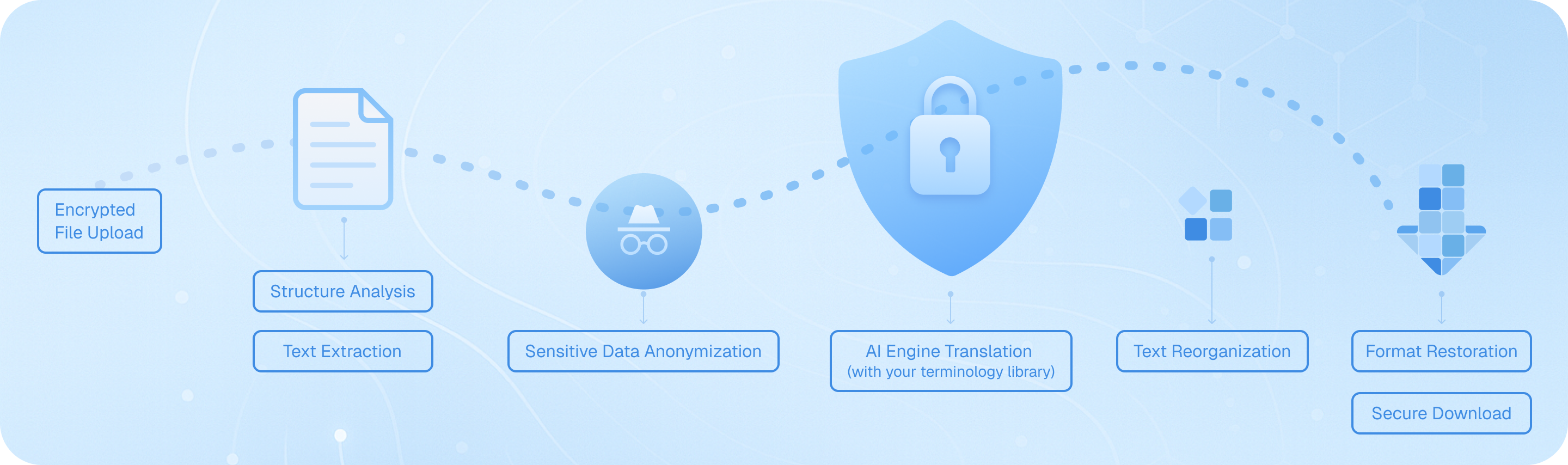
Загрузите файл Markdown безопасно, и наша система проанализирует его структуру — заголовки, списки, блоки кода — затем извлечет переводимый текст, сохраняя форматирование. Движки ИИ переводят контент с учетом контекста, собирают элементы, сохраняя исходный синтаксис, и предоставляют двуязычный файл или файл на целевом языке, готовый к загрузке, сохраняя целостность вашей технической документации.
Часто задаваемые вопросы по переводу Markdown
Как перевести файлы Markdown, сохраняя форматирование и блоки кода?
При переводе документов Markdown критически важно сохранять исходную структуру, включая заголовки, списки, фрагменты кода и встроенное форматирование. Функция перевода документов Immersive Translate интеллектуально обрабатывает файлы Markdown, распознавая синтаксис и сохраняя все элементы форматирования при переводе. Просто загрузите ваш файл .md через расширение для браузера или мобильное приложение, выберите целевой язык и выберите один из более чем 18 движков перевода на основе ИИ, таких как ChatGPT, DeepL или Gemini. Инструмент обрабатывает ваш контент, сохраняя блоки кода, ссылки и маркеры выделения нетронутыми. Для технической документации или заметок разработчика, написанных в формате Markdown, это гарантирует, что переведенная версия останется функциональной и удобочитаемой. Опция двуязычного отображения параллельно здесь особенно полезна — вы можете сравнивать исходный и переведенный контент Markdown абзац за абзацем, что позволяет легко убедиться, что технические термины, имена переменных и примеры синтаксиса обработаны правильно. Этот подход экономит часы по сравнению с ручным переводом или использованием базовых переводчиков текста, которые нарушают структуру Markdown.
Какой лучший способ перевести многоязычную документацию в формате Markdown для международных команд?
Для команд, управляющих технической документацией, файлами README или базами знаний в формате Markdown, Immersive Translate предлагает оптимизированный рабочий процесс, поддерживающий более 100 языковых пар. Функция AI Smart Context платформы особенно эффективна для длинных документов Markdown — она предварительно суммирует ваш контент перед переводом, обеспечивая согласованность терминологии и сохранение контекста в нескольких разделах. Это критически важно при переводе документации разработчиков, где такие термины, как «развертывание» или «репозиторий», должны переводиться согласованно на протяжении всего текста. Вы можете пакетно обрабатывать несколько файлов Markdown, выбирая различные движки перевода в зависимости от ваших потребностей: DeepL для европейских языков, ChatGPT для нюансированного технического контента или Google Translate для быстрых черновиков. Бесплатная версия позволяет использовать значительный объем, а Pro-версия увеличивает вашу ежемесячную квоту страниц до 10 000 — идеально для крупных проектов документации. После перевода сохраненный синтаксис Markdown означает, что вы можете сразу зафиксировать переведенные файлы в вашем репозитории или опубликовать их на сайте документации без переформатирования. Это устраняет традиционное узкое место ручного исправления форматирования после перевода.
Могу ли я переводить содержимое Markdown прямо в браузере при чтении репозиториев GitHub или сайтов документации?
Безусловно. Расширение браузера Immersive Translate меняет способ восприятия контента на основе Markdown на таких платформах, как GitHub, GitLab или службы хостинга документации. При просмотре файла README.md или страницы вики просто активируйте расширение, чтобы увидеть мгновенный двуязычный перевод, наложенный на исходный контент. Режим параллельного перевода отображает исходный Markdown и переведенную версию рядом друг с другом, что неоценимо, когда вы пытаетесь понять документацию к коду на иностранном языке или инструкции к проектам с открытым исходным кодом. Для быстрого поиска функция перевода при наведении курсора позволяет выделять любой абзац Markdown или комментарий в коде, чтобы увидеть всплывающее окно с мгновенным переводом — идеально подходит для понимания конкретных технических терминов без перевода всей страницы. Вы также можете использовать сочетания клавиш для включения и выключения перевода, что позволяет легко переключаться между режимами чтения. Эта возможность перевода Markdown в реальном времени работает в Chrome, Edge, Firefox и Safari и поддерживает те же 18+ движков перевода, что доступны для загрузки документов. Для разработчиков, работающих над международными проектами или обучающихся у глобального сообщества открытого исходного кода, эта функция устраняет языковые барьеры, не нарушая ваш рабочий процесс.
Как Immersive Translate обрабатывает техническую терминологию и фрагменты кода в файлах Markdown?
Технические документы Markdown часто сочетают естественный язык с примерами кода, ссылками на API и специализированной терминологией — это вызов для стандартных инструментов перевода. Immersive Translate решает эту задачу с помощью интеллектуального распознавания контента: он автоматически определяет блоки кода (как встроенные, так и огороженные) и оставляет их без перевода, гарантируя работоспособность ваших примеров синтаксиса. Для окружающего пояснительного текста вы можете использовать премиальные движки ИИ, такие как ChatGPT или DeepSeek, которые понимают технический контекст лучше, чем традиционный машинный перевод. Эти движки распознают концепции программирования, названия фреймворков и отраслевой жаргон, обеспечивая более точные переводы, сохраняющие исходный смысл. При переводе документации разработчиков, руководств по API или технических статей в блогах, написанных на Markdown, опция AI Smart Context сначала анализирует структуру всего документа, создавая глоссарий повторяющихся технических терминов для обеспечения единообразия. Например, если в вашем файле Markdown в первом разделе обсуждаются «асинхронные функции», этот же термин будет переведен одинаково в последующих разделах. Вы также можете создавать пользовательские правила перевода или использовать функцию улучшения поля ввода, чтобы уточнить конкретные технические фразы перед финализацией перевода. Это сочетание автоматического сохранения кода и контекстно-зависимого перевода делает Immersive Translate уникально подходящим для технического контента в формате Markdown.
Каковы преимущества использования двуязычного перевода Markdown для обучения и документации?
Двуязычное параллельное отображение — одна из самых мощных функций Immersive Translate для всех, кто работает с контентом в формате Markdown в образовательных или справочных целях. Когда вы переводите учебник по Markdown, учебный материал или техническое руководство, просмотр оригинальной и переведенной версий рядом друг с другом ускоряет понимание и изучение языка. Студенты, изучающие программирование по учебникам Markdown на иностранном языке, могут следить за ходом мысли на родном языке, постепенно усваивая техническую лексику на исходном языке. Для авторов документации, создающих многоязычные версии одного и того же контента Markdown, параллельный вид служит мгновенной проверкой качества — вы можете убедиться, что заголовки, списки и выделения переведены правильно, и что никакой контент не был случайно пропущен. Исследователи, переводящие академические заметки Markdown или обзоры литературы, выигрывают от возможности цитировать оригинальные формулировки, понимая при этом перевод. Сохранение формата означает, что все ваши элементы Markdown — таблицы, сноски, цитаты — отображаются правильно на обоих языках, сохраняя педагогическую структуру документа. Этот подход намного превосходит вывод только перевода, который заставляет вас постоянно переключаться между файлами для проверки точности. В сочетании с функцией мгновенного перевода выделенного текста вы можете нажать на любой незнакомый термин в любом из столбцов, чтобы увидеть определения и произношение, превращая каждый документ Markdown в интерактивный обучающий ресурс.
Как я могу эффективно переводить крупные проекты на Markdown или целые репозитории документации?
Для масштабных проектов перевода Markdown — таких как целые сайты документации, многоглавные электронные книги или обширные базы знаний — система перевода документов Immersive Translate предлагает как эффективность, так и качество. Начните с загрузки ваших файлов Markdown через расширение; платформа поддерживает пакетную обработку, поэтому вы можете поставить в очередь несколько файлов .md для перевода за один сеанс. Здесь становится важной функция AI Smart Context (умный контекст ИИ): она анализирует связи между документами, поддерживая согласованную терминологию во всем вашем проекте. Например, если вы переводите руководство по программному обеспечению с отдельными файлами Markdown для установки, настройки и устранения неполадок, система гарантирует, что технические термины, такие как "переменная среды" или "зависимость", переводятся одинаково на протяжении всего текста. С профессиональной версией (BabelDOC) вы получаете доступ к расширенному определению структуры документа и можете переводить до 10 000 страниц в месяц — этого достаточно даже для крупномасштабных проектов документации. Сохранение форматирования Markdown означает, что ваши переведенные файлы готовы к немедленному использованию; вы можете интегрировать их в генераторы статических сайтов, такие как Jekyll, Hugo или MkDocs, без дополнительной обработки. Для текущих проектов вы можете сохранить предпочитаемый движок перевода и настройки пар языков, что упрощает будущие обновления. Этот систематический подход сокращает время перевода с недель до часов, сохраняя при этом профессиональное качество, что делает практичным ведение многоязычной документации без выделенной команды переводчиков.
Существует ли экономически эффективное решение для регулярного перевода контента в формате Markdown для блогов или создания контента?
Создатели контента, технические блогеры и сопровождающие документацию, которые регулярно работают с Markdown, найдут ценовую модель Immersive Translate исключительно практичной. Бесплатный уровень предоставляет щедрый доступ к нескольким движкам перевода и поддерживает все основные функции Markdown, что делает его пригодным для отдельных блогеров или небольших проектов. Вы можете переводить до 1000 страниц в месяц с расширенными функциями BabelDOC бесплатно — этого более чем достаточно для еженедельных постов в блоге или регулярных обновлений документации. Для профессиональных создателей контента, управляющих несколькими сайтами или часто публикующих материалы, pro-подписка открывает 10 000 страниц в месяц и приоритетный доступ к премиальным ИИ-движкам, таким как ChatGPT и Gemini, которые обеспечивают более естественный и привлекательный перевод, подходящий для публичного контента. Кроссплатформенная доступность означает, что вы можете переводить черновики Markdown в браузере на рабочем столе, а затем проверять и редактировать их на мобильном устройстве. Функция улучшения поля ввода особенно полезна для создателей контента: при написании нового контента в Markdown вы можете переводить отдельные абзацы или разделы в реальном времени, чтобы одновременно создавать двуязычные посты. Это устраняет традиционный рабочий процесс, при котором сначала пишут на одном языке, а затем отдельно переводят и форматируют для других аудиторий. В сочетании с возможностью переключаться между службами перевода в зависимости от типа контента — используя DeepL для блогов на европейских языках или ChatGPT для креативного технического письма — вы получаете профессиональный перевод Markdown за небольшую часть от стоимости найма переводчиков-людей или подписки на несколько специализированных инструментов.
Поддерживаемые Форматы
Переводчик PDFПереводчик субтитровHTML переводчикпереводчик ePubпереводчик markdownПереводчик txt-файловпереводчик файлов WordПереводчик файлов SRTПереводчик файлов ASSПереводчик файлов VTTПереводчик резюмеКонтрактный переводчикПереводчик бизнес-планаПеревести статью.Переводчик отчетовПеревод медицинского отчетаПеревод финансовых отчетовПеревод делового отчетаПеревод журнала