

















사업 계획서를 즉시 번역하세요
Immersive Translate에 사업 계획서를 업로드하여 서식을 유지하며 정확한 이중 언어 번역을 받으세요—몇 초 만에 결과를 다운로드하세요.
1
당신의 필요에 맞는 번역 도구를 선택하세요.
2
파일을 업로드하세요.
3
선호하는 형식으로 번역된 문서를 다운로드하세요.
전문 사업계획서 번역 기능
서식을 유지하고 정확성을 보장하며, 즉각적이고 신뢰할 수 있는 번역을 위해 여러 AI 엔진을 지원하는 고급 문서 번역기로 사업계획서를 변환하세요.

원본 서식 보존
저희 번역기는 사업계획서의 원본 레이아웃, 차트, 표를 완벽하게 유지하여 모든 언어에서 전문적인 프레젠테이션을 보장합니다.
번역 정확도
ChatGPT 및 DeepL을 포함한 18개 이상의 AI 엔진을 활용하여 사업계획서에 포함된 정확한 재무 용어와 비즈니스 개념을 제공합니다.

다중 엔진 지원
비즈니스 문서 작업에 필요한 속도와 정확성의 완벽한 균형을 찾기 위해 번역 서비스 간에 즉시 전환할 수 있습니다.
용어 데이터베이스
AI 기반 문맥 인식 기능을 통해 사업계획서 전체에서 산업별 전문 용어와 재무 지표가 일관되게 번역됩니다.


데이터 보안
보안 처리를 통해 귀하의 기밀 비즈니스 정보를 보호하며, 국제 데이터 보호 표준 및 규정을 준수합니다.
사업 계획서 번역이 필요한 대상

창업가
투자자
컨설턴트
경영진
분석가
인큐베이터

국제 자금 조달 확보
스타트업 창업자들은 해외 투자자에게 피칭하기 위해 사업 계획서를 번역하며, 자금 조달 성공을 위해 언어 장벽을 넘어 정확한 재무 예측과 전략적 비전이 명확하게 전달되도록 합니다.

해외 기회 평가
벤처 캐피탈리스트와 엔젤 투자자들은 해외 벤처에 자본을 투입하기 전에 시장 잠재력, 재무적 타당성 및 성장 전략을 평가하기 위해 국제 사업 계획서를 번역합니다.

스타트업 생태계 지원
엑셀러레이터 프로그램은 국제 데모 데이 및 파트너 소개를 위해 멘티의 사업 계획서를 번역하여, 스타트업이 글로벌 네트워크 및 국경을 초월한 협업 기회에 효과적으로 접근할 수 있도록 돕습니다.
전문 비즈니스 계획서 번역 프로세스
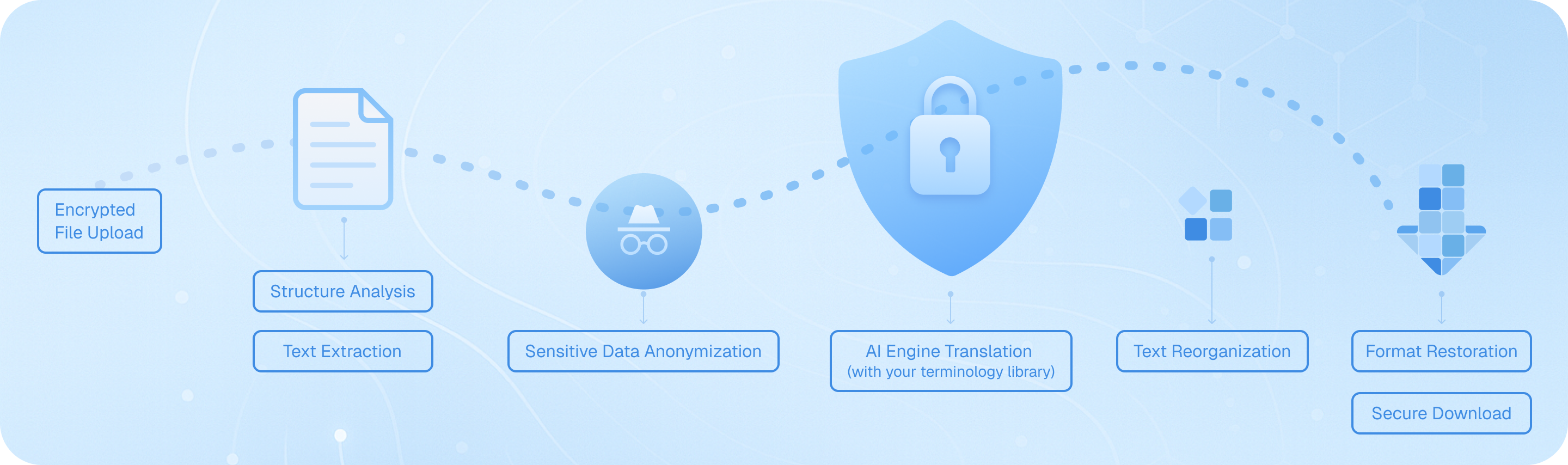
저희 문서 번역기는 암호화된 보안 업로드, 경영진 요약 및 재무 예측을 식별하는 지능형 구조 분석, 정밀한 텍스트 추출, 100개 이상의 언어에 걸쳐 귀하의 맞춤형 비즈니스 용어 데이터베이스를 활용한 AI 기반 번역, 원본 서식을 유지하는 매끄러운 텍스트 재조립, 차트와 표를 보존하는 완전한 레이아웃 복원, 그리고 암호화된 다운로드를 포함하는 엄격한 7단계 워크플로우를 채택합니다. 이를 통해 귀하의 기밀 비즈니스 계획서 번역이 전문적 무결성을 유지하면서도 해외 투자자 및 파트너와의 언어 장벽을 허물 수 있도록 보장합니다.
수백만이 사랑하는 — 최고 평점 온라인 번역기
Immersive Translate는 전 세계 사용자들로부터 신뢰받고 칭찬받는 도구로, 웹사이트 번역, PDF 번역, 온라인 비디오를 위한 이중 언어 자막 번역에 이용됩니다.
I recently explored creating bilingual e-books in Chinese and English using "Immersive Translate" and found this app to be incredibly powerful. It spans all systems and platforms, allowing you to use it on any device—PC, mobile—with virtually no difference in experience across platforms.
bluebird0605
Producer of Dailyio
Must have extension! Just found out this. No doubt it will be my must have extension. Way better than other simular choices.
Kobe Yeung
Chrome User
Bilingual translation with customizable styles is amazing—this is exactly what I wanted.
Su Shi
Chrome User
Easily the best translator. It can translate the web apps even though google translate doesn't recognise.
Dan
Chrome User
kly.wu
From Instagram
This is my first time reviewing a Chrome extension, and the overall experience has been exceptionally seamless. The name "Immersive Translate" couldn't be more apt—kudos to the developer!
Chen
Chrome User
gravity_tonya
From Instagram
The first time I used this extension, I was blown away. It surpassed all other translation extensions I've used before. The segment-by-segment translation mode is innovative, offering bilingual comparison, and there are multiple styles for the translated text to choose from.
tfpak 379
Chrome User
achngjuni
From Tiktok
I just discovered today that the "Immersive Bilingual Web Page Translation Extension" even supports PDF translation, which is truly fantastic. I can say without a doubt that Immersive-Translate is the most actively used extension in my browser at the moment!
Asuka Makina
Freelancer
I have been looking for a Chrome extension to show both original and translated languages on the same page for dual language education purpose. I used Saladict for a few years but the versatility this extension provides is much more powerful. Thanks for making this!
Bo Y.
Chrome User
Super easy to use, it's definitely the best translation extension I've used so far, bar none! Everything is just as I imagined!
Peng Ju
Edge User
How should I put this? This extension is just too awesome. After trying dozens of page translation extensions, this one has all the features you could want. I hope they continue to provide their service.
Bird Fat
Chrome User
I use this extension everyday!!!
Malanore Bal'a Dash
Chrome User
If you: 1. Use Chrome; 2. Need to read a lot of English literature/PDFs/slides; 3. Are short on time or just want to skim; 4. Wish to have machine translation as a reference while conveniently browsing the original text, then anyone meeting at least two of these criteria should undoubtedly try this extension!
Lymil
Chrome User
I recently explored creating bilingual e-books in Chinese and English using "Immersive Translate" and found this app to be incredibly powerful. It spans all systems and platforms, allowing you to use it on any device—PC, mobile—with virtually no difference in experience across platforms.
bluebird0605
Producer of Dailyio
Must have extension! Just found out this. No doubt it will be my must have extension. Way better than other simular choices.
Kobe Yeung
Chrome User
Bilingual translation with customizable styles is amazing—this is exactly what I wanted.
Su Shi
Chrome User
Easily the best translator. It can translate the web apps even though google translate doesn't recognise.
Dan
Chrome User
kly.wu
From Instagram
This is my first time reviewing a Chrome extension, and the overall experience has been exceptionally seamless. The name "Immersive Translate" couldn't be more apt—kudos to the developer!
Chen
Chrome User
gravity_tonya
From Instagram
The first time I used this extension, I was blown away. It surpassed all other translation extensions I've used before. The segment-by-segment translation mode is innovative, offering bilingual comparison, and there are multiple styles for the translated text to choose from.
tfpak 379
Chrome User
achngjuni
From Tiktok
I just discovered today that the "Immersive Bilingual Web Page Translation Extension" even supports PDF translation, which is truly fantastic. I can say without a doubt that Immersive-Translate is the most actively used extension in my browser at the moment!
Asuka Makina
Freelancer
I have been looking for a Chrome extension to show both original and translated languages on the same page for dual language education purpose. I used Saladict for a few years but the versatility this extension provides is much more powerful. Thanks for making this!
Bo Y.
Chrome User
Super easy to use, it's definitely the best translation extension I've used so far, bar none! Everything is just as I imagined!
Peng Ju
Edge User
How should I put this? This extension is just too awesome. After trying dozens of page translation extensions, this one has all the features you could want. I hope they continue to provide their service.
Bird Fat
Chrome User
I use this extension everyday!!!
Malanore Bal'a Dash
Chrome User
If you: 1. Use Chrome; 2. Need to read a lot of English literature/PDFs/slides; 3. Are short on time or just want to skim; 4. Wish to have machine translation as a reference while conveniently browsing the original text, then anyone meeting at least two of these criteria should undoubtedly try this extension!
Lymil
Chrome User
I recently explored creating bilingual e-books in Chinese and English using "Immersive Translate" and found this app to be incredibly powerful. It spans all systems and platforms, allowing you to use it on any device—PC, mobile—with virtually no difference in experience across platforms.
bluebird0605
Producer of Dailyio
Must have extension! Just found out this. No doubt it will be my must have extension. Way better than other simular choices.
Kobe Yeung
Chrome User
Bilingual translation with customizable styles is amazing—this is exactly what I wanted.
Su Shi
Chrome User
Easily the best translator. It can translate the web apps even though google translate doesn't recognise.
Dan
Chrome User
kly.wu
From Instagram
This is my first time reviewing a Chrome extension, and the overall experience has been exceptionally seamless. The name "Immersive Translate" couldn't be more apt—kudos to the developer!
Chen
Chrome User
gravity_tonya
From Instagram
The first time I used this extension, I was blown away. It surpassed all other translation extensions I've used before. The segment-by-segment translation mode is innovative, offering bilingual comparison, and there are multiple styles for the translated text to choose from.
tfpak 379
Chrome User
achngjuni
From Tiktok
I just discovered today that the "Immersive Bilingual Web Page Translation Extension" even supports PDF translation, which is truly fantastic. I can say without a doubt that Immersive-Translate is the most actively used extension in my browser at the moment!
Asuka Makina
Freelancer
I have been looking for a Chrome extension to show both original and translated languages on the same page for dual language education purpose. I used Saladict for a few years but the versatility this extension provides is much more powerful. Thanks for making this!
Bo Y.
Chrome User
Super easy to use, it's definitely the best translation extension I've used so far, bar none! Everything is just as I imagined!
Peng Ju
Edge User
How should I put this? This extension is just too awesome. After trying dozens of page translation extensions, this one has all the features you could want. I hope they continue to provide their service.
Bird Fat
Chrome User
I use this extension everyday!!!
Malanore Bal'a Dash
Chrome User
If you: 1. Use Chrome; 2. Need to read a lot of English literature/PDFs/slides; 3. Are short on time or just want to skim; 4. Wish to have machine translation as a reference while conveniently browsing the original text, then anyone meeting at least two of these criteria should undoubtedly try this extension!
Lymil
Chrome User
I recently explored creating bilingual e-books in Chinese and English using "Immersive Translate" and found this app to be incredibly powerful. It spans all systems and platforms, allowing you to use it on any device—PC, mobile—with virtually no difference in experience across platforms.
bluebird0605
Producer of Dailyio
Must have extension! Just found out this. No doubt it will be my must have extension. Way better than other simular choices.
Kobe Yeung
Chrome User
Bilingual translation with customizable styles is amazing—this is exactly what I wanted.
Su Shi
Chrome User
Easily the best translator. It can translate the web apps even though google translate doesn't recognise.
Dan
Chrome User
kly.wu
From Instagram
This is my first time reviewing a Chrome extension, and the overall experience has been exceptionally seamless. The name "Immersive Translate" couldn't be more apt—kudos to the developer!
Chen
Chrome User
gravity_tonya
From Instagram
The first time I used this extension, I was blown away. It surpassed all other translation extensions I've used before. The segment-by-segment translation mode is innovative, offering bilingual comparison, and there are multiple styles for the translated text to choose from.
tfpak 379
Chrome User
achngjuni
From Tiktok
I just discovered today that the "Immersive Bilingual Web Page Translation Extension" even supports PDF translation, which is truly fantastic. I can say without a doubt that Immersive-Translate is the most actively used extension in my browser at the moment!
Asuka Makina
Freelancer
I have been looking for a Chrome extension to show both original and translated languages on the same page for dual language education purpose. I used Saladict for a few years but the versatility this extension provides is much more powerful. Thanks for making this!
Bo Y.
Chrome User
Super easy to use, it's definitely the best translation extension I've used so far, bar none! Everything is just as I imagined!
Peng Ju
Edge User
How should I put this? This extension is just too awesome. After trying dozens of page translation extensions, this one has all the features you could want. I hope they continue to provide their service.
Bird Fat
Chrome User
I use this extension everyday!!!
Malanore Bal'a Dash
Chrome User
If you: 1. Use Chrome; 2. Need to read a lot of English literature/PDFs/slides; 3. Are short on time or just want to skim; 4. Wish to have machine translation as a reference while conveniently browsing the original text, then anyone meeting at least two of these criteria should undoubtedly try this extension!
Lymil
Chrome User
사업 계획서 번역에 대한 자주 묻는 질문
사업 계획서를 번역할 때, 전문 용어와 문서 구조를 유지하는 것은 투자자 프레젠테이션과 국제 파트너십에 매우 중요합니다. Immersive Translate의 문서 번역 기능은 DeepL, ChatGPT, Gemini와 같은 18개 이상의 AI 번역 엔진에 액세스할 수 있는 동시에, 표, 차트, 재무 예상치를 포함한 원본 서식을 보존합니다. 복잡한 비즈니스 문서의 경우, 시장 분석, 재무 전망, 경영진 요약과 같은 섹션 전반에서 용어의 일관성을 보장하기 위해 번역 전에 계획을 미리 요약하는 AI 스마트 컨텍스트 옵션을 사용하는 것이 좋습니다. 이중 언어 병렬 표시 기능을 통해 "매출 예상", "시장 침투 전략" 또는 "경쟁 우위"와 같은 업계 특화 용어가 목표 언어로 정확하게 렌더링되는지 확인할 수 있습니다. 이중 열 방식은 두 언어를 구사하는 이해관계자에게 두 버전을 모두 제시해야 하거나 국제 투자자를 위한 피치 덱을 준비할 때 특히 유용합니다.


