


















Traduci file SRT con Immersive Translate
1
Seleziona lo strumento di traduzione per le tue esigenze.
2
Carica il file.
3
Scarica il documento tradotto nel formato preferito.
Funzionalità del traduttore di file SRT professionale
Immersive Translate fornisce una traduzione precisa dei sottotitoli preservando il formato, utilizzando più motori AI e un display bilingue per una localizzazione video fluida.

Integrità del formato
Preserva perfettamente i codici temporali e la struttura SRT originali. Il file dei sottotitoli mantiene la sincronizzazione senza necessità di regolazioni manuali.
Precisione della traduzione
Sfrutta oltre 18 motori AI, tra cui DeepL e ChatGPT, per una traduzione dei sottotitoli sensibile al contesto con un flusso di dialogo naturale.

Output bilingue
Genera sottotitoli originali e tradotti affiancati. Ideale per l'apprendimento delle lingue e la verifica della qualità delle traduzioni.
Supporto multi-motore
Scegli tra i motori ChatGPT, Gemini o DeepSeek. Cambia traduttore istantaneamente per confrontare qualità e precisione.


Elaborazione sicura
I tuoi file SRT rimangono privati con trasmissione crittografata. Non memorizziamo mai e non condividiamo il contenuto dei tuoi sottotitoli.
Chi usa i traduttori SRT

Raggiungere un pubblico globale
I creatori di video traducono i sottotitoli SRT per espandere il pubblico oltre le barriere linguistiche, garantendo che i loro contenuti risuonino con il pubblico internazionale attraverso sottotitoli bilingui accurati.

Materiali didattici accessibili
Gli insegnanti traducono i sottotitoli delle lezioni in più lingue, rendendo i video educativi accessibili a diverse popolazioni studentesche e supportando ambienti di classe inclusivi e multilingue.

Contenuti live multilingue
Gli streamer live e i podcaster traducono i sottotitoli degli stream archiviati, riadattando i contenuti per un pubblico globale e costruendo comunità internazionali attraverso librerie video multilingue accessibili.
Come funziona la traduzione SRT
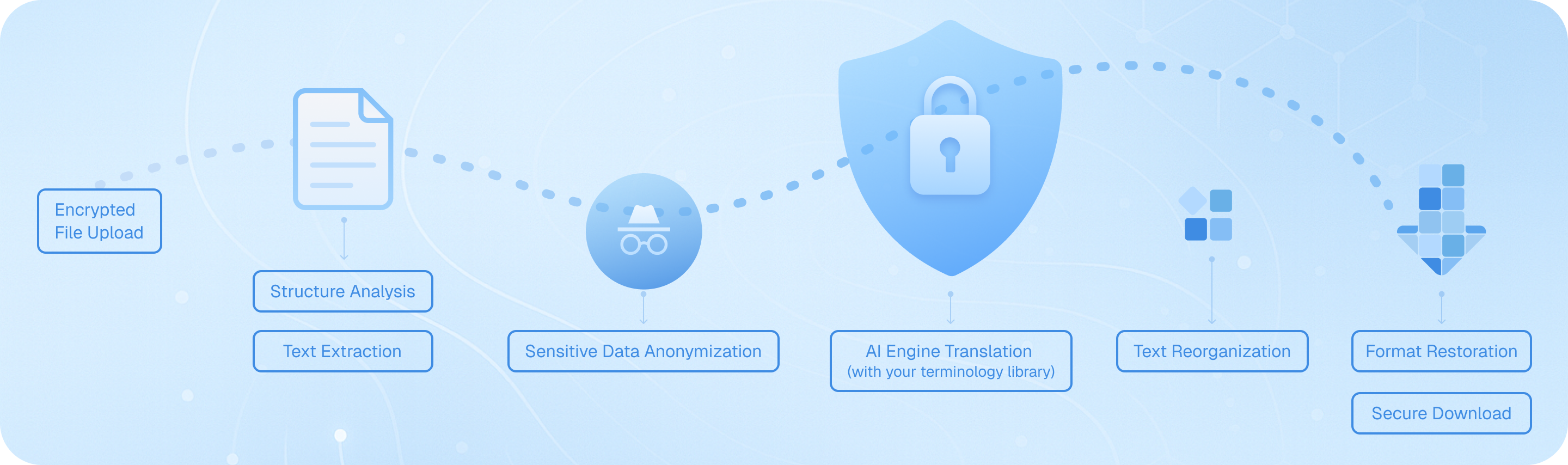
Carica il tuo file di sottotitoli tramite il nostro canale crittografato, dove il nostro sistema analizza la struttura SRT, estrae i segmenti di testo con timestamp, li elabora tramite il motore AI prescelto mantenendo i codici temporali, poi riassembla i dialoghi tradotti mantenendo intatta la formattazione originale—fornendo un file di sottotitoli bilingue o nella lingua di destinazione pronto per l'uso immediato nei tuoi progetti video.
Domande frequenti sulla traduzione di file SRT
Come posso tradurre i file di sottotitoli SRT mantenendo i codici temporali originali?
Quando si traducono file SRT, mantenere una sincronizzazione accurata dei timestamp è fondamentale per la riproduzione video. La funzione di traduzione documenti di Immersive Translate preserva automaticamente tutti i codici temporali e la struttura di formattazione quando carichi il tuo file SRT. Basta trascinare e rilasciare il file dei sottotitoli nell'interfaccia di traduzione, selezionare la lingua di destinazione tra oltre 100 opzioni supportate, e lo strumento tradurrà solo il contenuto testuale mantenendo intatti ogni timestamp, numero di sequenza e interruzione di riga. Ciò significa che i tuoi sottotitoli tradotti si sincronizzeranno perfettamente con il tuo video senza alcuna regolazione manuale. Per progetti professionali che richiedono versioni in più lingue dei sottotitoli, puoi elaborare in batch diversi file SRT contemporaneamente, risparmiando ore di lavoro manuale. L'opzione di output bilingue è particolarmente utile qui: visualizza sia il testo originale che quello tradotto affiancati, permettendoti di verificare l'accuratezza della traduzione rispetto al materiale originale prima di finalizzare i sottotitoli.
Quale motore di traduzione funziona meglio per tradurre i sottotitoli dei film e i sottotitoli dei video?
Il servizio di traduzione ideale per la traduzione di sottotitoli SRT dipende dal tuo tipo di contenuto specifico e dalla coppia di lingue. Per contenuti di intrattenimento come film e programmi TV, ChatGPT e DeepL eccellono nel catturare espressioni colloquiali, modi di dire e sfumature culturali che rendono il dialogo naturale nella lingua di destinazione. Questi motori comprendono meglio il contesto, il che è essenziale quando si traduce l'umorismo, lo slang o dialoghi emotivi. Per video tecnici, contenuti educativi o sottotitoli di documentari, Google Translate e Gemini forniscono un'accuratezza affidabile con terminologia specializzata. Immersive Translate ti dà accesso a oltre 18 motori di traduzione in un'unica piattaforma, così puoi sperimentare servizi diversi per lo stesso file SRT e confrontare i risultati. Molti traduttori di sottotitoli professionisti usano il nostro strumento per elaborare lo stesso file attraverso più motori, quindi selezionare l'output migliore o combinare i punti di forza di diverse traduzioni. La funzione AI Smart Context è particolarmente potente per i video più lunghi: analizza l'intero file dei sottotitoli prima di tradurre, garantendo che i nomi dei personaggi, i termini ricorrenti e gli elementi tematici rimangano coerenti in tutto il video, cosa che gli strumenti di traduzione frase per frase spesso trascurano.
Posso tradurre file SRT gratuitamente e quali sono le limitazioni?
Sì, Immersive Translate offre un piano gratuito generoso per la traduzione di file SRT che copre la maggior parte dei progetti personali e su piccola scala. Gli utenti gratuiti possono tradurre file di sottotitoli utilizzando più motori di traduzione, tra cui Google Translate, Bing e altri, con supporto per tutte le principali combinazioni linguistiche. La versione gratuita gestisce i file SRT standard senza restrizioni di dimensioni per le esigenze di traduzione di base, rendendola perfetta per tradurre progetti video personali, contenuti YouTube o materiali educativi. Tuttavia, se si lavora con video più lunghi o si necessita dell'accesso a motori AI premium come ChatGPT, DeepL o Gemini per una traduzione dei sottotitoli di qualità superiore, l'aggiornamento alla versione Pro sblocca queste opzioni avanzate. Gli utenti Pro beneficiano anche di quote di traduzione mensili più elevate—essenziale se si traducono regolarmente serie con più episodi, progetti cinematografici o contenuti video commerciali. Il piano gratuito è sinceramente utile per testare il servizio e gestire occasionali attività di traduzione dei sottotitoli, mentre i creatori di video professionisti, i team di localizzazione dei contenuti e le aziende mediatiche trovano solitamente che l'aggiornamento a Pro valga la pena per la precisione migliorata e la capacità di volume che offre.
In che modo la traduzione di sottotitoli bilingue aiuta nell'apprendimento delle lingue e nella verifica del contenuto?
La funzione di visualizzazione parallela bilingue trasforma la traduzione di file SRT da un semplice compito di conversione in un potente strumento di apprendimento e controllo qualità. Quando traduci i sottotitoli con Immersive Translate, puoi scegliere di visualizzare sia il testo originale che quello tradotto in un formato affiancato. Per gli studenti di lingue, questo crea un ambiente di studio immersivo: puoi guardare video con sottotitoli in doppia lingua, vedendo esattamente come frasi, modi di dire e strutture grammaticali vengono tradotte tra le lingue in un contesto conversazionale reale. Questo è molto più efficace dell'apprendimento tradizionale tramite libri di testo perché stai assorbendo modelli linguistici da dialoghi autentici. Per i creatori di contenuti e i traduttori professionisti, l'output bilingue funge da meccanismo essenziale di garanzia della qualità. Puoi scorrere rapidamente il testo parallelo per individuare errori di traduzione, verificare che i riferimenti culturali siano stati adattati in modo appropriato e assicurarti che i termini tecnici siano stati gestiti correttamente. Ciò è particolarmente prezioso quando si traducono video di marketing, materiali di formazione o qualsiasi contenuto in cui la precisione è importante. La possibilità di confrontare istantaneamente il testo di origine e quello di destinazione senza passare da un file all'altro accelera drasticamente il processo di revisione e aiuta a individuare errori che altrimenti potrebbero sfuggire.
Quali formati di file oltre all'SRT posso tradurre per i progetti di sottotitoli video?
Sebbene SRT sia il formato di sottotitoli più comune, la funzione di traduzione documenti di Immersive Translate supporta un'ampia gamma di tipi di file di sottotitoli e didascalie utilizzati su diverse piattaforme video e software di montaggio. Oltre ai file SRT standard, puoi tradurre direttamente i file VTT (comunemente usati per i video web e i lettori HTML5), i file ASS/SSA (formati di sottotitoli avanzati con opzioni di stile popolari nelle comunità di anime e fan-subbing) e formati di sottotitoli in testo normale. Questo supporto multi-formato è fondamentale perché diverse piattaforme video e strumenti di montaggio hanno preferenze di formato: YouTube utilizza SRT e VTT, i software professionali di montaggio video come Adobe Premiere lavorano spesso con SRT, mentre le piattaforme di streaming potrebbero richiedere formati specifici. Invece di convertire manualmente tra i formati prima della traduzione, puoi caricare il tuo file di sottotitoli nel suo formato nativo, tradurlo e poi convertirlo se necessario. Lo strumento gestisce anche tipi di documenti correlati che spesso accompagnano i progetti video: puoi tradurre sceneggiature video in formato DOCX, tradurre storyboard o elenchi di inquadrature in PDF e persino tradurre pagine HTML contenenti trascrizioni di video incorporate. Questo approccio unificato significa che i creatori di video possono gestire l'intero flusso di lavoro dei contenuti multilingue in un unico posto, invece di doversi destreggiare tra più strumenti di traduzione specializzati.
Come posso garantire una terminologia coerente durante la traduzione dei file dei sottotitoli per una serie video o un corso?
Mantenere una terminologia coerente tra più file di sottotitoli è una delle sfide più grandi nella traduzione di serie video, e la funzione Contesto Intelligente AI di Immersive Translate affronta specificamente questo problema. Quando si traducono i sottotitoli degli episodi, i moduli del corso o qualsiasi contenuto video in più parti, l'opzione di traduzione AI basata sul contesto analizza l'intero documento prima di iniziare la traduzione. Questo passaggio di pre-elaborazione identifica i nomi dei personaggi ricorrenti, i termini tecnici, i nomi dei marchi e il vocabolario tematico, quindi garantisce che questi elementi vengano tradotti in modo coerente in tutto il testo. Ad esempio, se stai traducendo una serie di programmi di cucina, i nomi degli ingredienti, le tecniche di cottura e le frasi tipiche dello chef manterranno la stessa traduzione in tutti gli episodi. Questo è un vantaggio significativo rispetto ai traduttori di sottotitoli di base che elaborano ogni riga in modo indipendente senza comprendere il contesto più ampio. Per un controllo ancora maggiore, puoi tradurre tutti gli episodi di una serie utilizzando lo stesso motore di traduzione e le stesse impostazioni, creando un'esperienza di visione multilingua coesa. I team professionisti di localizzazione dei contenuti apprezzano particolarmente questa funzione quando adattano corsi educativi, serie di formazione o contenuti video di marca, dove la coerenza della terminologia ha un impatto diretto sulla comprensione e sull'identità del marchio. La possibilità di elaborare in batch più file SRT con parametri di traduzione coerenti fa risparmiare una quantità enorme di tempo rispetto alla revisione manuale di ogni file per applicare gli standard terminologici.
Posso utilizzare i file SRT tradotti a scopo commerciale e in che modo questo strumento supporta i flussi di lavoro di localizzazione video professionale?
Assolutamente sì: Immersive Translate è progettato per supportare sia progetti di localizzazione video commerciale personali che professionali. I file SRT tradotti che generi sono tuoi da utilizzare senza restrizioni, rendendo lo strumento adatto ai creator di YouTube che monetizzano contenuti multilingue, alle aziende che producono video di formazione per team internazionali, alle istituzioni educative che creano materiali didattici per popolazioni studentesche diverse e alle aziende mediatiche che localizzano contenuti di intrattenimento per la distribuzione globale. Le funzionalità di livello professionale della piattaforma supportano specificamente i flussi di lavoro commerciali: puoi elaborare più file di sottotitoli in operazioni batch, accedere a motori di traduzione premium che forniscono risultati di qualità pubblicabile ed esportare in formati compatibili con piattaforme di montaggio e distribuzione video professionali. L'opzione di output bilingue funge da passaggio integrato di controllo qualità, consentendo ai project manager di rivedere le traduzioni prima della consegna finale. Per le agenzie che gestiscono progetti di localizzazione video per clienti, la possibilità di passare tra oltre 18 motori di traduzione significa che puoi adattare l'approccio di traduzione alle esigenze specifiche di ogni cliente: utilizzando motori più creativi per il contenuto di marketing e motori più letterali per la documentazione tecnica. Le generose quote mensili nella versione Pro soddisfano le esigenze di lavoro commerciale ad alto volume e la formattazione conservata garantisce che i sottotitoli tradotti si integrino perfettamente nelle pipeline di produzione video esistenti senza richiedere riformattazione manuale o modifiche al timing.
Formati Supportati
Traduttore PDFTraduttore di sottotitoliTraduttore HTMLTraduttore ePubtraduttore MarkdownTraduttore di file txtTraduttore di file WordTraduttore di file SRTTraduttore di file VTTTraduttore di CVTraduttore freelanceTraduttore di gare d'appaltoTraduttore di business planSegnala traduttoreTraduzione di referto medicoTraduzione di relazione annualeTraduzione di report finanziariTraduzione di rapporto aziendaleTraduzione di riviste