

















Miglior traduttore Markdown per risultati istantanei
1
Seleziona lo strumento di traduzione per le tue esigenze.
2
Carica il file.
3
Scarica il documento tradotto nel formato preferito.
Traduttore Markdown: Precisione incontra la semplicità
Il Traduttore di Documenti di Immersive Translate fornisce traduzioni markdown istantanee e accurate con visualizzazione bilingue, preservando la formattazione e supportando oltre 18 motori AI per risultati di livello professionale.

Preservazione della formattazione
Mantiene perfettamente la sintassi markdown originale, le intestazioni, gli elenchi e i blocchi di codice durante la traduzione senza alterare la struttura.
Accuratezza della traduzione
I motori AI basati sul contesto analizzano l'intero documento prima di tradurre, garantendo una terminologia coerente e una formulazione naturale in tutto il documento.
Motori multipli
Scegli tra ChatGPT, DeepL, Gemini o oltre 15 altri servizi per adattare il tuo tipo di contenuto markdown.
Output bilingue
La visualizzazione affiancata mostra il markdown originale e quello tradotto contemporaneamente, ideale per la revisione della documentazione tecnica e l'apprendimento.

Elaborazione sicura
La crittografia end-to-end protegge i tuoi file markdown durante la traduzione, senza conservazione dei dati al completamento dell'elaborazione.
Chi usa i traduttori Markdown

Barriere nella documentazione tecnica
Gli ingegneri del software traducono i file README e la documentazione delle API per collaborare a livello globale, preservando i blocchi di codice e la formattazione passando senza problemi da un linguaggio di programmazione all'altro.

Sfide nella localizzazione dei contenuti
Gli scrittori tecnici e i blogger traducono articoli in markdown per un pubblico internazionale, mantenendo collegamenti ipertestuali, immagini e lo stile per raggiungere efficacemente i lettori multilingua.

Esigenze di preservazione del formato
I linguisti professionisti gestiscono file markdown dai clienti, richiedendo strumenti che mantengano la struttura originale, i metadati e i caratteri speciali durante il flusso di lavoro di traduzione.
Come funziona la traduzione Markdown
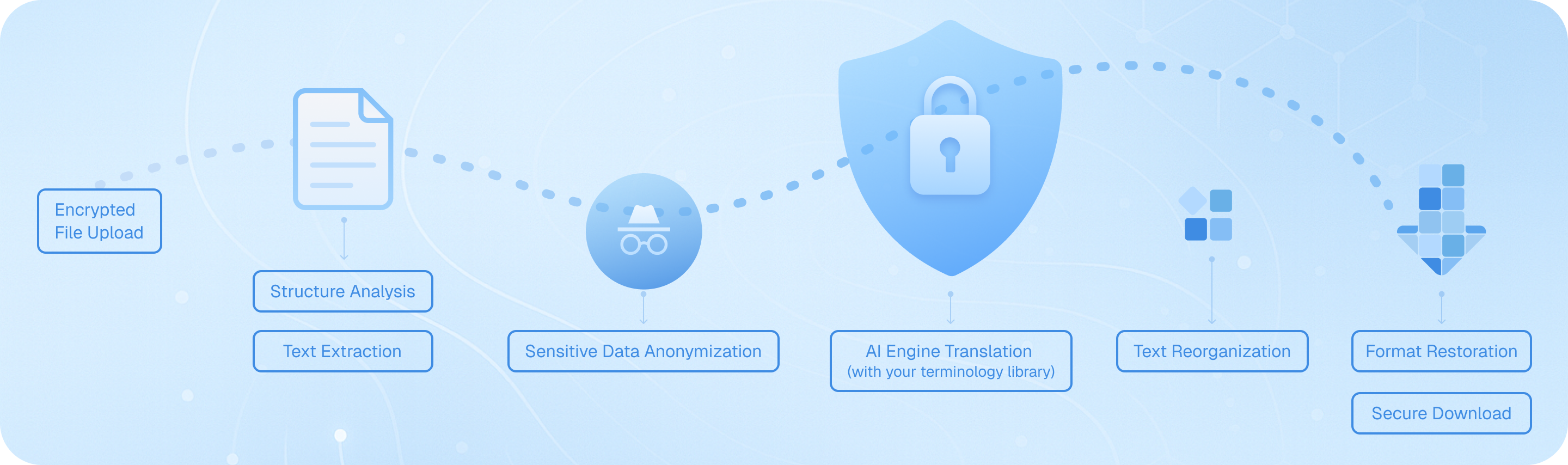
Carica il tuo file Markdown in modo sicuro, e il nostro sistema ne analizza la struttura—intestazioni, elenchi, blocchi di codice—quindi estrae il testo traducibile preservando la formattazione. I motori di intelligenza artificiale traducono il contenuto con consapevolezza del contesto, riassemblano gli elementi mantenendo la sintassi originale e forniscono un file bilingue o nella lingua di destinazione pronto per il download, mantenendo intatta la tua documentazione tecnica.
Domande frequenti sulla traduzione di Markdown
Come posso tradurre i file Markdown preservando la formattazione e i blocchi di codice?
Quando si traducono documenti Markdown, mantenere la struttura originale, inclusi intestazioni, elenchi, frammenti di codice e formattazione in linea, è fondamentale. La funzione di traduzione documenti di Immersive Translate gestisce i file Markdown in modo intelligente riconoscendo la sintassi e preservando tutti gli elementi di formattazione durante la traduzione. Carica semplicemente il tuo file .md tramite l'estensione del browser o l'app mobile, seleziona la lingua di destinazione e scegli tra oltre 18 motori di traduzione AI come ChatGPT, DeepL o Gemini. Lo strumento elabora il tuo contenuto mantenendo intatti i blocchi di codice, i collegamenti e i marcatori di enfasi. Per la documentazione tecnica o le note per sviluppatori scritte in formato Markdown, questo assicura che la versione tradotta rimanga funzionale e leggibile. L'opzione di visualizzazione bilingue affiancata è particolarmente utile qui: puoi confrontare il contenuto Markdown originale e quello tradotto paragrafo per paragrafo, rendendo facile verificare che i termini tecnici, i nomi delle variabili e gli esempi di sintassi siano gestiti correttamente. Questo approccio fa risparmiare ore rispetto alla traduzione manuale o all'uso di traduttori di testo di base che interrompono la struttura Markdown.
Qual è il modo migliore per tradurre la documentazione Markdown multilingue per team internazionali?
Per i team che gestiscono documentazione tecnica, file README o basi di conoscenza in Markdown, Immersive Translate offre un flusso di lavoro semplificato che supporta oltre 100 coppie di lingue. La funzione AI Smart Context della piattaforma è particolarmente potente per i documenti Markdown lunghi: pre-riassume il contenuto prima della traduzione, garantendo una terminologia coerente e mantenendo il contesto tra più sezioni. Ciò è fondamentale quando si traduce la documentazione per sviluppatori, dove un termine come 'deployment' o 'repository' deve essere tradotto coerentemente in tutto il testo. Puoi elaborare in batch più file Markdown, scegliendo diversi motori di traduzione in base alle tue esigenze: DeepL per le lingue europee, ChatGPT per contenuti tecnici sfumati o Google Translate per bozze rapide. La versione gratuita consente un utilizzo sostanziale, mentre la versione Pro aumenta la tua quota mensile di pagine a 10.000 pagine, ideale per grandi progetti di documentazione. Dopo la traduzione, la sintassi Markdown preservata significa che puoi immediatamente eseguire il commit dei file tradotti nel tuo repository o pubblicarli sul tuo sito di documentazione senza riformattazione. Ciò elimina il tradizionale collo di bottiglia delle correzioni di formattazione manuale dopo la traduzione.
Posso tradurre direttamente i contenuti Markdown nel mio browser mentre leggo repository GitHub o siti di documentazione?
Assolutamente. L'estensione browser di Immersive Translate trasforma il modo in cui consumi contenuti basati su Markdown su piattaforme come GitHub, GitLab o servizi di hosting della documentazione. Quando visualizzi un file README.md o una pagina wiki, attiva semplicemente l'estensione per vedere una traduzione bilingue istantanea sovrapposta al contenuto originale. La modalità di traduzione parallela visualizza il Markdown sorgente e la versione tradotta affiancate, il che è inestimabile quando si cerca di comprendere la documentazione del codice in lingua straniera o le istruzioni dei progetti open source. Per ricerche rapide, la funzione di traduzione al passaggio del mouse ti consente di evidenziare qualsiasi paragrafo Markdown o commento del codice per vedere un popup di traduzione immediato: perfetto per comprendere termini tecnici specifici senza tradurre l'intera pagina. Puoi anche usare le scorciatoie da tastiera per attivare e disattivare la traduzione, rendendo fluido il passaggio tra le modalità di lettura. Questa capacità di traduzione Markdown in tempo reale funziona su Chrome, Edge, Firefox e Safari e supporta gli stessi 18+ motori di traduzione disponibili per il caricamento dei documenti. Per gli sviluppatori che collaborano a progetti internazionali o imparano dalle comunità open source globali, questa funzione elimina le barriere linguistiche senza interrompere il tuo flusso di lavoro.
Come gestisce Immersive Translate la terminologia tecnica e gli snippet di codice all'interno dei file Markdown?
I documenti tecnici in Markdown spesso mescolano linguaggio naturale con esempi di codice, riferimenti API e terminologia specializzata: una sfida per gli strumenti di traduzione standard. Immersive Translate affronta questo problema attraverso il riconoscimento intelligente del contenuto: rileva automaticamente i blocchi di codice (sia in linea che delimitati) e li preserva senza tradurli, assicurando che i vostri esempi di sintassi rimangano funzionali. Per il testo esplicativo circostante, puoi sfruttare motori AI premium come ChatGPT o DeepSeek, che comprendono il contesto tecnico meglio della traduzione automatica tradizionale. Questi motori riconoscono concetti di programmazione, nomi di framework e gergo del settore, fornendo traduzioni più accurate che mantengono il significato previsto. Quando si traduce la documentazione per sviluppatori, le guide API o post di blog tecnici scritti in Markdown, l'opzione AI Smart Context analizza prima l'intera struttura del documento, costruendo un glossario di termini tecnici ricorrenti per garantire la coerenza. Ad esempio, se il tuo file Markdown discute di "funzioni asincrone" nella prima sezione, lo stesso termine verrà tradotto in modo identico nelle sezioni successive. Puoi anche creare regole di traduzione personalizzate o utilizzare la funzione di miglioramento della casella di input per perfezionare specifiche frasi tecniche prima di finalizzare la traduzione. Questa combinazione di conservazione automatica del codice e traduzione consapevole del contesto rende Immersive Translate unico nel suo genere per i contenuti tecnici in Markdown.
Quali sono i vantaggi dell'utilizzo della traduzione Markdown bilingue per l'apprendimento e la documentazione?
La visualizzazione parallela bilingue è una delle funzionalità più potenti di Immersive Translate per chiunque lavori con contenuti Markdown a scopo educativo o di consultazione. Quando traduci un tutorial Markdown, materiale didattico o una guida tecnica, vedere le versioni originale e tradotta affiancate accelera la comprensione e l'apprendimento linguistico. Gli studenti che studiano programmazione attraverso tutorial Markdown in lingua straniera possono seguire il corso nella propria lingua madre acquisendo gradualmente il vocabolario tecnico nella lingua di origine. Per i redattori di documentazione che creano versioni multilingue dello stesso contenuto Markdown, la vista parallela funge da controllo qualità istantaneo: puoi verificare che titoli, elenchi ed enfasi siano tradotti correttamente e che nessun contenuto sia stato omesso accidentalmente. I ricercatori che traducono note accademiche in Markdown o revisioni della letteratura traggono beneficio dalla possibilità di citare la formulazione originale comprendendo al contempo la traduzione. La preservazione del formato significa che tutti i tuoi elementi Markdown — tabelle, note a piè di pagina, blocchi di citazione — appaiono correttamente in entrambe le lingue, mantenendo la struttura pedagogica del documento. Questo approccio è di gran lunga superiore all'output di sola traduzione, che ti costringe a passare costantemente da un file all'altro per verificarne la precisione. In combinazione con la funzione di traduzione istantanea tramite selezione del testo, puoi fare clic su qualsiasi termine sconosciuto in una delle due colonne per vedere definizioni e pronuncia, trasformando ogni documento Markdown in una risorsa di apprendimento interattiva.
Come posso tradurre efficientemente grandi progetti Markdown o interi repository di documentazione?
Per progetti di traduzione Markdown sostanziali—come interi siti di documentazione, e-book a più capitoli o basi di conoscenza complete—il sistema di traduzione documenti di Immersive Translate offre sia efficienza che qualità. Inizia caricando i tuoi file Markdown tramite l'estensione; la piattaforma supporta l'elaborazione in batch, quindi puoi mettere in coda più file .md per la traduzione in un'unica sessione. La funzione AI Smart Context diventa essenziale qui: analizza le relazioni tra i documenti, mantenendo una terminologia coerente in tutto il progetto. Ad esempio, se stai traducendo un manuale software con file Markdown separati per l'installazione, la configurazione e la risoluzione dei problemi, il sistema garantisce che termini tecnici come "variabile d'ambiente" o "dipendenza" vengano tradotti in modo identico in tutto il testo. Con la versione Pro (BabelDOC), ottieni l'accesso al rilevamento avanzato della struttura del documento e puoi tradurre fino a 10.000 pagine mensilmente—sufficiente anche per progetti di documentazione su larga scala. La formattazione Markdown preservata significa che i tuoi file tradotti sono immediatamente utilizzabili; puoi integrarli in generatori di siti statici come Jekyll, Hugo o MkDocs senza ulteriori elaborazioni. Per progetti in corso, puoi salvare il tuo motore di traduzione preferito e le impostazioni della coppia di lingue, semplificando i futuri aggiornamenti. Questo approccio sistematico riduce i tempi di traduzione da settimane a ore mantenendo una qualità professionale, rendendo pratico mantenere una documentazione multilingue senza un team di traduzione dedicato.
Esiste una soluzione conveniente per tradurre regolarmente i contenuti Markdown per blog o la creazione di contenuti?
I creatori di contenuti, i blogger tecnici e i manutentori di documentazione che lavorano regolarmente con Markdown troveranno il modello di prezzi di Immersive Translate eccezionalmente pratico. Il livello gratuito offre un accesso generoso a più motori di traduzione e supporta tutte le principali funzionalità Markdown, rendendolo adatto per blogger individuali o piccoli progetti. Puoi tradurre fino a 1.000 pagine mensilmente con le funzionalità avanzate di BabelDOC senza costi—più che sufficiente per post di blog settimanali o aggiornamenti regolari della documentazione. Per i creatori di contenuti professionisti che gestiscono più siti o pubblicano frequentemente, l'abbonamento pro sblocca 10.000 pagine mensili e l'accesso prioritario ai motori AI premium come ChatGPT e Gemini, che offrono traduzioni più naturali e coinvolgenti adatte ai contenuti pubblici. La disponibilità multipiattaforma significa che puoi tradurre bozze Markdown sul tuo browser desktop, quindi rivederle e perfezionarle sul tuo dispositivo mobile. La funzione di miglioramento della casella di input è particolarmente utile per i creatori di contenuti: quando scrivi nuovi contenuti Markdown, puoi tradurre singoli paragrafi o sezioni in tempo reale per creare post bilingue contemporaneamente. Questo elimina il flusso di lavoro tradizionale di scrivere in una lingua, quindi tradurre e formattare separatamente per altri pubblici. Combinato con la possibilità di passare da un servizio di traduzione all'altro in base al tipo di contenuto—usando DeepL per i blog in lingue europee o ChatGPT per la scrittura tecnica creativa—ottieni una traduzione Markdown di qualità professionale a una frazione del costo dell'assunzione di traduttori umani o della sottoscrizione a più strumenti specializzati.
Formati Supportati
Traduttore PDFTraduttore di sottotitoliTraduttore HTMLTraduttore ePubtraduttore MarkdownTraduttore di file txtTraduttore di file WordTraduttore di file SRTTraduttore di file VTTTraduttore di CVTraduttore freelanceTraduttore di gare d'appaltoTraduttore di business planSegnala traduttoreTraduzione di referto medicoTraduzione di relazione annualeTraduzione di report finanziariTraduzione di rapporto aziendaleTraduzione di riviste