

















El mejor traductor de Markdown para resultados instantáneos
1
Selecciona la herramienta de traducción para tus necesidades.
2
Sube el archivo.
3
Descarga el documento traducido en tu formato preferido.
Traductor de Markdown: Precisión y Simplicidad
El Traductor de Documentos de Immersive Translate proporciona una traducción de markdown instantánea y precisa con visualización bilingüe, preservando el formato y admitiendo más de 18 motores de IA para obtener resultados de calidad profesional.

Preservación del Formato
Mantiene perfectamente la sintaxis, encabezados, listas y bloques de código originales de markdown durante la traducción sin romper la estructura.
Precisión de Traducción
Los motores de IA con conciencia del contexto analizan documentos completos antes de traducir, asegurando una terminología consistente y una fraseología natural en todo momento.
Múltiples Motores
Elija entre ChatGPT, DeepL, Gemini u otros 15+ servicios para adaptarse a su tipo de contenido markdown.
Salida Bilingüe
La visualización lado a lado muestra el markdown original y traducido simultáneamente, ideal para corregir documentación técnica y aprender.

Procesamiento Seguro
El cifrado de extremo a extremo protege sus archivos markdown durante la traducción, sin retención de datos una vez completado el procesamiento.
Quiénes utilizan traductores de Markdown

Barreras en la documentación técnica
Los ingenieros de software traducen archivos README y documentación de API para colaborar a nivel global, preservando los bloques de código y el formato mientras cambian sin problemas entre lenguajes de programación.

Desafíos de localización de contenido
Los redactores técnicos y blogueros traducen artículos en markdown para audiencias internacionales, manteniendo hipervínculos, imágenes y estilos para llegar de manera eficiente a lectores multilingües.

Demandas de preservación de formato
Los lingüistas profesionales manejan archivos markdown de clientes, requiriendo herramientas que mantengan la estructura original, los metadatos y los caracteres especiales a lo largo del flujo de trabajo de traducción.
Cómo funciona la traducción de Markdown
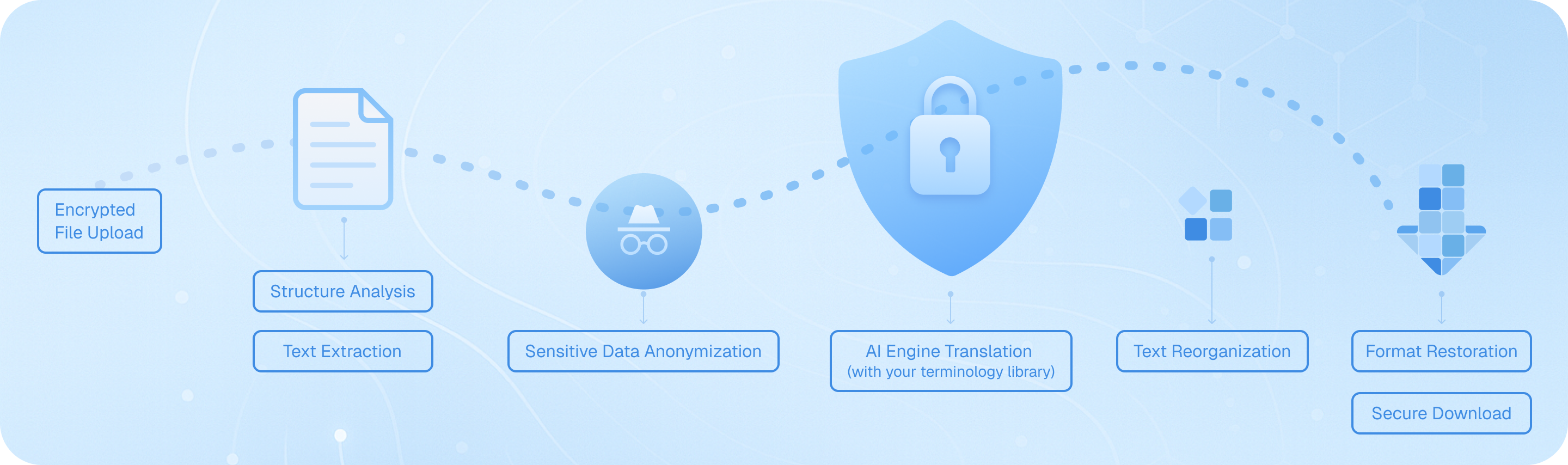
Cargue su archivo Markdown de forma segura, y nuestro sistema analiza su estructura—encabezados, listas, bloques de código—luego extrae el texto traducible conservando el formato. Los motores de IA traducen el contenido con conciencia del contexto, reensamblan los elementos manteniendo la sintaxis original y entregan un archivo bilingüe o en el idioma de destino listo para descargar, manteniendo su documentación técnica intacta.
Preguntas frecuentes sobre la traducción de Markdown
¿Cómo puedo traducir archivos Markdown conservando el formato y los bloques de código?
Al traducir documentos Markdown, es fundamental mantener la estructura original, incluidos los encabezados, listas, fragmentos de código y formato en línea. La función de traducción de documentos de Immersive Translate gestiona los archivos Markdown de forma inteligente reconociendo la sintaxis y conservando todos los elementos de formato durante la traducción. Simplemente cargue su archivo .md a través de la extensión del navegador o la aplicación móvil, seleccione su idioma de destino y elija entre más de 18 motores de traducción de IA como ChatGPT, DeepL o Gemini. La herramienta procesa su contenido manteniendo los bloques de código, enlaces y marcadores de énfasis intactos. Para documentación técnica o notas de desarrollador escritas en formato Markdown, esto garantiza que su versión traducida siga siendo funcional y legible. La opción de visualización bilingüe lado a lado es particularmente valiosa aquí; puede comparar el contenido Markdown original y el traducido párrafo por párrafo, lo que facilita verificar que los términos técnicos, nombres de variables y ejemplos de sintaxis se manejen correctamente. Este enfoque ahorra horas en comparación con la traducción manual o el uso de traductores de texto básicos que rompen la estructura de Markdown.
¿Cuál es la mejor manera de traducir documentación en Markdown multilingüe para equipos internacionales?
Para equipos que gestionan documentación técnica, archivos README o bases de conocimientos en Markdown, Immersive Translate ofrece un flujo de trabajo optimizado que admite más de 100 pares de idiomas. La función de Contexto Inteligente con IA de la plataforma es especialmente potente para documentos Markdown largos: pre-resume su contenido antes de la traducción, garantizando una terminología coherente y manteniendo el contexto en varias secciones. Esto es fundamental al traducir documentación de desarrolladores, donde un término como 'despliegue' o 'repositorio' debe traducirse de manera coherente a lo largo del texto. Puede procesar por lotes varios archivos Markdown, eligiendo diferentes motores de traducción según sus necesidades: DeepL para idiomas europeos, ChatGPT para contenido técnico matizado o Google Translate para borradores rápidos. El nivel gratuito permite un uso sustancial, mientras que la versión pro aumenta su cuota mensual de páginas a 10.000 páginas, ideal para grandes proyectos de documentación. Después de la traducción, la sintaxis de Markdown preservada significa que puede confirmar inmediatamente los archivos traducidos en su repositorio o publicarlos en su sitio de documentación sin reformatear. Esto elimina el cuello de botella tradicional de las correcciones de formato manual después de la traducción.
¿Puedo traducir contenido de Markdown directamente en mi navegador mientras leo repositorios de GitHub o sitios de documentación?
Absolutamente. La extensión de navegador de Immersive Translate transforma la forma en que consumes contenido basado en Markdown en plataformas como GitHub, GitLab o servicios de alojamiento de documentación. Al ver un archivo README.md o una página wiki, simplemente activa la extensión para ver una traducción bilingüe instantánea superpuesta al contenido original. El modo de traducción paralela muestra el Markdown original y la versión traducida una al lado de la otra, lo cual es invaluable cuando intentas entender documentación de código en idiomas extranjeros o instrucciones de proyectos de código abierto. Para consultas rápidas, la función de traducción al pasar el mouse te permite resaltar cualquier párrafo de Markdown o comentario de código para ver una ventana emergente de traducción inmediata, perfecta para entender términos técnicos específicos sin traducir la página completa. También puedes usar atajos de teclado para activar y desactivar la traducción, lo que hace que sea fluido cambiar entre modos de lectura. Esta capacidad de traducción de Markdown en tiempo real funciona en Chrome, Edge, Firefox y Safari, y admite los mismos más de 18 motores de traducción disponibles para la carga de documentos. Para desarrolladores que colaboran en proyectos internacionales o aprenden de comunidades globales de código abierto, esta función elimina las barreras del idioma sin interrumpir tu flujo de trabajo.
¿Cómo maneja Immersive Translate la terminología técnica y los fragmentos de código dentro de los archivos Markdown?
Los documentos técnicos de Markdown a menudo mezclan lenguaje natural con ejemplos de código, referencias de API y terminología especializada, un desafío para las herramientas de traducción estándar. Immersive Translate aborda esto mediante el reconocimiento inteligente de contenido: detecta automáticamente los bloques de código (tanto en línea como cercados) y los preserva sin traducir, asegurando que sus ejemplos de sintaxis sigan siendo funcionales. Para el texto explicativo circundante, puede aprovechar motores de IA premium como ChatGPT o DeepSeek, que entienden el contexto técnico mejor que la traducción automática tradicional. Estos motores reconocen conceptos de programación, nombres de marcos de trabajo y jerga de la industria, proporcionando traducciones más precisas que mantienen el significado deseado. Al traducir documentación para desarrolladores, guías de API o publicaciones de blog técnicas escritas en Markdown, la opción de Contexto Inteligente de IA analiza primero la estructura completa del documento, construyendo un glosario de términos técnicos recurrentes para garantizar la coherencia. Por ejemplo, si su archivo Markdown trata sobre 'funciones asíncronas' en la primera sección, el mismo término se traducirá de manera idéntica en las secciones posteriores. También puede crear reglas de traducción personalizadas o utilizar la función de mejora del cuadro de entrada para perfeccionar frases técnicas específicas antes de finalizar su traducción. Esta combinación de preservación automática de código y traducción consciente del contexto hace que Immersive Translate sea único para el contenido técnico de Markdown.
¿Cuáles son las ventajas de utilizar la traducción bilingüe de Markdown para el aprendizaje y la documentación?
La visualización paralela bilingüe es una de las características más potentes de Immersive Translate para cualquiera que trabaje con contenido Markdown con fines educativos o de referencia. Cuando traduces un tutorial de Markdown, material de curso o guía técnica, ver las versiones original y traducida una al lado de la otra acelera la comprensión y el aprendizaje del idioma. Los estudiantes que estudian programación a través de tutoriales de Markdown en idiomas extranjeros pueden seguir en su idioma nativo mientras, poco a poco, adquieren vocabulario técnico en el idioma de origen. Para los redactores de documentación que crean versiones multilingües del mismo contenido Markdown, la vista paralela sirve como una verificación de calidad instantánea: puedes verificar que los encabezados, listas y énfasis se traduzcan correctamente y que no se haya omitido contenido accidentalmente. Los investigadores que traducen notas académicas de Markdown o revisiones bibliográficas se benefician al poder citar la redacción original mientras comprenden la traducción. La preservación del formato significa que todos tus elementos de Markdown (tablas, notas al pie, citas en bloque) aparecen correctamente en ambos idiomas, manteniendo la estructura pedagógica del documento. Este enfoque es muy superior a la salida de solo traducción, que te obliga a cambiar constantemente entre archivos para verificar la precisión. Combinado con la función de traducción instantánea por selección de texto, puedes hacer clic en cualquier término desconocido en cualquiera de las dos columnas para ver definiciones y pronunciación, convirtiendo cada documento de Markdown en un recurso de aprendizaje interactivo.
¿Cómo puedo traducir grandes proyectos de Markdown o repositorios de documentación completos de manera eficiente?
Para proyectos de traducción de Markdown sustanciales, como sitios de documentación completos, libros electrónicos de varios capítulos o bases de conocimiento exhaustivas, el sistema de traducción de documentos de Immersive Translate ofrece eficiencia y calidad. Comience cargando sus archivos Markdown a través de la extensión; la plataforma admite el procesamiento por lotes, por lo que puede poner en cola varios archivos .md para traducirlos en una sola sesión. La función de contexto inteligente de la IA se vuelve esencial aquí: analiza las relaciones entre los documentos, manteniendo una terminología coherente en todo su proyecto. Por ejemplo, si está traduciendo un manual de software con archivos Markdown separados para la instalación, la configuración y la solución de problemas, el sistema garantiza que los términos técnicos como 'variable de entorno' o 'dependencia' se traduzcan de manera idéntica en todo el documento. Con la versión Pro (BabelDOC), obtiene acceso a la detección avanzada de la estructura del documento y puede traducir hasta 10.000 páginas mensuales, suficiente incluso para proyectos de documentación a gran escala. El formato Markdown preservado significa que sus archivos traducidos son inmediatamente utilizables; puede integrarlos en generadores de sitios estáticos como Jekyll, Hugo o MkDocs sin procesamiento adicional. Para proyectos en curso, puede guardar su motor de traducción preferido y la configuración del par de idiomas, lo que agiliza las futuras actualizaciones. Este enfoque sistemático reduce el tiempo de traducción de semanas a horas y mantiene una calidad profesional, lo que hace que sea práctico mantener documentación multilingüe sin un equipo de traducción dedicado.
¿Existe una solución rentable para traducir contenido de Markdown regularmente para blogs o creación de contenido?
Los creadores de contenido, blogueros técnicos y mantenedores de documentación que trabajan regularmente con Markdown encontrarán el modelo de precios de Immersive Translate excepcionalmente práctico. El nivel gratuito ofrece un acceso generoso a múltiples motores de traducción y admite todas las funciones principales de Markdown, lo que lo hace viable para blogueros individuales o proyectos pequeños. Puede traducir hasta 1,000 páginas mensualmente con las funciones avanzadas de BabelDOC sin costo alguno, más que suficiente para publicaciones semanales de blog o actualizaciones regulares de documentación. Para los creadores de contenido profesionales que gestionan varios sitios o publican con frecuencia, la suscripción pro desbloquea 10,000 páginas mensuales y acceso prioritario a motores de IA premium como ChatGPT y Gemini, que ofrecen traducciones más naturales y atractivas, adecuadas para contenido orientado al público. La disponibilidad multiplataforma significa que puede traducir borradores de Markdown en su navegador de escritorio y luego revisarlos y perfeccionarlos en su dispositivo móvil. La función de mejora del cuadro de entrada es particularmente útil para los creadores de contenido: al escribir nuevo contenido en Markdown, puede traducir párrafos o secciones individuales en tiempo real para crear publicaciones bilingües simultáneamente. Esto elimina el flujo de trabajo tradicional de escribir en un idioma y luego traducir y formatear por separado para otras audiencias. Combinado con la capacidad de cambiar entre servicios de traducción según el tipo de contenido —usando DeepL para blogs en idiomas europeos o ChatGPT para escritura técnica creativa—, obtiene una traducción de Markdown de calidad profesional a una fracción del costo de contratar traductores humanos o suscribirse a múltiples herramientas especializadas.
Formatos Soportados
Traductor de PDFTraductor de subtítulosTraductor de HTMLTraductor de ePubtraductor de Markdowntraductor de archivos txtTraductor de archivos de WordTraductor de archivo SRTTraductor de archivos ASSTraductor de archivo VTTTraductor de currículumTraductor de contratosTraductor tiernoTraductor de plan de negociosTraducir papelTraductor de informesTraducción de informe médicoTraducción de informes financierosTraducción de informe de negociosTraducción de revistas