
Translate SRT Files with Immersive Translate
1
Select translation tool for your needs.
2
Upload the file.
3
Download translated document with your preferred format.
Professional SRT File Translator Features
Immersive Translate delivers precise subtitle translation with format preservation, multiple AI engines, and bilingual display for seamless video localization.

Format Integrity
Preserves original SRT timing codes and structure perfectly. Your subtitle file maintains synchronization without manual adjustments needed.
Translation Accuracy
Leverages 18+ AI engines including DeepL and ChatGPT for context-aware subtitle translation with natural dialogue flow.

Bilingual Output
Generates side-by-side original and translated subtitles. Ideal for language learning and quality verification of translations.
Multi-Engine Support
Choose from ChatGPT, Gemini, or DeepSeek engines. Switch translators instantly to compare quality and accuracy.


Secure Processing
Your SRT files remain private with encrypted transmission. We never store or share your subtitle content.
Who Uses SRT Translators

Reaching Global Audiences
Video creators translate SRT subtitles to expand viewership across language barriers, ensuring their content resonates with international audiences through accurate bilingual captions.

Accessible Learning Materials
Teachers translate lecture subtitles into multiple languages, making educational videos accessible to diverse student populations and supporting inclusive multilingual classroom environments.

Multilingual Live Content
Live streamers and podcasters translate archived stream subtitles, repurposing content for global audiences and building international communities through accessible multilingual video libraries.
How SRT Translation Works
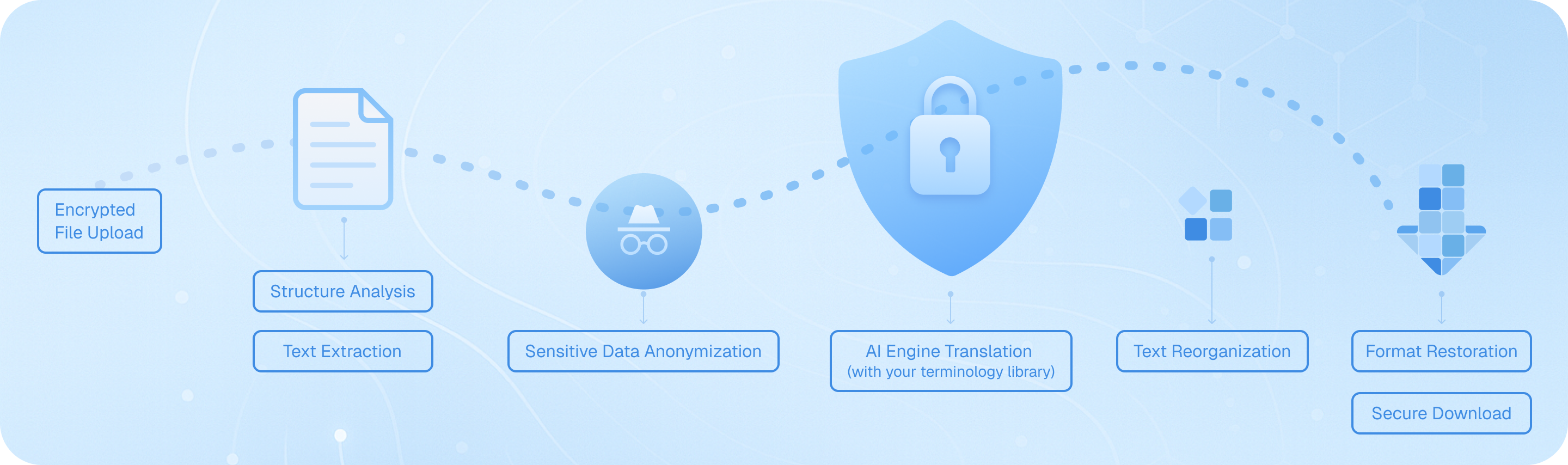
Upload your subtitle file through our encrypted channel, where our system analyzes the SRT structure, extracts timestamped text segments, processes them through your chosen AI engine while preserving timing codes, then reassembles the translated dialogue with original formatting intact—delivering a bilingual or target-language subtitle file ready for immediate use in your video projects.
Frequently Asked Questions About SRT File Translation
How can I translate SRT subtitle files while preserving the original timing codes?
When translating SRT files, maintaining accurate timestamp synchronization is crucial for video playback. Immersive Translate's document translation feature automatically preserves all timing codes and formatting structure when you upload your SRT file. Simply drag and drop your subtitle file into the translation interface, select your target language from over 100 supported options, and the tool will translate only the text content while keeping every timestamp, sequence number, and line break intact. This means your translated subtitles will sync perfectly with your video without any manual adjustment. For professional projects requiring multiple subtitle language versions, you can batch-process several SRT files simultaneously, saving hours of manual work. The bilingual output option is particularly valuable here—it displays both the original and translated text side by side, allowing you to verify translation accuracy against the source material before finalizing your subtitles.
Which translation engine works best for translating movie subtitles and video captions?
The ideal translation service for SRT subtitle translation depends on your specific content type and language pair. For entertainment content like movies and TV shows, ChatGPT and DeepL excel at capturing colloquial expressions, idioms, and cultural nuances that make dialogue sound natural in the target language. These engines understand context better, which is essential when translating humor, slang, or emotional dialogue. For technical videos, educational content, or documentary subtitles, Google Translate and Gemini provide reliable accuracy with specialized terminology. Immersive Translate gives you access to 18+ translation engines in one platform, so you can experiment with different services for the same SRT file and compare results. Many professional subtitle translators use our tool to run the same file through multiple engines, then select the best output or combine strengths from different translations. The AI Smart Context feature is particularly powerful for longer videos—it analyzes the entire subtitle file before translating, ensuring character names, recurring terms, and thematic elements remain consistent throughout your video, which single-sentence translation tools often miss.
Can I translate SRT files for free, and what are the limitations?
Yes, Immersive Translate offers a generous free tier for SRT file translation that covers most personal and small-scale projects. Free users can translate subtitle files using multiple translation engines including Google Translate, Bing, and others, with support for all major language combinations. The free version handles standard SRT files without size restrictions for basic translation needs, making it perfect for translating personal video projects, YouTube content, or educational materials. However, if you're working with longer videos or need access to premium AI engines like ChatGPT, DeepL, or Gemini for higher-quality subtitle translation, upgrading to the pro version unlocks these advanced options. Pro users also benefit from higher monthly translation quotas—essential if you're regularly translating multiple episode series, film projects, or commercial video content. The free tier is genuinely useful for testing the service and handling occasional subtitle translation tasks, while professional video creators, content localization teams, and media companies typically find the pro upgrade worthwhile for the enhanced accuracy and volume capacity it provides.
How does bilingual subtitle translation help with language learning and content verification?
The bilingual parallel display feature transforms SRT file translation from a simple conversion task into a powerful learning and quality control tool. When you translate subtitles with Immersive Translate, you can choose to output both the original and translated text in a side-by-side format. For language learners, this creates an immersive study environment—you can watch videos with dual-language subtitles, seeing exactly how phrases, idioms, and sentence structures translate between languages in real conversational context. This is far more effective than traditional textbook learning because you're absorbing language patterns from authentic dialogue. For content creators and professional translators, the bilingual output serves as an essential quality assurance mechanism. You can quickly scan through the parallel text to spot mistranslations, verify that cultural references were adapted appropriately, and ensure technical terms were handled correctly. This is especially valuable when translating marketing videos, training materials, or any content where precision matters. The ability to instantly compare source and target text without switching between files dramatically speeds up the review process and helps catch errors that might otherwise slip through.
What file formats besides SRT can I translate for video subtitle projects?
While SRT is the most common subtitle format, Immersive Translate's document translation feature supports a comprehensive range of subtitle and caption file types used across different video platforms and editing software. Beyond standard SRT files, you can directly translate VTT files (commonly used for web videos and HTML5 players), ASS/SSA files (advanced subtitle formats with styling options popular in anime and fan-subbing communities), and plain text subtitle formats. This multi-format support is crucial because different video platforms and editing tools have format preferences—YouTube uses SRT and VTT, professional video editing software like Adobe Premiere often works with SRT, while streaming platforms may require specific formats. Instead of manually converting between formats before translation, you can upload your subtitle file in its native format, translate it, and then convert if needed. The tool also handles related document types that often accompany video projects: you can translate video scripts in DOCX format, translate PDF storyboards or shot lists, and even translate HTML pages containing embedded video transcripts. This unified approach means video creators can manage their entire multilingual content workflow in one place rather than juggling multiple specialized translation tools.
How can I ensure consistent terminology when translating subtitle files for a video series or course?
Maintaining consistent terminology across multiple subtitle files is one of the biggest challenges in video series translation, and Immersive Translate's AI Smart Context feature specifically addresses this problem. When translating episode subtitles, course modules, or any multi-part video content, the AI context-aware translation option analyzes the entire document before beginning translation. This pre-processing step identifies recurring character names, technical terms, brand names, and thematic vocabulary, then ensures these elements are translated consistently throughout. For example, if you're translating a cooking show series, ingredient names, cooking techniques, and the chef's catchphrases will maintain the same translation across all episodes. This is a significant advantage over basic subtitle translators that process each line independently without understanding the broader context. For even greater control, you can translate all episodes of a series using the same translation engine and settings, creating a cohesive multilingual viewing experience. Professional content localization teams particularly value this feature when adapting educational courses, training series, or branded video content where terminology consistency directly impacts comprehension and brand identity. The ability to batch-process multiple SRT files with consistent translation parameters saves enormous time compared to manually reviewing each file to enforce terminology standards.
Can I use translated SRT files commercially, and how does this tool support professional video localization workflows?
Absolutely—Immersive Translate is designed to support both personal and professional commercial video localization projects. The translated SRT files you generate are yours to use without restrictions, making the tool suitable for YouTube creators monetizing multilingual content, businesses producing training videos for international teams, educational institutions creating course materials for diverse student populations, and media companies localizing entertainment content for global distribution. The platform's professional-grade features specifically support commercial workflows: you can process multiple subtitle files in batch operations, access premium translation engines that deliver publication-quality results, and export in formats compatible with professional video editing and distribution platforms. The bilingual output option serves as a built-in quality control step, allowing project managers to review translations before final delivery. For agencies handling client video localization projects, the ability to switch between 18+ translation engines means you can match the translation approach to each client's specific needs—using more creative engines for marketing content and more literal engines for technical documentation. The generous monthly quotas in the pro version accommodate high-volume commercial work, and the preserved formatting ensures translated subtitles integrate seamlessly into existing video production pipelines without requiring manual reformatting or timing adjustments.
Supported formats
PDF translatorSubtitle translatorHTML translatorePub translatormarkdown translatortxt file translatorword file translatorSRT file translatorASS file translatorVTT file translatorResume translatorContract translatorTender translatorBusiness plan translatorTranslate paperReport translatorMedical report translationAnnual report translationFinancial reports translationBusiness report translationJournal translationPDF ProBabelDOC
Read Without Boundaries
Choose Your Platform to Download
Browser
Extensions
Edge
Chrome
Firefox
Mac Safari
Userscript
Zip
Mobile/
Tablet
iOS
Android
Google Play
Edge Browser
