
進階自訂選項
本頁面面向具備一定 HTML/CSS/JSON 基礎的高級用戶。進階設定可以大幅提升適配能力,但也更容易產生「看似正確卻無效」的設定,建議編輯前先行備份。
使用前須知
- 入口請至 開發者設定。
- 編輯前請先備份 User Config / User Rules,以免格式錯誤導致設定被忽略。
- 內建最終設定請以「Click to expand the final config」顯示為準(欄位、預設值、可用服務)。
入口與優先順序
常用入口(在開發者設定):
- Edit Full User Config:完整設定(包含
rules、翻譯服務、樣式等)。 - Edit User Rules:只編輯
rules陣列(此入口僅接受陣列,勿包覆{ "rules": [...] })。 - Injected CSS:全域 CSS 注入。
優先順序(由高到低):符合的 rules > generalRule > 內建預設設定。
命中某條 rule 時,會將 generalRule 與該 rule 合併,以 rule 欄位優先。
快速開始(最常見需求)
1) 只翻譯某網站的主文
{
  "rules": [
    {
      "matches": ["example.com"],
      "selectors": ["article", ".post-content"],
      "excludeSelectors": ["nav", "footer", ".comment"]
    }
  ]
}
2) 總是翻譯 / 永不翻譯
{
  "translationUrlPattern": {
    "matches": ["stackoverflow.com"],
    "excludeMatches": ["www.google.com/mail/*"]
  }
}
3) 不同站點使用不同翻譯服務
{
  "translationService": "google",
  "translationServices": {
    "deepl": {
      "matches": ["sci-hub.se"]
    }
  }
}
4) 依站點區分譯文樣式
{
  "translationTheme": "none",
  "translationThemePatterns": {
    "underline": {
      "matches": ["discord.com"]
    }
  }
}
5) 譯文樣式發生錯亂時,用樣式修正
{
  "rules": [
    {
      "matches": ["youtube.com"],
      "globalStyles": {
        "#video-title": "max-height:unset;"
      }
    }
  ]
}
6) 不在面板裡顯示未設定的翻譯服務
{
  "showUnconfiguredTranslationServiceInPopup": false
}
規則與匹配
規則合併
generalRule:所有站點通用的規則基底。rules:站點級規則,命中後優先權最高。
rules 內容可引用大多數 generalRule 欄位。
matches 的常見格式
matches 支援字串或陣列:
- 網域名稱:
example.com - 完整 URL:
https://example.com/path/ - 萬用字元:
https://*/*q=* - 全部匹配:
*/*://*/*://*/* - 本地檔案:
file://*
注意:*.twitter.com 只匹配子域名,不包含根網域 twitter.com。
selectors / excludeSelectors
selectors:僅翻譯命中的元素(會覆蓋預設範圍)。excludeSelectors:排除不需翻譯的元素。
若僅需「在原範圍上增減項目」,請優先使用 .add / .remove(見下節)。
繼承與增量修改(.add / .remove)
對於陣列或物件欄位,支援 .add / .remove 作為增量修改。
建議使用此法以免覆蓋預設規則:
[
  {
    "id": "twitter",
    "selectors.add": ["[data-testid='tweetText'] a"],
    "excludeSelectors.add": ["header"]
  }
]
常用欄位速查(節選)
匹配相關:
matches/excludeMatchesselectorMatches/excludeSelectorMatches
翻譯範圍:
selectors/excludeSelectors/excludeTagsstayOriginalSelectors/stayOriginalTagsextraInlineSelectors/extraBlockSelectors
樣式與排版:
translationClasses:為譯文額外新增 classglobalStyles/globalAttributesinjectedCss/additionalInjectedCsswrapperPrefix/wrapperSuffixblockMinTextCount/blockMinWordCount
時機與行動裝置:
urlChangeDelay/observeUrlChangeisShowUserscriptPagePopup
GPT 類型的即時訊息流翻譯
{
  "matches": ["chat.openai.com"],
  "excludeSelectors": [".markdown *"],
  "aiRule": {
    "streamingSelector": ".result-streaming.markdown",
    "messageWrapperSelector": ".markdown",
    "streamingChange": true
  }
}
更多欄位說明見文末「附錄:Rule 欄位參考」。
matches 匹配邏輯(簡要說明)
- 純網域(無
*且無路徑):僅比對 hostname。 - 完整 URL(無
*):比對協定 + 主機 + 埠號 + 路徑。 - 含
*或省略協定:採萬用字元規則比對(預設支援 http/https/file)。
常見範例:
twitter.com✅ 命中https://twitter.com/home*.twitter.com✅ 命中https://mobile.twitter.com,❌ 不命中https://twitter.comhttps://twitter.com/home僅命中完全一致的 URLtwitter.com/*命中twitter.com旗下所有路徑
網站適配範例(以 Twitter 為例)
下列為內建 Twitter 規則(摘錄),說明 selectors / excludeSelectors / globalStyles 的典型用法:
[
  {
    "id": "twitter",
    "matches": [
      "twitter.com",
      "mobile.twitter.com",
      "tweetdeck.twitter.com",
      "pro.twitter.com",
      "https://platform.twitter.com/embed*"
    ],
    "selectors": [
      "[data-testid=\"tweetText\"]",
      ".tweet-text",
      ".js-quoted-tweet-text",
      "[data-testid='card.layoutSmall.detail'] > div:nth-child(2)",
      "[data-testid='developerBuiltCardContainer'] > div:nth-child(2)",
      "[data-testid='card.layoutLarge.detail'] > div:nth-child(2)",
      "[data-testid='cellInnerDiv'] div[data-testid='UserCell'] > div> div:nth-child(2)",
      "[data-testid='UserDescription']",
      "[data-testid='HoverCard'] div[dir=auto]",
      "[data-testid='HoverCard'] span[dir=auto]",
      "[data-testid='HoverCard'] [role='dialog'] div[dir=ltr]",
      "[data-testid='birdwatch-pivot'] div[dir=ltr]"
    ],
    "excludeSelectors": [
      "[aria-describedby][role=button]",
      "header",
      "[data-testid='radioGroupplayback_rate'] div",
      "[data-testid='userFollowIndicator']",
      "[class='css-901oao r-14j79pv r-37j5jr r-n6v787 r-16dba41 r-1cwl3u0 r-bcqeeo r-qvutc0']",
      "[class='css-175oi2r r-1wbh5a2 r-dnmrzs']"
    ],
    "globalStyles": {
      "[data-testid='card.layoutLarge.detail'] > div:nth-child(2)": "-webkit-line-clamp: unset;",
      "[data-testid='card.layoutSmall.detail'] > div:nth-child(2)": "-webkit-line-clamp: unset;",
      "[data-testid='tweetText']": "-webkit-line-clamp: unset;"
    }
  }
]
selectors:只翻譯推文主體等核心內容,避免翻譯暱稱/按鈕。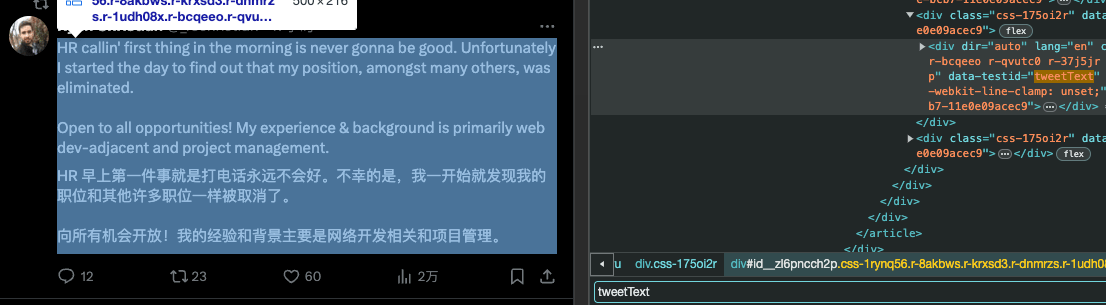
excludeSelectors:排除按鈕、導覽等互動元素。
globalStyles:取消原頁面行數限制,避免譯文被截斷。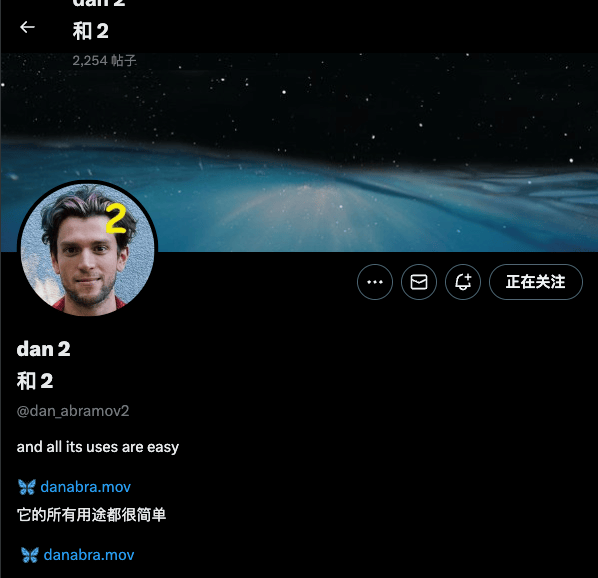
自訂網站適配
可透過 id 繼承內建規則,並用 .add/.remove 進行增量修改:
[
  {
    "id": "twitter",
    "selectors.remove": ["[data-testid=\"tweetText\"]"],
    "selectors.add": ["[data-testid=\"tweetText\"] a"],
    "excludeSelectors.add": ["header"],
    "excludeSelectors.remove": []
  }
]
說明:
id可繼承內建規則,避免重複設定matches。.add/.remove用於陣列欄位的增量修改,強烈建議優先使用。
常見內建 id(節選):
isEbook:epub 閱讀器頁面isEbookBuilder:產生 epub 雙語書頁面pdf:PDF 雙語對照頁面
完整內建規則:
https://github.com/immersive-translate/next-immersive-translate/blob/main/docs/buildin_config.json
翻譯服務設定
translationService:預設翻譯引擎。translationServices:服務設定與依站點覆寫。showUnconfiguredTranslationServiceInPopup:隱藏未設定服務。
範例(以騰訊為例):
{
  "translationService": "tencent",
  "translationServices": {
    "tencent": {
      "secretId": "xxx",
      "secretKey": "xxx",
      "matches": ["twitter.com"],
      "limit": 3,
      "maxTextGroupLengthPerRequest": 25,
      "maxTextLengthPerRequest": 1800,
      "apiUrl": ""
    }
  }
}
說明:
matches用於指定該服務作用的網站。limit為服務限流(每秒發送次數)。maxTextGroupLengthPerRequest/maxTextLengthPerRequest控制單次傳送規模。apiUrl可自訂服務網址。
請求逾時設定(最大請求時長)
可針對服務自訂請求逾時,單位為毫秒(ms)。若使用 Pro 服務,可額外設定 proRequestTimeout。
{
  "translationServices": {
    "openai": {
      "requestTimeout": 60000
    },
    "gemini": {
      "proRequestTimeout": 90000
    }
  }
}
提示:
- 逾時時間過長會導致等待加久;過短易頻繁失敗。
- 預設值依服務不同,請參見最終設定。
proRequestTimeout僅 provider 為pro(即付費會員服務)時生效。
語言與翻譯策略
指定語言始終翻譯 / 永不翻譯
{
  "translationLanguagePattern": {
    "matches": ["en"],
    "excludeMatches": ["zh"]
  }
}
為指定站點指定來源語言
{
  "sourceLanguageUrlPattern": {
    "en": {
      "matches": ["*.google.com"]
    }
  }
}
其他常用全域設定
允許渲染 HTML 標籤
如需讓譯文中保留並渲染 HTML,可啟用下列設定:
{
  "enableRenderHtmlTag": true
}
譯文樣式與主題
translationTheme 支援樣式(實際以最終設定為準):
none, grey, dashed, dashedBorder, solidBorder, dotted, underline, mask, opacity,
paper, dividingLine, highlight, marker, marker2, blockquote, weakening, italic,
bold, thinDashed, nativeDotted, wavy, nativeDashed, nativeUnderline, background
依網站設定樣式:
{
  "translationThemePatterns": {
    "highlight": {
      "matches": ["discord.com"]
    }
  }
}
AI / 進階服務參數
可在【開發者設定】 -> 【Edit Full User Config】中加入以下進階配置參數:
免費 AI 翻譯模式
擴充功能已支援啟用免費 AI 聚合翻譯服務。開啟此模式後,會優先使用免費 AI 聚合翻譯方案。
目前限制:
- 暫不支援 AI 術語庫
- 暫不支援 AI 自訂提示詞
如需關閉此模式並回退至舊版非聚合免費 AI 翻譯,可加入以下設定:
{
  "enableFreeModelMode": false
}
temperature
{
  "translationServices": {
    "openai": {
      "temperature": 0.2
    }
  }
}
自訂請求 Header 及 Body 參數
{
  "translationServices": {
    "claude": {
      "headerConfigs": {
        "anthropic-version": "2023-06-01",
        "anthropic-dangerous-direct-browser-access": "true"
      },
      "bodyConfigs": {
        "max_tokens": 2048
      }
    }
  }
}
Gemini 系列模型如何自訂設定
由於 Gemini 系列有內建預設,若需覆蓋,建議用 modelsOverrides 針對模型設有細部設定:
{
  "translationServices": {
    "gemini": {
      "modelsOverrides": [
        {
          "models": ["gemini-2.5-flash", "gemini-2.5-flash-lite"],
          "bodyConfigs": {
            "temperature": 0.1
          }
        }
      ]
    }
  }
}
提示:modelsOverrides 亦適用於其他 AI 服務,依模型命中後會取代對應設定。
嚴格遵循自訂提示詞
為降低大語言模型產生「幻覺」問題,插件內建翻譯品質檢查機制。系統會依據回應文字與請求文字的 Token 數比例,判斷結果合理與否。若此比例異常(過高或過低),會自動採用備用方案。 若您的自訂提示詞非一般翻譯情境(如擴寫、潤色或其他任務),可能 Token 比例與常規翻譯不符,請啟用嚴格模式跳過比例檢查。
{
  "translationServices": {
    "claude": {
      "strictPrompt": true
    }
  }
}
自訂多語言提示詞(精選範例)
{
  "translationServices": {
    "openai": {
      "langOverrides": [
        {
          "id": "auto2ja",
          "systemPrompt": "あなたはプロの翻訳エンジンです。",
          "prompt": "次のテキストを{{to}}に翻訳してください:\n\n<text>\n{{text}}\n</text>",
          "multiplePrompt": "<yaml>\n{{yaml}}\n</yaml>",
          "subtitlePrompt": "<yaml_subtitles>\n{{yaml}}\n</yaml_subtitles>"
        }
      ]
    }
  }
}
術語庫與機器翻譯
最新支援 AI 術語庫 功能,僅 AI 翻譯服務適用。
機器翻譯預設不套用術語庫(機器翻譯多採 placeholder 替換,易損失品質),如需強制啟動(不建議):
{
  "enableMachineTranslateTerms": true
}
快取清理週期
插件預設每 30 天自動清除翻譯快取,防止快取過大影響效能。
{
  "cacheMaxAgeDay": 30
}
Injected CSS 與 globalStyles
- Injected CSS:全域 CSS 注入,適合頁面級統一修復。
- globalStyles:依規則套用,適合站點級修復。
Injected CSS 範例:
.immersive-translate-target-wrapper img {
  width: 16px;
  height: 16px;
}
排錯與常見雷區
*.twitter.com不含根網域,請同時寫twitter.com。selectors會覆蓋預設翻譯範圍,請優先用.add/.remove。matches若寫為example.com/path會按萬用字元匹配,建議明確區分是否需要完整 URL。- 設定無效時:請先在最終設定確認合併結果,再刷新頁面。
- JSON 結尾的多餘逗號會導致設定失效。
附錄:Rule 欄位參考
下列為 Rule 欄位速查(文件版),涵蓋常用欄位;完整/最新欄位請以最終設定為準。
提示:對陣列或物件欄位,可使用 .add / .remove 作增量修改,避免覆蓋預設。
export interface Rule {
  // 匹配站點
  id?: string; // 內建規則 ID,引用內建設定時使用
  matches?: string | string[]; // 本條 Rule 僅作用於這些網站
  excludeMatches?: string | string[]; // 排除特定站點
  selectorMatches?: string | string[]; // 僅靠選擇器匹配,不需指定 URL
  excludeSelectorMatches?: string | string[]; // 排除規則,同上

  // 指定翻譯範圍
  selectors?: string | string[]; // 僅翻譯選中元素
  excludeSelectors?: string | string[]; // 排除元素,這些不翻譯
  excludeTags?: string | string[]; // 排除特定 Tag,不翻譯

  // 追加翻譯範圍(如無效請改用 selectors.add / selectors.remove)
  additionalSelectors?: string | string[]; // 追加翻譯範圍
  additionalExcludeSelectors?: string | string[]; // 追加排除元素
  additionalExcludeTags?: string | string[]; // 追加排除 Tag(部分版本已棄用)

  // 保持原樣
  stayOriginalSelectors?: string | string[]; // 指定元素原樣不翻
  stayOriginalTags?: string | string[]; // 指定 Tag 原樣不翻,如 code

  // Block 或 Inline
  extraBlockSelectors?: string | string[]; // 指定元素視為 block
  extraInlineSelectors?: string | string[]; // 指定元素視為 inline
  inlineTags?: string | string[]; // 指定 Tag 視為 inline
  preWhitespaceDetectedTags?: string | string[]; // 指定 Tag 自動換行

  // 譯文樣式
  translationClasses?: string | string[]; // 為譯文新增額外 Class

  // 全域樣式
  globalStyles?: Record<string, string>; // 修改網頁樣式
  globalAttributes?: Record<string, Record<string, string | null>>; // 修改元素屬性

  // 嵌入樣式
  injectedCss?: string | string[]; // 嵌入 CSS 樣式
  additionalInjectedCss?: string | string[]; // 追加 CSS

  // 上下文
  wrapperPrefix?: string; // 譯文區塊前綴
  wrapperSuffix?: string; // 譯文區塊後綴

  // 譯文換行字數
  blockMinTextCount?: number; // 譯文作 block 最小字元數
  blockMinWordCount?: number; // 譯文作 block 最小單字數

  // 內容可翻譯的最小字數
  containerMinTextCount?: number; // 智能識別元素最少字元數
  paragraphMinTextCount?: number; // 段落最少字元數
  paragraphMinWordCount?: number; // 段落最少單字數

  // 長段落強制換行字數
  lineBreakMaxTextCount?: number; // 強制分行的段落最大字元數

  // 啟動翻譯的時機
  urlChangeDelay?: number; // 進入頁面後延遲翻譯
  observeUrlChange?: boolean; // URL 變化時再次翻譯

  // 行動裝置
  isShowUserscriptPagePopup?: boolean; // 在行動裝置顯示浮窗
  fingerCountToToggleTranslagePageWhenTouching?: number; // 已棄用

  // AI streaming 翻譯
  aiRule?: {
    streamingSelector: string; // 標示翻譯中元素的 selector
    messageWrapperSelector: string; // 訊息正文 selector
    streamingChange: boolean; // 是否採增量更新
  };
}