繁體中文(香港)
10M+ Active users
100K+ 5-star rave review
2025 Editor's Pick
🎉 向普通機器翻譯說再見!
會員支持
DeepSeek
DeepL
OpenAI
Claude
Gemini
功能更多 | 價格更省 | 體驗更好 | 響應更快 | 效率更高

常見問題

我可以免費使用沉浸式翻譯嗎?

是的,您可以完全免費地使用沉浸式翻譯,因為沉浸式翻譯提供了同類產品中最全面的免費套餐,沒有限制任何核心功能的使用。而對於那些希望使用 DeepL、OpenAI、Claude、Gemini 翻譯的用戶,沉浸式翻譯為其提供了低成本且開箱即用的體驗。

安裝沉浸式翻譯擴展功能後,我該如何使用?
快速開始使用的話,看下面的內容就夠了(我們也在這裡準備了一份更詳細的使用指南):

  1. 安裝後,瀏覽器預設會把沉浸式翻譯的擴展圖示折起來,所以第一步,你需要在瀏覽器右上角的折疊選單裡將沉浸式翻譯放出來,如下:

    沉浸式翻译扩展图标
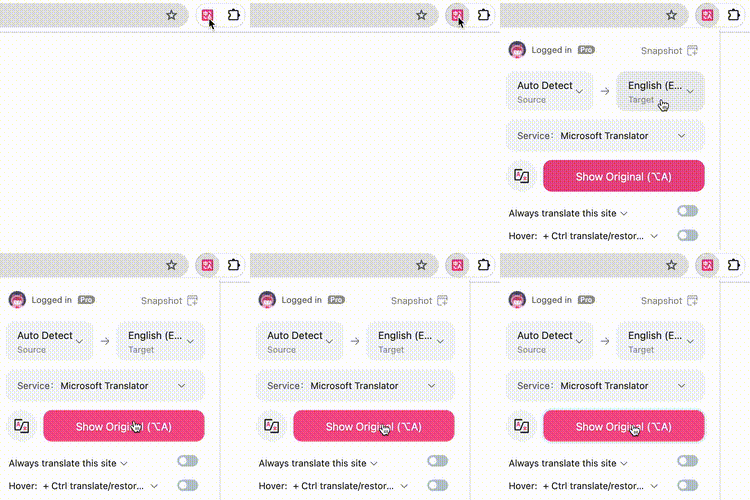
  2. 接下來就可以翻譯網頁了,以USA Today 為例,打開USA Today 的英文網頁,在任何區域點擊右鍵,在選單裡選擇【翻譯網頁/還原原文】按鈕,網頁就會以雙語的形式顯示。如果你喜歡快捷鍵的話,可以直接按下【Alt+A】(MacOS是【Option+A】)來觸發網頁翻譯。還有一種辦法,就是點選瀏覽器工具列裡的沉浸式翻譯圖標,然後點選【翻譯】,如下:
  3. 如果你想翻譯文檔,例如PDF,Epub,字幕文件等,你可以在瀏覽器工具列裡點擊【沉浸式翻譯】圖標,點擊【更多】,即可看到。
我很喜歡沉浸式翻譯,想推薦給朋友,你們有聯盟計劃嗎?

是的,我們有一個易於加入的聯盟計劃,任何人都可以點擊這裡自助申請,之後你會得到一個專屬的推廣鏈接,使用這個鏈接,您可以向朋友推薦沉浸式翻譯。如果您的朋友在 60天 內升級為沉浸式翻譯的 Pro 會員,您將獲得 20% 的推廣佣金。同時,通過您的鏈接購買的朋友還能享受首期 5% 的折扣。

我覺得外語內容很有價值,但我不知道去哪看,有推薦嗎?

是的,我們確實發現網路的外語內容更多,品質更高,所以我們才開發了沉浸式翻譯。我們也整理了一個高品質的英文網站列表,你可以在裡面探索你可能感興趣的內容,然後你還可以在國外著名社交媒體上關註一些你感興趣的人來獲取更多實時信息,例如TwitterRedditYoutube等。

有沒有同時使用的設備數限制?

有,每個帳號最多同時使用8 台設備,超出後,最先登入的設備將會被登出登入(注意:這裡的設備指的是瀏覽器)

我可以免費試用嗎?

是的,您可以免費試用,直接選擇上方的免費試用套餐(試用套餐相比正式套餐會對可用的翻譯額度有上限,請參考試用),訂閱該套餐即可。試用到期前,您可以隨時取消,不會收取任何費用,試用結束之後,如果您未取消的話,將會自動扣費。

我可以退款嗎?

我們針對不同訂閱類型和帳戶狀態有不同的退款政策。 月度訂閱:在首次購買後的24小時內,可以申請退款。申請時,請提供您退款請求的原因。 年度訂閱:在首次購買後的72小時內,可以申請退款。必須在您的申請中包含退款請求的原因。請注意,付款超過72小時後提交的請求將不予退款。 在這兩種訂閱類型中,只有在未大量使用我們的翻譯服務的情況下,才可能退款。我們將根據具體情況評估使用情況,以確保公平並防止濫用我們的服務。 如果您符合退款條件,我們的客戶支持將在7-10個工作日內處理並通知您。然而,如果您之前已經獲得過我們服務的退款,我們保留拒絕額外退款請求的權利。 退款流程:如果您認為自己有資格獲得退款,請通過 support@immersivetranslate.com 與我們聯繫。我們的客戶服務團隊將審查您的請求並指導您完成退款流程。

如果我不想繼續訂閱了,我要如何退訂該服務?

你可以在個人主頁點選【帳單】,進入帳單頁面後,點選【取消方案】即可。

我還有其他問題

如果你還有其他問題,請發送郵件至 support@immersivetranslate.com 聯絡我們的客戶支持。

千萬用戶,好評如潮 —— 線上翻譯口碑之選

沉浸式翻譯獲得眾多用戶口碑讚譽,是他們首選的網頁翻譯、PDF 翻譯、在線影片字幕雙語翻譯工具。
I recently explored creating bilingual e-books in Chinese and English using "Immersive Translate" and found this app to be incredibly powerful. It spans all systems and platforms, allowing you to use it on any device—PC, mobile—with virtually no difference in experience across platforms.
bluebird0605
bluebird0605
Producer of Dailyio
Must have extension! Just found out this. No doubt it will be my must have extension. Way better than other simular choices.
Kobe Yeung
Kobe Yeung
Chrome User
Bilingual translation with customizable styles is amazing—this is exactly what I wanted.
Su Shi
Su Shi
Chrome User
Easily the best translator. It can translate the web apps even though google translate doesn't recognise.
Dan
Dan
Chrome User
kly.wu
kly.wu
From Instagram
This is my first time reviewing a Chrome extension, and the overall experience has been exceptionally seamless. The name "Immersive Translate" couldn't be more apt—kudos to the developer!
Chen
Chen
Chrome User
gravity_tonya
gravity_tonya
From Instagram
The first time I used this extension, I was blown away. It surpassed all other translation extensions I've used before. The segment-by-segment translation mode is innovative, offering bilingual comparison, and there are multiple styles for the translated text to choose from.
tfpak 379
tfpak 379
Chrome User
achngjuni
achngjuni
From Tiktok
I just discovered today that the "Immersive Bilingual Web Page Translation Extension" even supports PDF translation, which is truly fantastic. I can say without a doubt that Immersive-Translate is the most actively used extension in my browser at the moment!
Asuka Makina
Asuka Makina
Freelancer
I have been looking for a Chrome extension to show both original and translated languages on the same page for dual language education purpose. I used Saladict for a few years but the versatility this extension provides is much more powerful. Thanks for making this!
Bo Y.
Bo Y.
Chrome User
Super easy to use, it's definitely the best translation extension I've used so far, bar none! Everything is just as I imagined!
Peng Ju
Peng Ju
Edge User
How should I put this? This extension is just too awesome. After trying dozens of page translation extensions, this one has all the features you could want. I hope they continue to provide their service.
Bird Fat
Bird Fat
Chrome User
I use this extension everyday!!!
Malanore Bal'a Dash
Malanore Bal'a Dash
Chrome User
If you: 1. Use Chrome; 2. Need to read a lot of English literature/PDFs/slides; 3. Are short on time or just want to skim; 4. Wish to have machine translation as a reference while conveniently browsing the original text, then anyone meeting at least two of these criteria should undoubtedly try this extension!
Lymil
Lymil
Chrome User