If you create training videos, online courses, or internal learning materials, AI video translators for e-learning content can dramatically expand your reach. Modern learners expect global accessibility, and education platforms increasingly require multi-language support for compliance, accessibility, and engagement. The right translation workflow can help you repurpose your lessons into Hindi, English, Spanish, French, or any language your learners need—without re-recording audio or hiring a subtitle team.
In this guide, we'll break down the 10 best AI video translators for e-learning content in 2026, focusing on accuracy, subtitle synchronization, long-video performance, language support, and workflow efficiency. And among all options, we'll highlight why Immersive Translator is becoming a top alternative for creators who need precise, high-quality subtitle translation with minimal effort. Let's get into the list.
1. Immersive Translator — Best Overall for Browser-Based E-Learning Video Translation
Best for: Educators, instructional designers, training teams, and self-paced course creators who need fast, high-quality translations in the browser.
Why it stands out
Immersive Translator is a lightweight but powerful extension that excels at translating long e-learning videos on platforms like YouTube, Coursera, Udemy, Khan Academy, and company LMS portals. While positioned as a browser translator, it has become a surprisingly strong option in the ai video translators for e-learning content category thanks to its accuracy, clean UI, and practical time-alignment engine.
Key strengths
- High-accuracy translation for multi-language learning materials
- Smooth subtitle synchronization, especially when CC files are available
- Pro users can auto-generate captions for YouTube/X videos without CC
- Fast switching between bilingual, dual-subtitles, or translated-only mode
- Works directly in browser—no uploads, no waiting
- Supports professional learning content, technical vocabulary, and academic terms
How to use it
-
Install the Immersive Translator extension in your browser.
-
Open an e-learning video with CC or use Pro mode for AI captioning.
-
Choose your target language and subtitle mode; the tool instantly overlays translated subtitles.
Pro Tips:
- For technical lectures, enable "term consistency mode" to keep translations stable across long lessons.
- Use dual subtitles when teaching language-learning courses.
2. Notta Video Translator — Best for Automatic Transcription Workflows
Best for: Teams that prioritize transcription + translation together.
Notta is widely searched as a notta video translator thanks to its strong speech recognition accuracy. It handles long recordings well and provides clean transcripts for further editing.
Strengths
- Very accurate transcription
- Good for meeting recordings, webinars, and instructor narration
- Supports large video uploads
Limitations
- Editing interface is slower compared to browser-based tools
- Translated subtitles sometimes require manual timing fixes
- Not optimized specifically for e-learning UX
Immersive Translator vs Notta
| Comparison Point | Immersive Translator | Notta |
|---|---|---|
| Workflow | In-browser, instant subtitles | Upload-based processing |
| Best Use Case | E-learning platforms with streaming video | Formal transcription + translation |
| Handling Long Videos | Very stable, minimal lag | Stable but slower |
| Translation Style | Smooth, natural learning-friendly output | Literal translation style |
| CC Requirement | Works with CC; Pro supports AI captions | Generates its own transcripts |
| Ideal For | Course creators, learners | Corporate teams, transcription users |
3. Veed.io — Best for Creating Translated Exported Videos
Best for: Educators who need polished exported videos with burned-in subtitles.
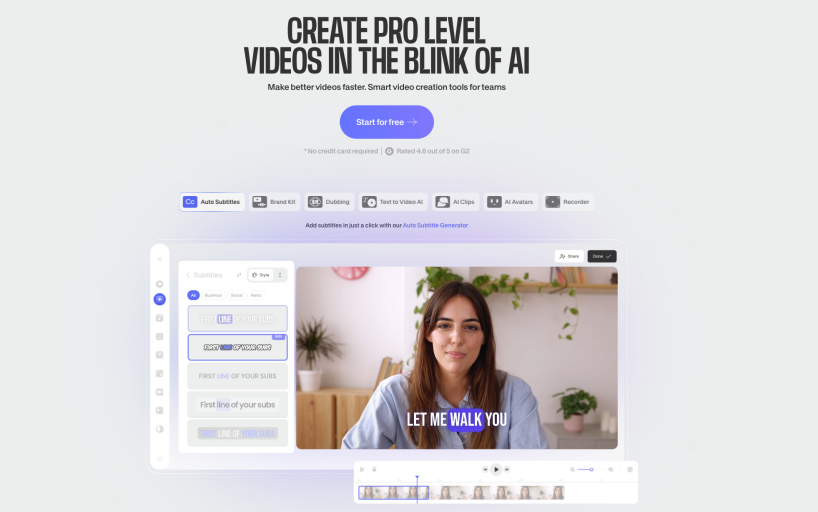
Veed.io is a cloud-based video editing platform known for its clean interface and strong subtitle generation tools. For e-learning creators, Veed.io offers a full editing timeline, auto-captioning, and customizable subtitle styling. Its export options make it ideal for instructors who want to produce polished course content with permanently embedded subtitles for platforms like LMS portals, marketing websites, or downloadable course packs.
Strengths
- User-friendly editor
- Built-in subtitle styling
- Offers auto-translate and auto-caption features
Limitations
- Export times can be slow
- Costs add up quickly for long videos
- Time alignment sometimes drifts for academic lectures
4. Kapwing — Best for Collaboration on Course Videos
Best for: Course production teams working across multiple devices.
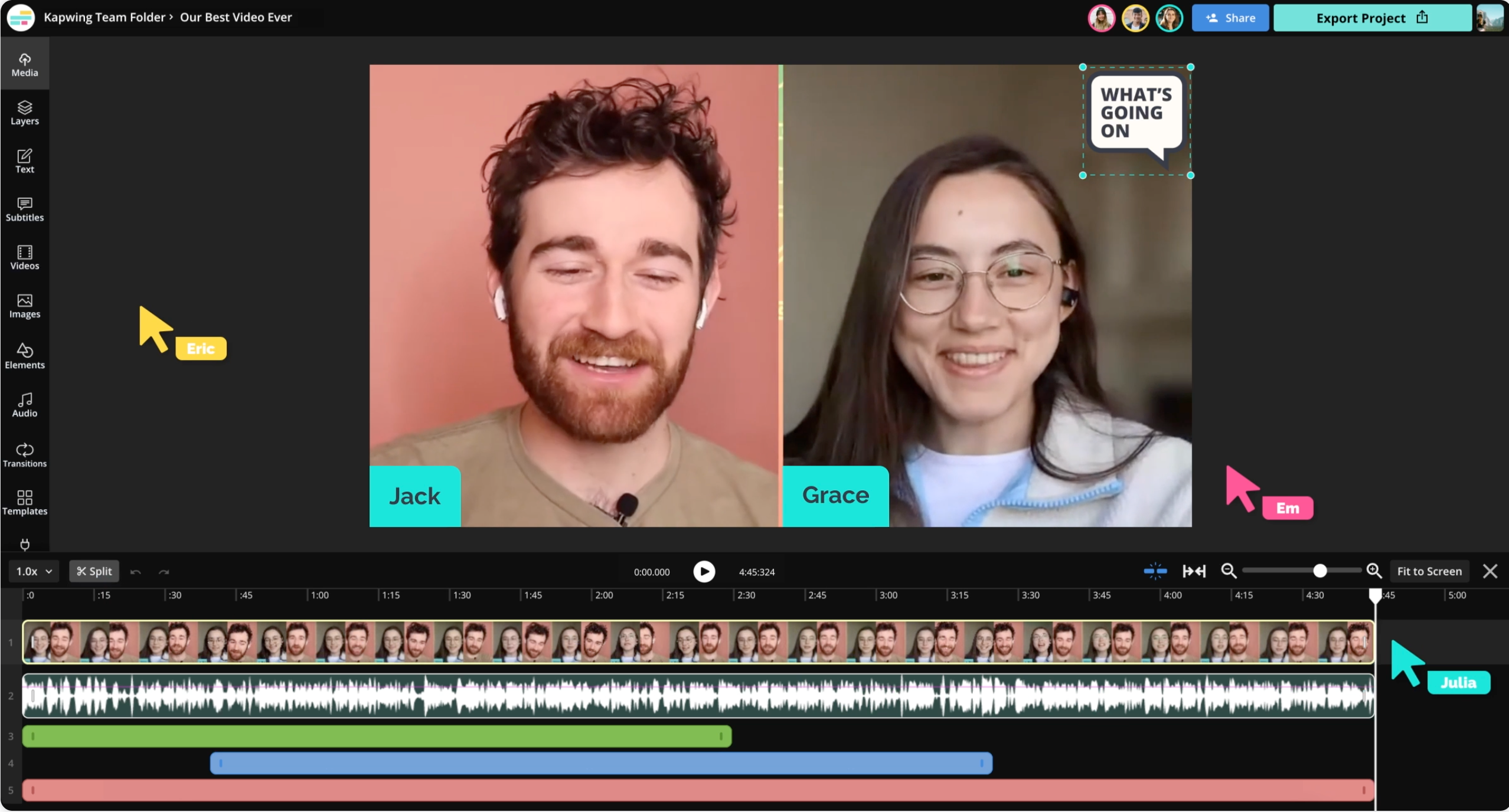
Kapwing is a collaborative video creation platform popular among remote content teams. Its browser-based interface allows multiple editors to work simultaneously on subtitles, translations, layouts, and timelines. This makes Kapwing especially useful for instructional design teams who want a shared environment for editing, reviewing, and approving course videos before publishing.
Strengths
Try Immersive Translate?
Translate web pages, PDFs, and video subtitles in real-time. Bilingual display makes foreign language content easier to read.
Install for Free- Real-time collaboration
- Supports multi-language subtitles
- Cloud-based
Limitations
- Free plan is restrictive
- Subtitle editor is less precise for hour-long content
5. YouTube Auto-Translate — Best for Free Basic Learning Content
Best for: Simple educational content with English narration.
YouTube's auto-translate feature is widely used because it requires no setup and works instantly for any video with built-in CC captions. For e-learning creators, it offers a frictionless way to provide multi-language access, especially for learners watching on mobile. While it lacks editing controls, its convenience makes it a popular choice for low-budget educational content.
Strengths
- Entirely free
- Reasonably accurate for common languages
- Works instantly with CC-enabled videos
Limitations
- Accuracy drops for specialized topics
- No manual correction tools
- Doesn't support downloadable subtitle files
6. Wondershare UniConverter — Best for Desktop Offline E-Learning Processing
Best for: Instructors who prefer desktop workflows.
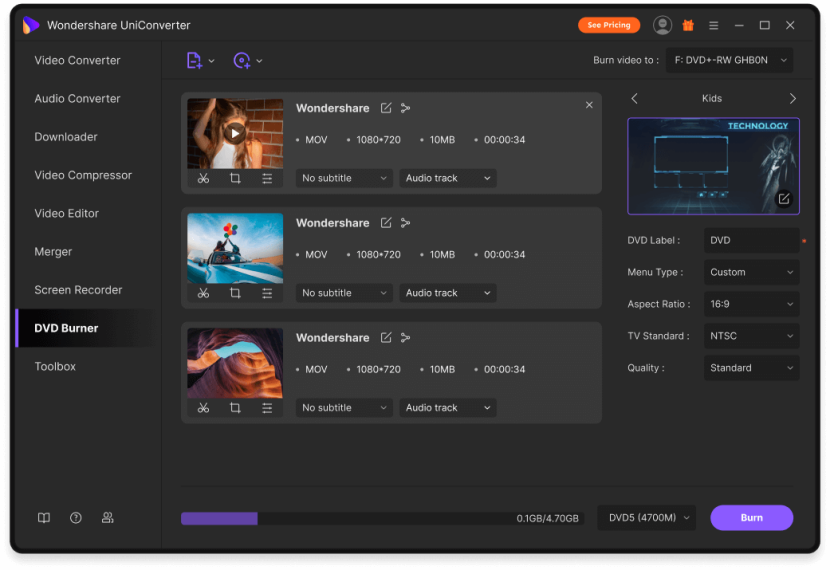
UniConverter is a full-featured desktop video processing toolkit that includes subtitle extraction, translation, and editing. Because it processes videos locally, it appeals to instructors concerned about privacy or working with sensitive internal training materials. It also supports a wide range of video formats and offline workflows, making it suitable for educators in low-bandwidth environments.
Strengths
- Offline processing
- Many export formats
- Works even with weak internet
Limitations
- Interface feels outdated
- Translation accuracy varies
- Heavy software installation required
7. CaptionHub — Best for Enterprise-Level E-Learning Localization
Best for: Companies producing compliance training across regions.
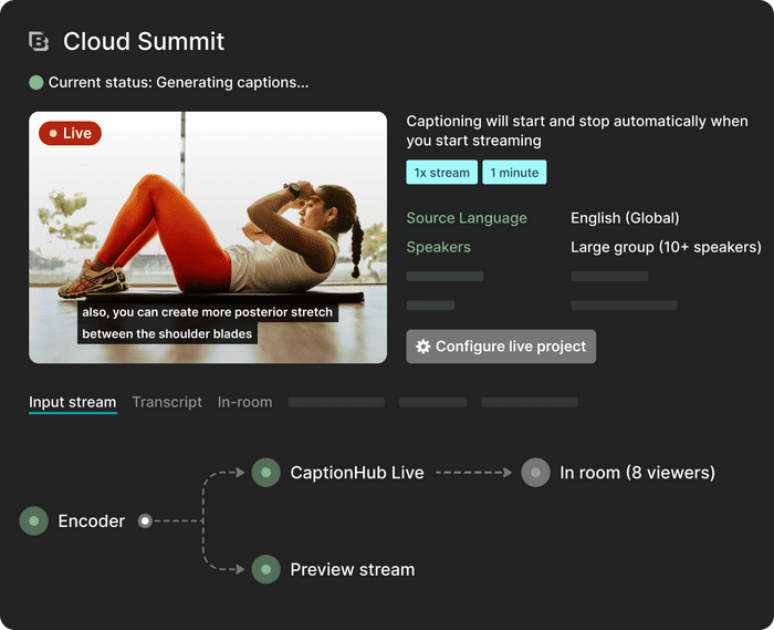
CaptionHub is an enterprise-grade subtitling and localization platform used by global training teams, compliance departments, and multinational corporations. It includes reviewer roles, terminology management, subtitle versioning, and multilingual workflows. For organizations producing large volumes of training content across regions, CaptionHub provides governance and scalability that consumer tools cannot match.
Strengths
- Professional-grade localization tools
- Team workflows, reviewer roles, glossary support
- Excellent subtitle version control
Limitations
- Pricing fits enterprise budgets, not individuals
- Requires onboarding and training
8. Rev AI Subtitles — Best for Human-Quality Captions + AI Translation
Best for: High-stakes training content that demands high accuracy.
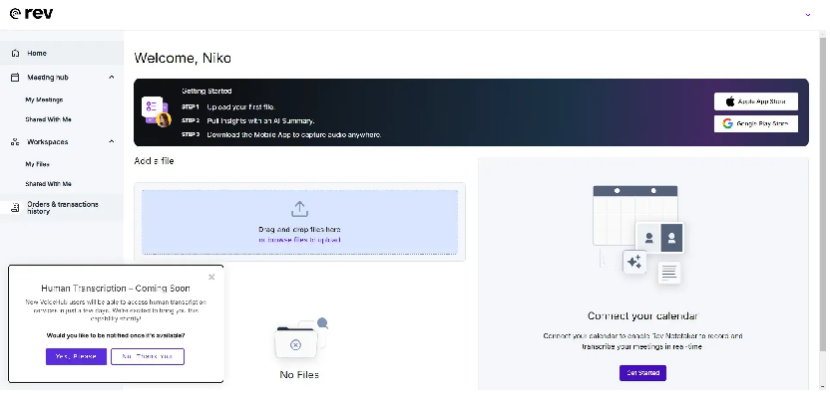
Rev AI integrates human transcription services with AI translation, producing some of the highest-accuracy captions available. It is widely used by universities, medical institutions, legal organizations, and government agencies that require near-perfect transcripts. Its AI translation layer maintains the structure and timing of professionally created subtitles, making it ideal for high-stakes e-learning modules.
Strengths
- Accurate transcripts from experts
- Reliable timing
- AI translation available as an add-on
Limitations
- Expensive for large libraries of e-learning content
- Turnaround time is longer
9. HeyGen Translate — Best for Instructor Avatar & Lip-Sync Editing
Try Immersive Translate?
Translate web pages, PDFs, and video subtitles in real-time. Bilingual display makes foreign language content easier to read.

Best for: Courses needing localized instructor presence.
HeyGen is known for its AI avatar and lip-sync technology, which allows instructors to appear in multiple languages without re-recording. For e-learning creators, this means course introductions, module summaries, and marketing materials can be localized with realistic voice and mouth movement. It is especially popular for interactive courses and promotional content.
Strengths
- Lip-sync video translation
- Creates multilingual instructor avatars
- Works well for marketing + course intros
Limitations
- Not ideal for long lessons
- Costly for high-volume translation
10. Descript — Best for Editing Narration and Subtitles Together
Best for: Podcasters and instructors who want text-based editing.
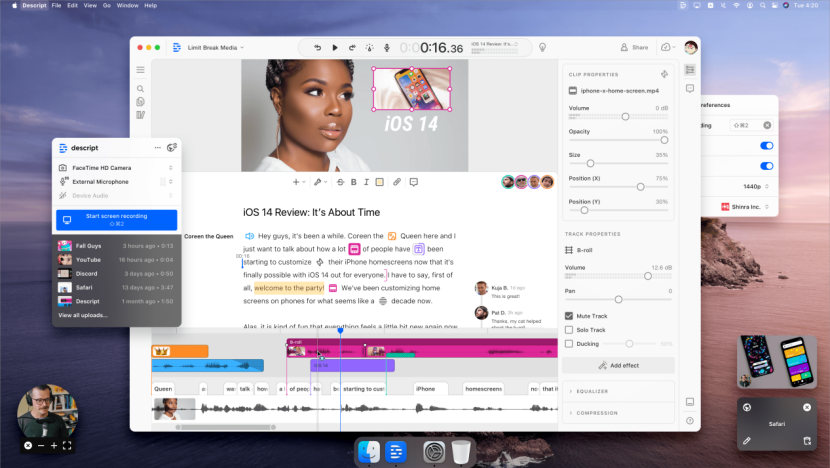
Descript offers a unique "edit video by editing text" workflow that appeals to instructors who narrate long educational content. After transcribing videos, Descript allows creators to cut mistakes, rearrange segments, and edit voiceovers directly through the transcript. The translation module supports multi-language subtitle exports, making it a strong tool for script-driven courses.
Strengths
- Text-based video editing
- Solid transcription
- Supports multi-language subtitle exports
Limitations
- Translation quality not as strong as specialized tools
- Long videos take time to render
Quick Comparison Table of All 10 Tools
| Tool | Best Use Case | Handling Long Videos | Translation Accuracy | Workflow Type |
|---|---|---|---|---|
| Immersive Translator | Browser e-learning video translation | Very strong | High | In-browser instant |
| Notta | Transcription + translation | Strong | Medium-high | Upload |
| Veed.io | Exported training videos | Medium | Medium | Editor |
| Kapwing | Team collaboration | Medium | Medium | Cloud editor |
| YouTube Auto | Free translation | Weak | Medium | Platform-native |
| UniConverter | Offline processing | Strong | Medium | Desktop |
| CaptionHub | Enterprise localization | Strong | High | Enterprise platform |
| Rev AI | Human-quality captions | Strong | Very high | Hybrid |
| HeyGen | Lip-sync training | Weak | Medium-high | AI avatar |
| Descript | Text-based editing | Medium | Medium | Editor |
When Should E-Learning Creators Choose Immersive Translator?
Immersive Translator is ideal when:
- You rely heavily on streaming platforms
You frequently use:
- YouTube course playlists
- LMS embedded videos
- Public educational videos
- You want instant subtitle translation with zero uploads: Just open the video, and subtitles appear—perfect for learners.
- You need a reliable fallback for CC-free videos: Pro mode's AI captioning solves the no-CC limitation.
- You need consistent terminology across long lessons: Its terminology-stability mode helps keep technical terms accurate.
Pro Workflow Tips for E-Learning Course Creators
Tip 1: Always check whether your source video has CC - If not, use Immersive Translator Pro or Notta for caption generation.
Tip 2: Use dual subtitles when recording bilingual learning videos - Great for language learning and international training teams.
Tip 3: Keep technical terms in a glossary - Upload or store key terms to ensure translations stay consistent.
Tip 4: For exported course videos, start in Immersive Translator → polish in Veed/Kapwing - This hybrid workflow saves hours.
Final Verdict: The Most Practical AI Video Translator for E-Learning in 2026
As the e-learning industry grows, creators and training teams need scalable tools to localize long educational videos. And that's exactly why ai video translators for e-learning content have become essential.
Among all tools reviewed in this list, Immersive Translator stands out as the most practical everyday solution thanks to:
- Instant in-browser translation
- Stable performance with long videos
- Clean and fast UI
- Strong translation accuracy
- Dual subtitle support
- AI captioning for CC-free videos (Pro)
If you're producing e-learning content in 2025, Immersive Translator should be one of the first tools you try—fast, accessible, and surprisingly powerful for daily course translation.