How to Use a YouTube Video Transcript Translator in 2026 — A Complete Guide with Immersive Translate
If you regularly watch online courses, tutorials, interviews, or academic lectures, having a reliable YouTube video transcript translator can completely change the way you learn. Whether you want to translate a Portuguese lesson into Spanish, a Spanish documentary into English, or any video from one language to another, modern AI tools make the process far easier than manual transcription and translation ever were. And as more creators publish multilingual content, the demand for accurate transcription and translation video solutions keeps rising.
In this how-to guide, we're going to walk through the most practical ways to translate YouTube video transcripts, how to generate subtitles when a video has no captions, and how Immersive Translate can streamline video transcription translation directly in your browser. We'll break down real workflows, advanced tips, hidden features, and a direct comparison with other audio & video transcription and translation services—so you can choose the right tool for studies, work, or personal learning.
Why a YouTube Video Transcript Translator Matters More Than Ever
Most educational YouTube videos now include captions, and these captions can be instantly transformed into translated subtitles. This is where tools like a YouTube video transcript translator shine: they take existing CC (closed captions) and convert them into your target language with high accuracy.
For videos without captions, professional tools—including Immersive Translate—can generate AI subtitles by extracting speech, turning it into text, aligning timestamps, and then translating it. This is the same way most transcription and translation video apps work today, especially for long-form lectures and tutorials.In short:A video transcript is the backbone of every translation workflow.Once you have high-quality transcription, transcription translation video becomes fast and reliable.
How to Translate Any YouTube Video Transcript
Below is the straightforward method most users follow.
Step 1: Open the YouTube video you want to translate
Choose any video:
- A Portuguese–Spanish history lecture
- A Spanish cooking tutorial you want in English
- A technical talk that needs clearer subtitles
- A vlog or interview with multi-speaker audio
This method works as long as the video has CC (closed captions) or the translator can generate them.
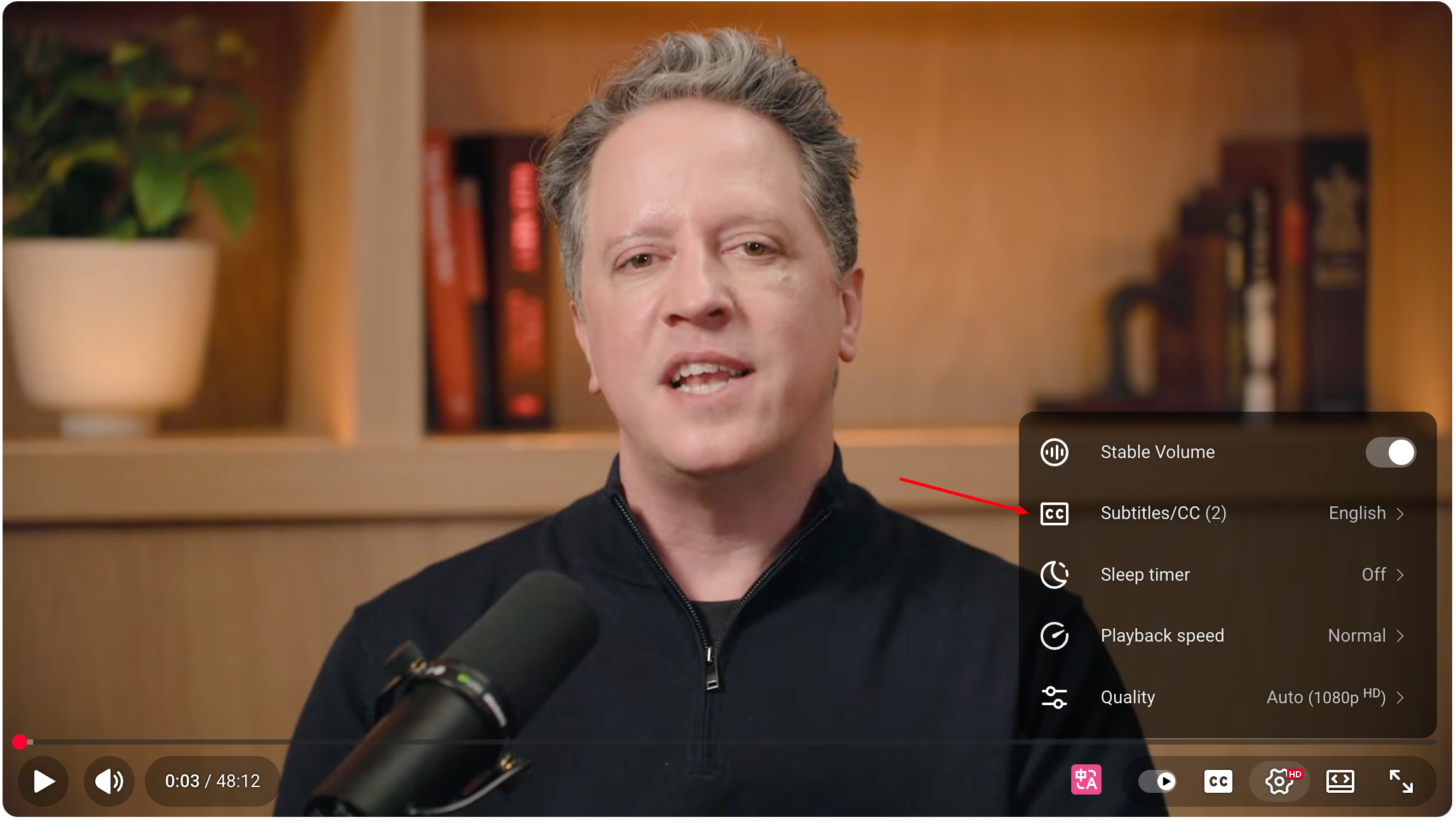
Step 2: Enable CC and check available languages
Click the CC icon.
If captions exist, you'll see:
- "Portuguese (auto-generated)"、
- "Spanish (auto-generated)"
- "English"
- "English (auto-translated)", etc.
If only "auto-generated" captions exist, it still works—your translator will handle the rest.
Step 3: Use a YouTube video transcript translator to extract the transcript
Search results usually include:
- online subtitle extractors
- browser extensions
- AI platforms offering video transcription translation• Audio & video transcription and translation servicesBut the fastest method is using a browser extension.
Step 4: Translate the transcript into your target language
Depending on your tool, you can:
- Export SRT
- Copy transcript text
- Auto-translate directly on YouTube
- Overwrite original subtitles with bilingual subtitles
This is where Immersive Translate becomes extremely convenient.
How to Use Immersive Translate to Translate YouTube Videos
Immersive Translate works directly inside YouTube and requires no file uploads. It automatically detects the transcript and overlays translated subtitles instantly. This makes it one of the fastest tools for YouTube video transcript translation.
Why Immersive Translate Works So Well
Here's what makes it stand out:
- Translates YouTube transcripts in real time
- Supports bilingual (two-line) subtitles
- Works on any streaming platform, not just YouTube
- Pro version can generate AI captions for CC-free videos
- Clean English UI and simple workflow
- Supports long videos with accurate timestamp alignment
And since it's browser-based, you never upload files—your transcript stays private.
How to Translate Video Transcripts with Immersive Translate
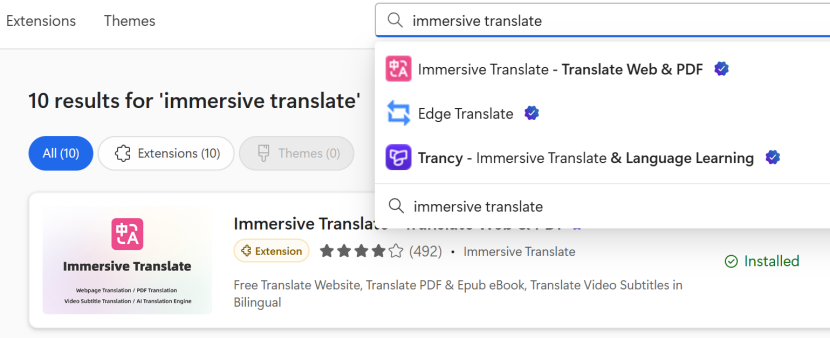
Step 1 — Install Immersive Translate
Add the extension to your browser.(Chrome, Edge, Firefox all supported.)
Step 2 — Open a YouTube video
The extension automatically detects:
- captions
- transcript
- timing information
Step 3 — Choose "Translate Subtitles"
A panel appears on the right side of the video player.
Step 4 — Select your target language
For example:
- Portuguese → Spanish
- French → English
- English → Spanish
- Any language → Spanish
- Spanish → any other language
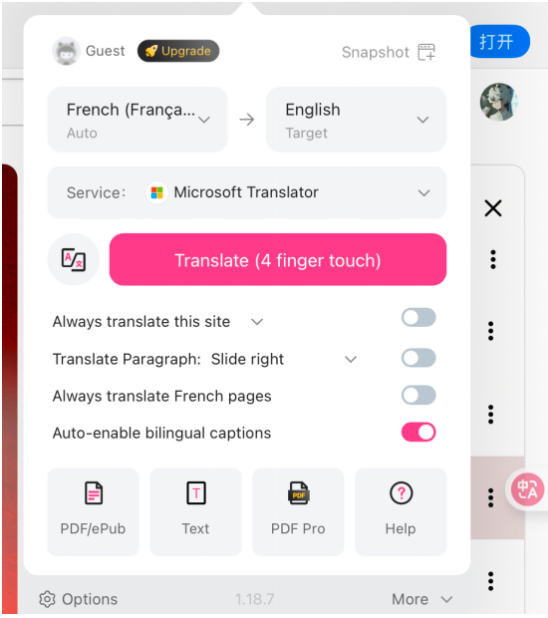
This flow supports every keyword scenario in this guide, including all transcription translation video needs.
Step 5 — Choose your subtitle mode
Immersive Translate offers:
- Dual Subtitles (Original + Translated)
- Translated-only subtitles
- Bilingual line-by-line mode
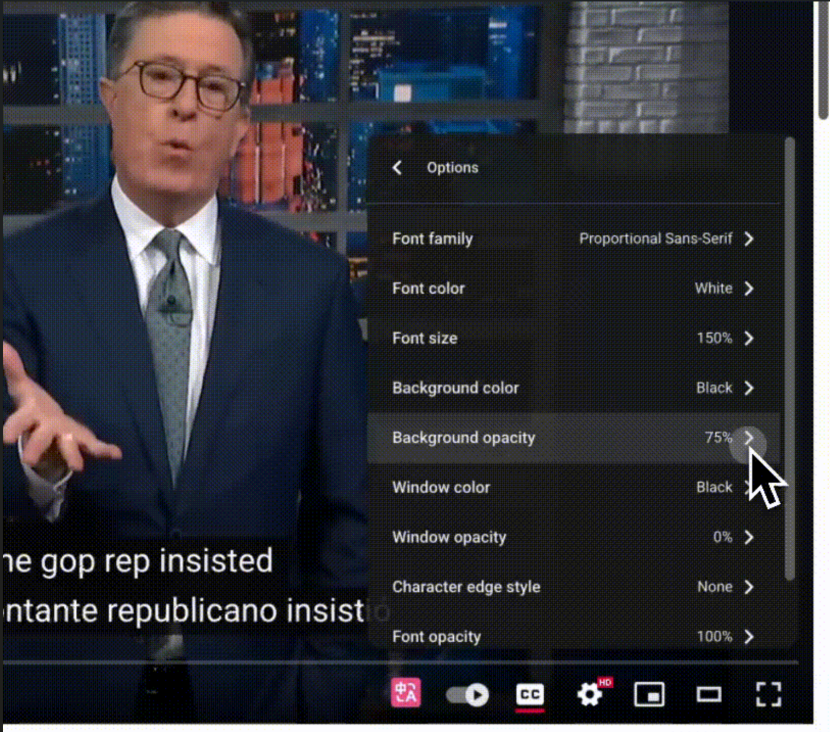
Step 6 — Play the video and enjoy translated subtitles instantlyFinally, you can diectly watch the video with the original language subtitle and the translated subtitle, so convenient, right?
Translating Spanish Videos into English for Example
Since many learners need to translate Spanish video to English, here's how the workflow looks.
Example Workflow: How to Translate a Spanish Video to English
- Open a Spanish educational video
- Check if CC exists
- Turn on Immersive Translate
- Select Spanish → English
- Choose "Auto-enable bilingual captions" to improve comprehension
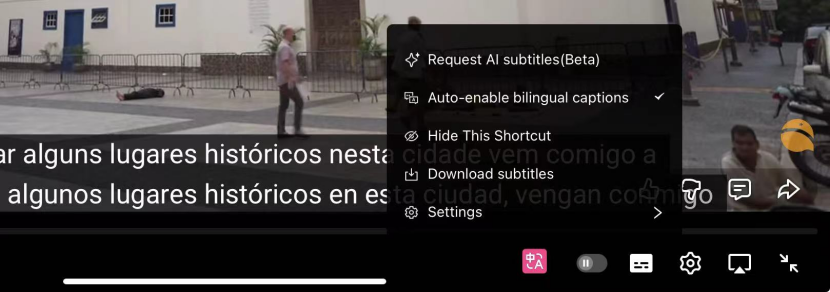
This is the most requested scenario for:
- translate a video from spanish to english
- how to translate a spanish video to english
- spanish to english video translation
The translation appears instantly with smooth timing.
Tool Comparison Table
Feature | Immersive Translate | Auto YouTube Translation | Zoom Live Translate | Web Upload Translators |
|---|---|---|---|---|
Live Stream Support | Supports CC-based real-time translation | Limited accuracy | Requires meeting host setup | Not applicable |
Workflow | In-browser, instant | Platform-limited | Requires permissions | Requires uploads |
Subtitle Customization | Bilingual, adjustable | None | Single-language | Limited |
Offline Video Support | Online only | Online only | Online | Requires uploads |
Best Use Case | Real-time web video & streaming | Basic viewing | Business meetings | Post-production |
This format avoids checkmarks and compares one feature at a time, per your requirement.
Pro Tips and Tricks for Better Translation Results
- Enable dual subtitles when learning languages:Especially for bilingual learning.
- Use the transcript panel to review context:Immersive Translate keeps the transcript synced with the video.
- For CC-free videos, upgrade to Pro:AI captions solve 90% of timing issues.
- Pause and hover to see original wording:Useful for technical terms or academic vocabulary.
- Save translated subtitles:Helpful for study review, lecture summaries, and course notes.
When Immersive Translate Outperforms Traditional Tools
Immersive Translate is ideal when:
- You watch lots of YouTube videos
- You want fast YouTube video transcript translation
- You study content that uses technical vocabulary
- You need bilingual subtitles
- You want translation without uploading video files
- You need consistent terminology across long chapters
Unlike most audio & video transcription and translation services, it is:
- immediate
- private
- integrated into YouTube
- extremely easy to use
Final Verdict — The Best YouTube Video Transcript Translator for 2026
As online education grows, translation needs to grow with it. Teachers, students, global learners, and professionals all rely on accurate captions to understand videos from around the world. That's why having a reliable YouTube video transcript translator is essential in 2026.
Among all tools tested, Immersive Translate provides:
- instant translations
- dual subtitles
- automatic transcript detection
- optional AI captions
- multilingual translation including Spanish, English, Portuguese, French, and more
If you want the fastest and most practical way to translate YouTube transcripts—whether for everyday learning, professional research, or multilingual training—Immersive Translate stands as the most efficient solution.